New enhancements in this release for this role:
(Tip: You can use the Table of Content  on the right side to view the list of all enhancements)
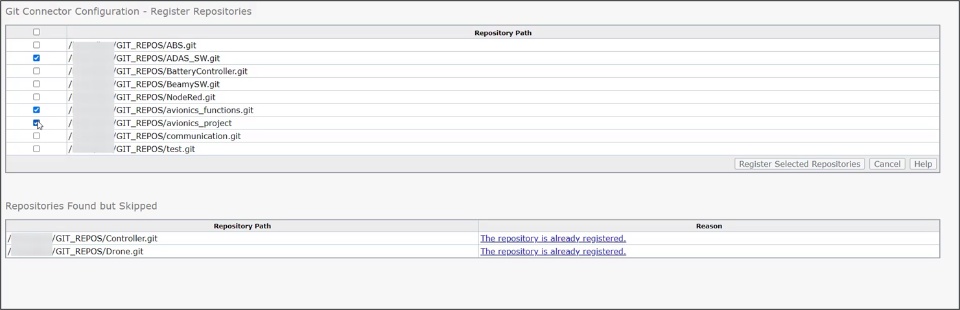
Registering Multiple GIT Repositories |
Why Save time and improve efficiency thanks to the ability to register multiple GIT repositories at once |
How - While Git Connector Configuration, you can now specify a folder containing multiple GIT repositories when defining GIT repositories.
- The system presents all the repositories within the folder, allowing you to choose which ones to register.
- This is useful while registering multiple repositories on a single server
|
SWS Command-line Enhancements |
Why Improved efficiency while working in local Linux environment thanks to the enhancements in the SWS command-line feature |
How - The SWS command line feature allows you to work in local Linux environment to access and manage the local engineering design and information. This following commands are now available:
- sws create
- To seamlessly build the user workspace using a structure defined in the 3DEXPERIENCE Platform.
- Components are added into the Workspace based on the structure defined in the 3DEXPERIENCE Platform
- sws compare
- To quickly compare the local structure with the structure in the 3DEXPERIENCE Platform
- sws add
- To easily add the components into the Workspace
- sws insert:
- To easily modify structure
- sws status
- To ensure continuous alignment between your workspace and 3DEXPERIENCE Platform
|
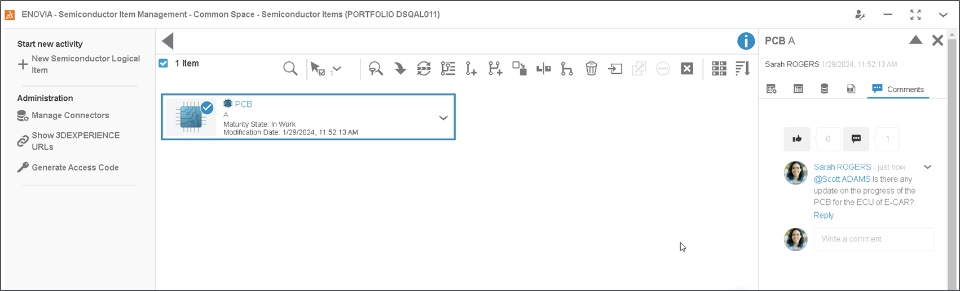
Support for Comments |
Why Enhanced collaboration through comments and user tagging for timely updates |
How - The new Comments tab is now added in the Information panel of the Semiconductor Item
- You can effectively collaborate with any stakeholders by commenting and tagging them for timely updates
|
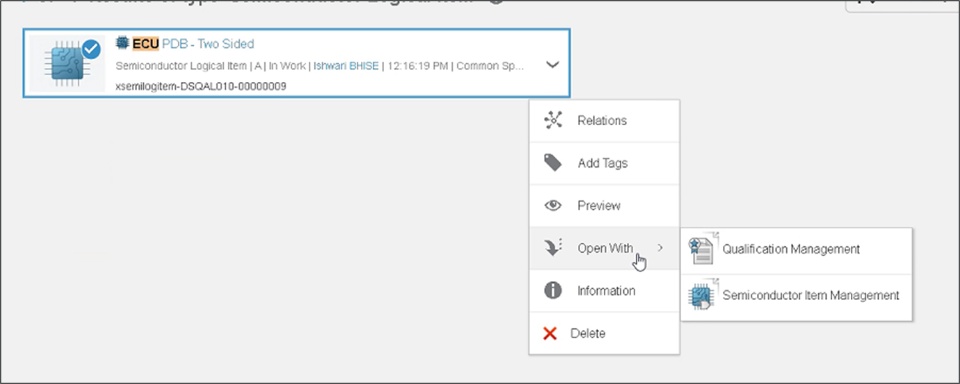
Quick Open with Supported App |
Why Quickly open the software item thanks to the support for “Open with” option |
How - The new “Open with” command is added in the context menu of the Semiconductor Item. This shows the list of supported apps that you can access to quickly open it.
- The displayed app list includes all supported apps available with licenses assigned to you.
- The list only shows 4 apps. If the app you want doesn’t exists in the list, you can click on the compass and access required app to open it.
|
🎬 To discover more about these enhancements, watch the video below:
If you have any question or comments on these highlights, please share them with us below. 👇
Thanks!

