New enhancements in this release for this role:
(Tip: You can use the Table of Content  , on the right side, to view the list of all enhancements)
New Application: Supplier Connect Administration |
|---|
Why
Improve collaboration with suppliers through a new admin application |
How
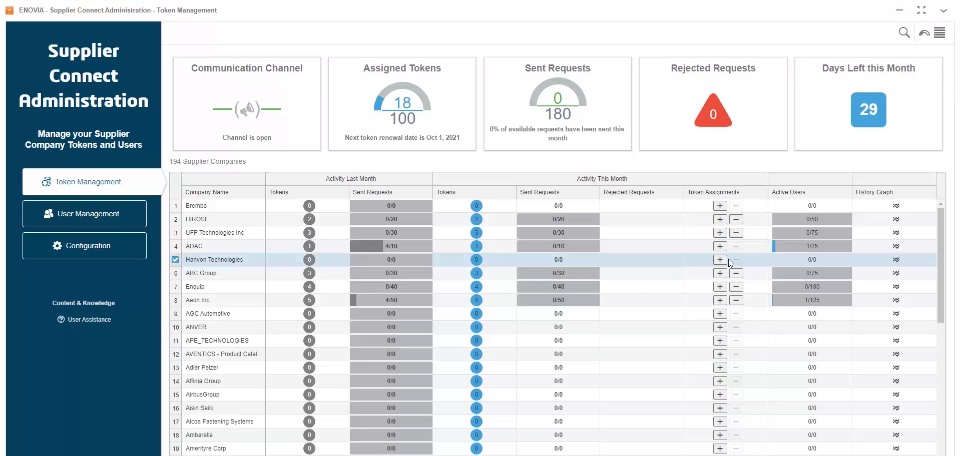
New dashboard application ‘Supplier Connect Administration’ is introduced, this application allows you to manage, configure and administrate the new supplier portal ‘Supplier Connect’. The Welcome page consists of three sections: - Token Management
- Displays the token assignments, history, RFx requests, consumption, and active users for each supplier company.
- Allows to assign and un-assign tokens to supplier companies
- User Management
- Manages and monitors the status of the supplier users who have been invited to the Supplier portal.
- Configuration
- Allows to configure the ‘Supplier Connect’ portal including the banner image and welcome text
|
New Supplier Portal, ‘Supplier Connect’ |
|---|
Why
Improve collaboration with suppliers through a new supplier portal |
How A new supplier portal ‘Supplier Connect’ is introduced for Supplier Users.
The portal enables the supplier users to: - Read and respond to messages from OEM
- Respond to RFx Requests
The portal consists of three sections: - Home Section: Provides dashboards of total number of received requests throughout the year, pending requests and my messages.
- My messages section: Displays exchanged message between the OEM and Supplier. Supplier user cannot initiate a conversation, but only respond to messages.
- Sourcing Requests Section: Displays new, late and pending RFx requests, and reply to RFx requests.

|
Messaging Mechanism |
|---|
Why
Improve collaboration with suppliers through a new messaging mechanism |
How Messaging mechanism is introduced and allows Supplier manager and its suppliers to communicate through Discussions and Broadcasts. - Discussion is a list of messages between Supplier Manager and one particular supplier user.
- Broadcast is a message sent by the Supplier Manager to all suppliers users.
To support the messaging capability new sections were introduced in ‘Supply Network Management’ application : - New Message – allows to create a new discussion or broadcast.
- My Messages – display the list of all discussions and broadcasts, and the message content for selected message.
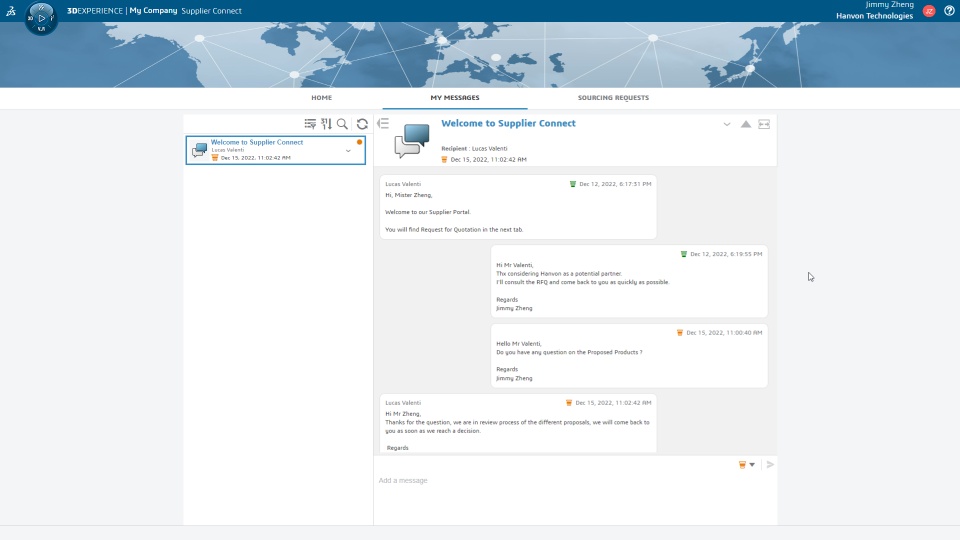
‘My Messages’ section is also available in the ‘Supplier Connect’ portal allows supplier users to : - View and reply to a message of type discussion received from the Supplier Manager.
- Read the broadcasts messages sent by the Supplier Manager.
Notes: - Supplier User cannot create a new discussion, but only reply to existing discussion. - Supplier User cannot reply to broadcast message, but only read it. 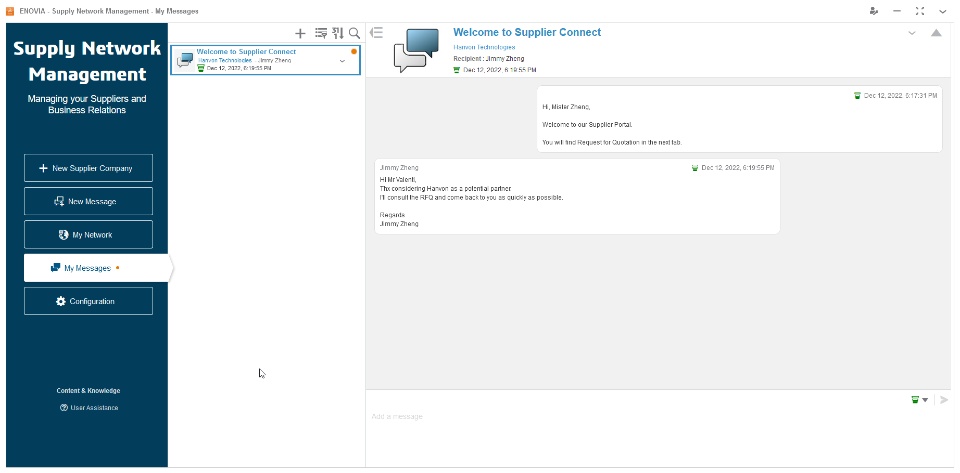
|
🎬 To discover more about these enhancements, watch the video below:
Note that the video has a voice over that can help you better understand the content
If you have any question or comments on these highlights, please share them with us below. 👇
Thanks!

