New enhancements in this release for this role:
(Tip: You can use the Table of Content  , on the right side, to view the list of all enhancements)
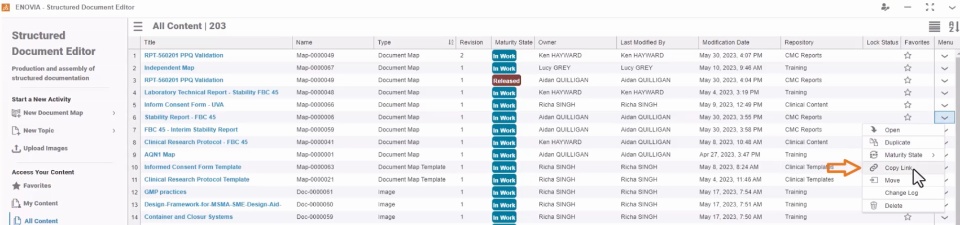
Copy Link of the Document Content |
Why Speed up collaboration by sharing a direct link of the document or its object with required stakeholders |
How - The new “Copy Link” option is now provided in the context menu of the following document objects:
- Documents & Document templates
- Document Topic & Document Topic Templates
- Images in the document
- Data topics & Maps
- The link is copied to your system clipboard and can be shared with required stakeholders to access the content.
- Stakeholders can refer to this link to access the shared content. For this, they must have the Structured Document Manager (XDO-OC) role assigned and access to the repository in which content is placed.
|
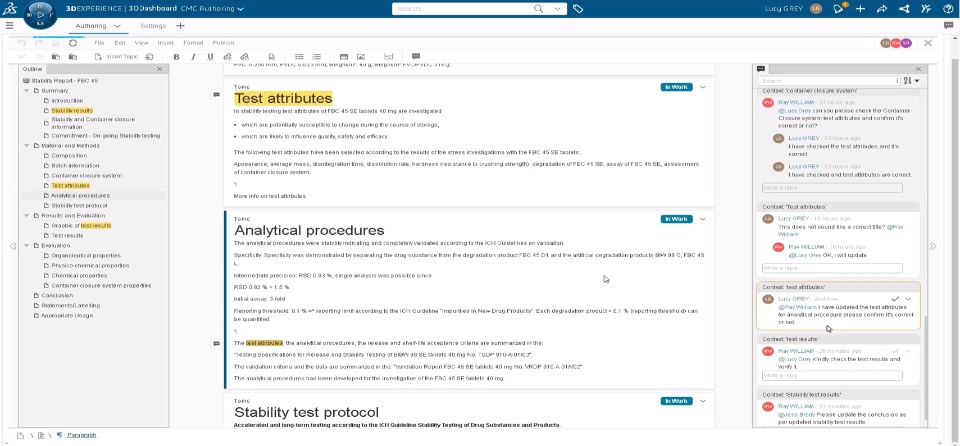
Collaboration Using Comments and Replies |
Why Seamless collaboration while reviewing or collaborating on structured documents |
How - You can now add your comment on any text within the document to:
- Share your review suggestions
- Collaborate on achieving shared documentation objectives
- You can also tag other stakeholders to notify them about your comment. Stakeholders are notified through 3DNotification and can add their reply to the comment.
- You can also use the filter based on the resolution status, stakeholder name, and text to find the required comment.
|
🎬 To discover more about these enhancements, watch the video below:
If you have any question or comments on these highlights, please share them with us below. 👇
Thanks!

