New enhancements in this release for this role:
(Tip: You can use the Table of Content  , on the right side, to view the list of all enhancements)
Report an Issue Using Existing Issue Template |
Why Save time by using the predefined issue template while raising issue in the Design Review app |
How - You can now use the new “Generate Issue from Template” option in the Review tab of the Design Review app.
- This allows you to select the predefined issue template from the list and use it to raise the issue.
- All the details from the template are carried-forward. You can update them as required and raise new issue on-the-fly.
|
This functionality is also available in the Design Validation app of the Digital Mockup Validation Manager [YED] role. |
New Clipping Tool |
Why Improved review productivity by easily visualizing and reviewing internal parts of the product |
How - You can now use the new clipping feature to visualize the relevant parts of the product.
- For this, the new “Activate Clipping” option is provided in the Review tab of the Design Review app. This provides you following three options to position your clipping planes:
- Clip by a Section: Lets you position one sectional planes to view elements located on one side of it.
- Clip by a Slice: Result displays elements located inside the two parallel planes.
- Clip by a Box: Result displays elements located inside the positioned box.
|
This functionality is also available in the Design Validation app of the Digital Mockup Validation Manager [YED] role. |
Transfer the 3D Viewpoint to Native Apps |
Why Faster issue resolution by easily transferring 3D viewpoint from Design Review slides to native design apps |
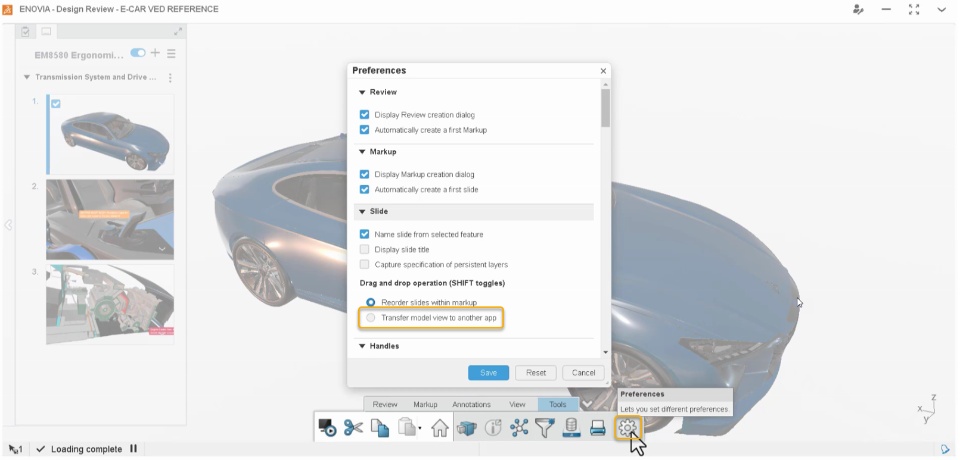
How - You can now drag-and-drop slide view from Design Review app into the native app (For example: Product Structure Design) to quickly visualize the selected viewpoint and fix the issue.
- To enable this transfer of viewpoint from dashboard app, you can select the “Transfer Model View to Another app“ check box in the Design Review app preferences.
|
This functionality is also available in the Design Validation app of the Digital Mockup Validation Manager [YED] role. |
Share Design Review Objects Using Hyperlink |
Why Avoid errors by sharing a direct link of the review objects with the required stakeholders |
How - You can now use the new “Copy Link” option in the menu of the following objects to generate the direct hyperlink:
- Link is automatically copied to your system clipboard and can be easily shared with required stakeholders to speed up your collaborative review.
|
This functionality is also available in the Design Validation app of the Digital Mockup Validation Manager [YED] role. |
🎬 To discover more about these enhancements, watch the video below:
If you have any question or comments on these highlights, please share them with us below. 👇
Thanks!

