New enhancements in this release for this role:
(Tip: You can use the Table of Content  , on the right side, to view the list of all enhancements)
3DWhiteboard
3DWhiteboard: Working with Video Assets |
Why Improved brainstorming experience thanks to the new enhancement s in managing your video assets |
How - In the 3DWhiteboard, you can now effectively manage your video assets by:
- Taking a screenshot of required frame within the video
- Selecting the quality of the video
- Using video timeline to play video from specific duration
- Controlling the volume of the video
|
3DWhiteboard: New EMOJIS Pane |
Why Easily convey your message using the intuitive and expressive emojis |
How - You can now use the new EMOJI pane to access required emoji and add it in your 3DWhiteboard. This is useful to express yourself and convey the message easily.
- To do that, open the EMOJI pane and DND the required emoji in the 3DWhiteboard. If requited, you can resize the emoji or cop-paste it as well.

|
3DSwym
3DSwym: Content Forwarding |
Why Improved collaboration with extending forwarding capabilities to all users in the community |
How - With this enhancement, all the users of the community (Authors/Contributors) can now forward content to other community or conversation. This is possible even if you are not owner of the content or owner of the community.

|
3DNotification
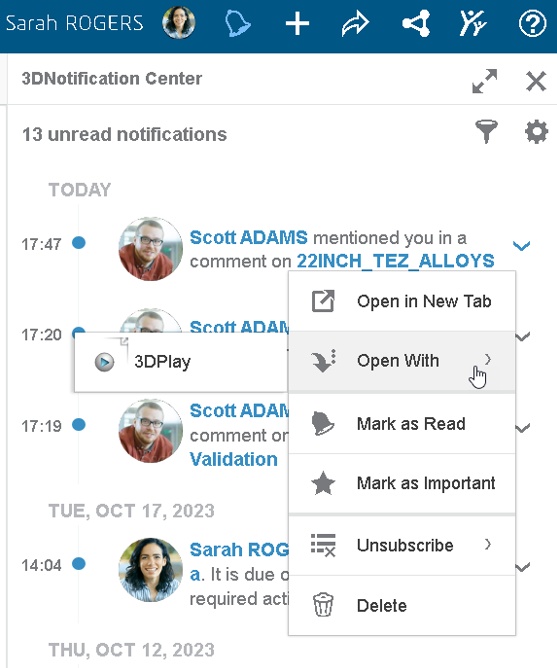
3DNotification: Support of “Open With” Option for 3DSpace Objects |
Why Save time by quickly opening required object using “Open With” option in the 3DNotification |
How - The new “Open with” option is now available for the notifications (From 3DSpace app) to quickly open the object in one of the compatible apps.
|
3DStory
3DStory: Concurrent Editing Warning Message |
Why Avoid rework thanks to the warning message about concurrent editing |
How - With this enhancement, the warning message is shown when you mistakenly try to edit the story which is already being edited in other tab of the same browser for editing.
Note: This warning message is only supported for story posted in community. 
|
This enhancement is available on cloud only. |
3DStory: Scenes with Multiple Videos |
Why Improve story loading performances for stories containing multiple videos |
How - With this new enhancement, the 3DStory now preloads videos from next two scenes to improve story initial startup time. This means, you can now seamlessly play the story containing scenes with one or multiple videos.
- Also, a new maximize button now allows you to maximize videos in your scenes.
|
| This enhancement is available on cloud only. |
3DStory: Customize the Background Color |
Why Improved viewing experience thanks to the ability to customize background color of story |
How - You can now use the 3 background color options provided in the “Play Settings”.
- This is useful to set the contrasting background color and easily view the story

|
This enhancement is available on cloud only. |
3DStory: New Stories Pane |
Why Improved efficiency thanks to ability to search and reuse scenes from existing stories |
How - You can now use the new Stories Library to access your existing stories or stories that you have access to.
- You can also select the scenes you want to insert inside your current story.
Note: When necessary, the media associated with the scene get automatically duplicated in the relevant community.

|
| This enhancement is available on cloud only. |
3DPassport
3DPassport: New User Interface |
Why Seamlessly access your 3DEXPERIENCE Platform thanks to the new intuitive user interface |
How - The new user interface is now available for Sign-in and Sign-up pages of the 3DEXPERIENCE Platform.
- This new UI is available when you access it from any type of devices such as laptop and mobile device.


|
3DDashboard
3DDashboard: 3DEXPERIENCE Platform Update Plan Prompt |
Why Stay informed about any upcoming updates in the 3DEXPERIENCE Platform |
How - The new “Update Planned” tab is now available in the “Help > About 3DEXPERIENCE Platform” whenever there’s an upcoming update planned. This is useful to stay up-to-date about upcoming updates and plan your work accordingly.
- This tab contains detailed information about platform update plan and it is only available whenever a platform update is planned.

|
3DDashboard: Hosting HTML Skeleton Internally |
Why Improved security by hosting HTML skeleton of your widget within the platform |
How - With this new enhancement you can now host the HTML skeleton of a widget directly in the 3DEXPERIENCE platform.
- In the “Create Additional App“ for a “Widget” type, the new “Internal” storage option is available that lets you select source code hosted locally.
Note: The Create Additional App is available to Platform Administrators only through the Platform Management > Members > Additional Apps 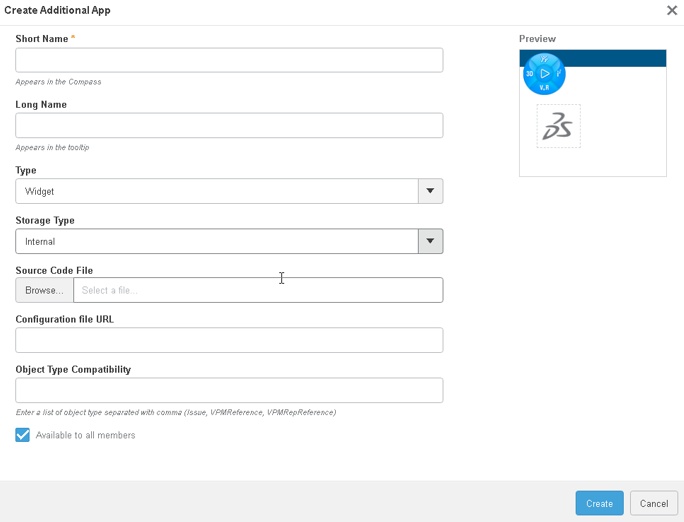
|
3DDrive
3DDrive: Enhancements in Content Sharing |
Why Improved experience while sharing and collaborating on content with internal and external stakeholders |
How - The sharing feature in the 3DDrive is now revamped to make it more intuitive and effective. When you initiate sharing, following three tabs are now available in the dialog box depending on your selection:
- Share with users
- Publish to 3DSwym
- Share with external
- Along with this, the “Copy Link” and “Copy External Link” is also available on this dialog box
Note: The Enable guest comment is not available while sharing folder

|
This enhancement is available on cloud only. |
3DDrive: Enhanced User Search |
Why Improved search experience while sharing your IP with users |
How - In the 3DDrive app, while searching the user to provide the required level of access, you can now see their avatar and name. This is useful to quickly identify users or user groups with whom you want to share your content
|
| This enhancement is available on cloud only. |
If you have any question or comments on this highlight, please share them with us below. 👇
Thanks!

