| This technical practice allows you to explore a tool in resilient modelling, which is used to analyse the error in the featurer and provides an efficient fix. It also guides in the definition of a feature or its modification using shortcut commands. Also, it displays the parent-child relation to clearly identify which feature is responsible for triggering cascading failures in the model. The tool can be launched at any time, and stays up without interrupting your design work. |
 |
During the development of a complex 3D model, a designer makes a minor update to a reference surface used across multiple features. Although the change seems simple, the model update fails unexpectedly. Without error detection, the exact cause of the failure is unclear. The designer must manually search through several features to find what went wrong.
To overcome such scenarios, Design Helper play as vital role with its interactive debugging. This eventually allows the designer to speed up the update process and isolate the failing feature instead of checking the entire model. With the visual feedback, the problematic geometry and affected areas are highlighted directly in the 3D view, making the issue immediately visible. Using the parent-child dependency analysis feature of the Design Helper, designers can trace how the failed feature is linked to its parent references and find out the dependencies causing the error.
Finally, by applying resilience strategies, such as local update or adaptive handling of references, the designer resolves the issue without rebuilding the model from scratch saving time, reducing rework, and maintaining design intent.
|
 |
The Design Helper is a diagnostic tool plays a vital role in error detection, interactive debugging, Dependency Analysis and providing resilience strategies. Design Helper is part of the broader resilience framework in 3DEXPERIENCE CATIA. The Design Helper provides you with the following capabilities: |
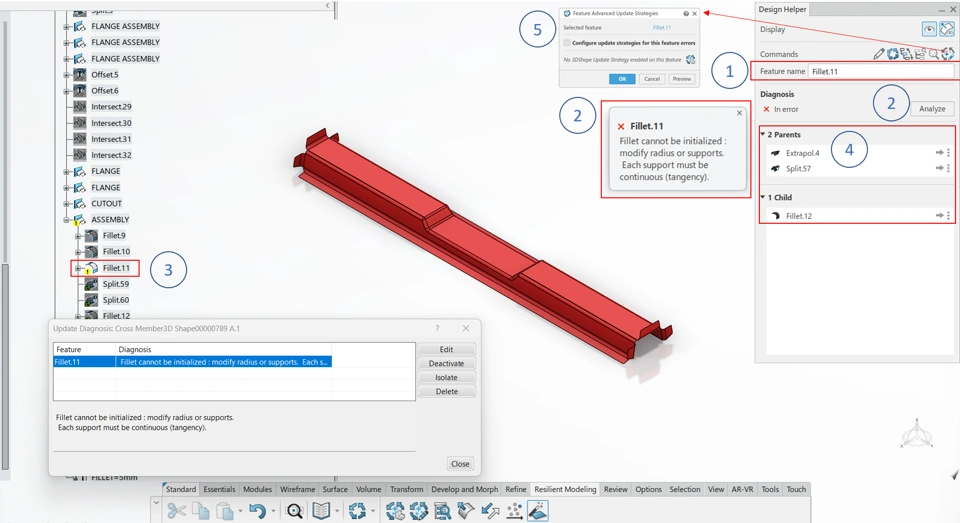 |
Error Detection - Highlights failed features in the specification tree (marked with a red cross or warning symbol)
- Lists root causes, like missing references, geometric conflicts, or invalid parameters
Interactive Debugging - Offers suggestions for fixing errors like Adapt Fillet Radius,Ignore Parent or Replace Reference
- Allows step-by-step repair of broken features
| Visual Feedback - Shows problematic geometry in the 3D view, like edges where a fillet fails
- Provides previews of potential fixes
Dependency Analysis - Displays parent-child relationships to help identify the features that are causing cascading failures
Resilience Strategies - Integrates with update modes, Automatic, Manual, Smart, and Repair to apply fixes dynamically
|
 |
| All roles that include the Part Design app, Part Design Plus app, Generative Shape Design app and Generative Shape Design Plus app |
 |
| Mechanical Designers, Conceptual Designers, Mechanical Surface Designers |
 |
Key Features of Design Helper| Function | Description | When to Use |
|---|
| Error Explanation | Describes why a feature failed (Edge no longer exists). | When a feature turns red and you need to understand the cause. | | Suggested Fixes | Proposes solutions like Adapt Fillet Radius or Replace Parent. | To quickly resolve common errors. | | Graphical Debugging | Highlights problematic geometry in the 3D view. | For visualizing where a feature like, fillet breaks. | | Dependency Graph | Shows how features are linked, like a pad depending on a sketch. | To trace why a change broke multiple features. | | Repair Mode | Attempts to automatically fix errors during updates. | When manually fixing each feature is time-consuming. | | Ignore Parents in Error | Allows a feature to update even if its parent is broken. | For temporary workarounds during design iterations. | | Replace Reference | Swaps a broken reference like, an edge with a valid one. | When a referenced geometry is deleted or modified. |
|
 |
Use Case: Use the Design Helper to identify and fix the feature failuresScenario: Let us see a scenario where a feature has failed and how it is diagnosed using Design Helper. 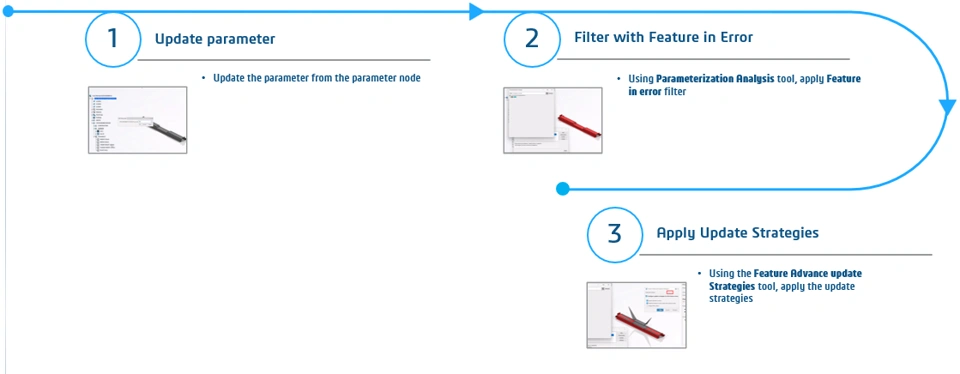 |
 |
Play the video to explore how Design Helper is used to resolve feature failure. |
 |
Design Helper works seamlessly with tools like Smart Update Mode and Parameterization Analysis.
To learn more about Design Helper, explore the M3S learning module. |

