
Hi everyone
Anna Wood suggested I come here to see if someone could help.
Point one:
I would like to get SW to update the Thumbnail ever time I hit thesave.
Point Two
I have a part number creation spread sheet in excel and I wouldlike to have a picture ref to the thumbnail for prt, ass and drw.
Anna suggested that it would take a API in excel or something toachieve it. I have very little knowledge of such things couldsomeone help?? ,,,,,,, please
SolidworksApi macros


Anna Wood suggested I come here to see if someone could help.
Point one:
I would like to get SW to update the Thumbnail ever time I hit thesave.
Point Two
I have a part number creation spread sheet in excel and I wouldlike to have a picture ref to the thumbnail for prt, ass and drw.
Anna suggested that it would take a API in excel or something toachieve it. I have very little knowledge of such things couldsomeone help?? ,,,,,,, please
SolidworksApi macros

As for the second request. Your best bet is to use the DocumentManager to extract the actual bitmap from the files and then placeit as the source of a picturebox in excel. You could have thisrunning every time the excel sheet opened or just on a synchronisebasis where to save the bitmap to file and reference them.Unfortunately this is not exactly a beginners level task so youwould probably struggle.
Do you have any experience with this functionality? I got curiousand wrote a macro using SldWorks::GetPreviewBitmap (macroattached). It does work (saves out a bitmap), but contrary to theAPI help the picture isnot the same as what you see in the SolidWorks "Open"dialog. It seems to be just a screenshot of the model window at thetime of the last save rather than the nice isometric picture in thedialog. I seem to recall something about the preview image beingimproved for 2006, 2007, or 2008. Maybe that has something to dowith it. I haven't tested the Document Manager function of the samename. Another thing I wanted to look at but am not really sure ifit will even work for me is SldWorks::PreviewDoc. I only have VBA,so I don't know if I'd be able to figure out what to use for thehWnd argument.
Josh the macro works, at first I thought it was not working till Ifond the bitmaps in the same folder as the file.
Sorry, is everyone saying that one can not write a VBA in excel todo the same as this macro, which could then save to a selectedcell?
I've attached a version that uses the document manager. Add licensekey string and stir.
ActiveSheet.Pictures.Insert( "path\name.jpg" )
I have attached Josh's sw macro as excell macro.
You must make reference to "C:\Program Files\CommonFiles\SolidWorks Shared\SwDocumentMgr.dll"
and you need access key for document manager fromapisupport
Josh Brady wrote:
Note that this code just dumps the picture on top of the Excel sheet with its top-left corner in the selected cell. It does not put the picture in a cell.
What and where is document manager?
How do I ask for an access key?
Again thank you so much for your help, if you ever need somethingdesigned, I would love to help.
Thank you Josh. Thank you Ivan and thanks everyone else
All you need to do in order to get the license key is send an emailto apisupport@solidworks.com and ask for it. You have to promisenot to tell anyone what it is - all secret like. I don't know whythey do this. Seems stupid to me. SW'07 sp0 didn't require thelicense key, (I'm pretty sure this was touted as a feature!) butthey locked it back up a couple of sp's later.
Anyone at SW care to comment on why? What's the rationalethere?
It is only solidworks api, so you don't need any key to useit.
Public Sub pv(ByVal filePath As String )
Dim pic as System.Drawing.Bitmap
Dim pvf As wpfPreviewFlowControl.wpfThumbnailCreator
pvf = New wpfPreviewFlowControl.wpfThumbnailCreator()
Dim size As System.Drawing.Size
size.Width = 200 ' SIZE OF PREVIEW
size.Height = 200 ' SIZE OF PREVIEW
pvf.DesiredSize = Size
pic = pvf.GetThumbNail(filePath)
pic .Save(NewPath)
End Function
add reference C:\Program Files (x86)\SolidWorks\SolidWorks Explorer 2008\wpfPreviewFlowControl.dll
need SolidWorks Explorer 2008
if this is the wrong Lang. or need help add reference let me now
What program are you using (SW Macro,Visual Studio,Other)
Also There is noway to insert a pic into an excel sheet
excel is not made for that
have you thought of using access or an other database
Jacob
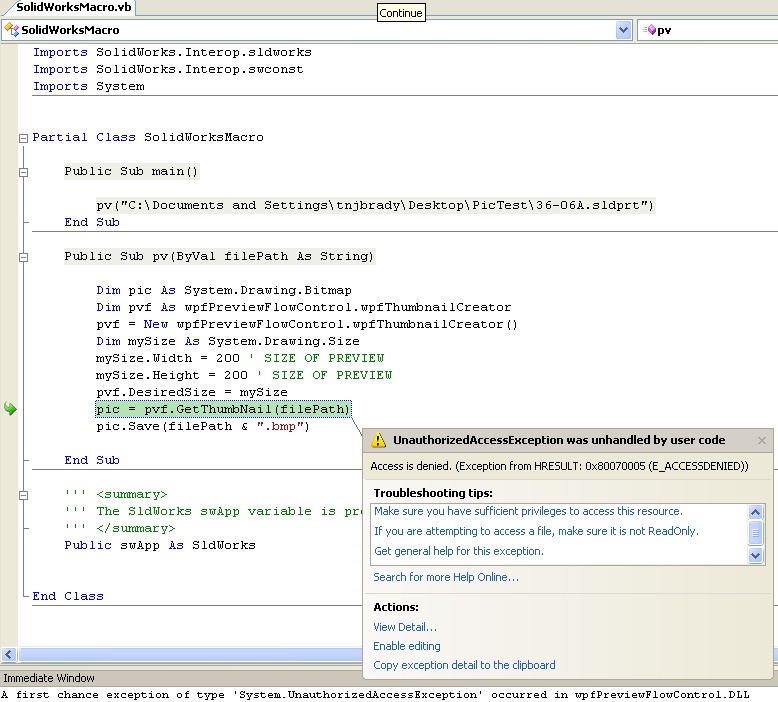
I also tried your code in a VSTA VB.net macro. Didn't work there either. I was able to add the reference, but I got the error below:
I using this and it dose work in SW 2008 sp4 or sp5
It look's like it is a permission problem
The project runs fine as is so it is a permissions issue for sure.
This begs the question though why use this messy way of getting an image? It doesn't even get a large image its actually smaller than using the built in SW functions to get an image, which gives it you at the last display resolution the model was open on... this way gets thumbnail size; for example set the size to 2000x2000 and see the giant pixels. Compare that with GetPreviewBitmap which is totally fine.
The Code is using a DLL from SolidWorks Explorer 2008
And it is for a Thumbnail view like in when tab through opend Files
The size I should have put smaller