
Hello SW forum community,
My group here at SW are evaluating and re-evaluating many functionsof SW. One that I'd like to get some feedback from those of youthat do part design that requires draft is:
Where in your designs is it important to have and not have(option given to the user) tangent propagation when using the draftfeature?
For instance, when creating a partline option draft, there is anoption to include adjacent edges (faces). Is this something thatshould be on by default, off by default or not an option at all(make tangent propigation off by default.)
If you could give an explanation and also an example I wouldgreatly appreciate it.
ThanksSolidworksParts And Features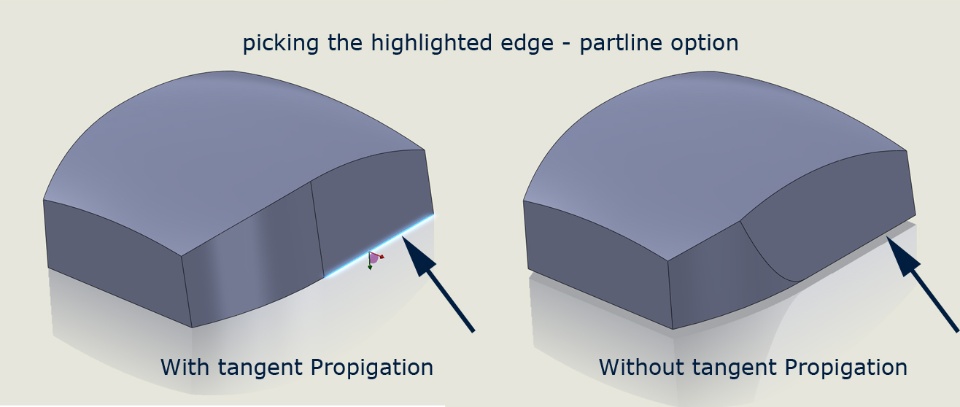
My group here at SW are evaluating and re-evaluating many functionsof SW. One that I'd like to get some feedback from those of youthat do part design that requires draft is:
Where in your designs is it important to have and not have(option given to the user) tangent propagation when using the draftfeature?
For instance, when creating a partline option draft, there is anoption to include adjacent edges (faces). Is this something thatshould be on by default, off by default or not an option at all(make tangent propigation off by default.)
If you could give an explanation and also an example I wouldgreatly appreciate it.
ThanksSolidworksParts And Features

The plastic and cast parts I do are mostly flat in nature but I'vealways wondered what it would be like if I could design withoutdraft and then go back and draft everything from a surface, oneclick.
HTH
Steve
You can't draft a face that has tangencies that are not also beingdrafted, unless you allow for some weird brep thing like a tangentface being extended or trimmed such that it is no longer tangentafter the draft.
example, line, arc, line extruded. only line is drafted. arc has todo something funny (trim or extend) over which you have no control,but that's a separate issue.
It would almost be useful for tangencies to be selected by default,and for SW to be able to tell which tangencies can be drafted andwhich can't (like fillets on top of ribs).
Also, it would be useful if SW actually highlighted the selectedtangent faces. I don't always blindly trust automated functions todo the right thing unless it can show me what it has done. SWcurrently highlights the selected tangent faces nicely, but itdoesn't show them in the selection list.
I usually do not use the tangent propagation in draft, although Ihave once or twice. Maybe I'm superstitious or something, but Itend to explicitly select faces. Generally the case in whichtangent propagation would pick up faces that I don't want to draftare cases in which the tangent faces can't be drafted, such asmentioned above, fillets on edges perpendicular to the line ofdraw.
When modeling parts, I leave the fillets to the end where possible,because of the conflict with draft and shell. Fillets on edgesparallel to the line of draw are ok before the draft, but can causeminor manufacturability issues (tapered radius instead of straightradius on a taper).
Can you be more detailed in your question?
Please see image I included (updated) in my original post.
Thanks
In the case you show, the undrafted tangent face is trimmed back,but in other cases it might extend, and you can't control that.Workaround is a ruled surface and cut with surface.
In cases like what you show, I think selecting tangent faces shouldbe the default, but you should be able to override it. You may wantto put more draft on the linear face than the curved one. It mightalso be a design feature instead of a mistake.
Actually, there is nothing wrong with the image or solution, it'ssimply doing what it is suppose to do. In the first image,propiagation is on and picking the straight edge, propiagates thedraft to the tangent arced edge. In the image on the left,propigation is turned off and it only drafts that face whileleaving the arced face undrafted.
So this is what I want to hear back from you all; have you usedraft this way to get this kind of solution?
Matt, what I'm hearing you say is NO.
Starting from the first image and applying the same exact draft,how do you control whether you get the second or third image as aresult? It's just a side issue, but one you might consider whileyou're tinkering with stuff.
I don't do this routinely, but I wouldn't want to lose the abilityto do it if I needed to. You never know what is going to come up.If you're looking to assign defaults, I think selecting tangent bydefault would be good. When using the Parting Line type, it wouldbe nice if it also showed the tangent PL edges selected.
I think the times when I do this kind of draft are times when thedraft I want won't work, so I accept this as a mid-way solution,and then add the rest of the draft later. You can't discount thatkind of stuff if you are thinking about eliminating functionality.
I hear the question you're asking, but you're asking something veryspecific but you must be getting at a more general situation. Ihate to answer questions like this "yes" or "no" for fear that theanswer will be used to justify something altogether unacceptable.
In the left pic, are the faces tangent? What is the direction ofpull? Normal to the bottom face or up that vertical side. I knowthis is just a basic shape used for this demo but these are thethings I ask myself before I choose a tool. If it's a complex shapeI may even loft to get a desired draft. It all depends on what youwant in the end.
Steve
Steve
No, you can't do that in SW. It's a bit of a bummer. I've beenasking for that one for almost 10 years. Seems easy enough, and itwould certainly make applying draft faster.
How did you accomplish the 3rd image? I get the second image byapplying draft to the linear edge but without Tangent Propiagation.
Not sure what you mean by "show the tangent PL edge selected" Is itnot enough that we show the little yellow directional arrows on thetangent faces automatically when tangent propiagation is on?
I'm with you on both keeping it as an option for those "what if"situations and keeping tangent propiation as the default.
Steve, PL draft is essential when you have a plastic part that hasa non-linear parting line. Look at the telephone handset on youdesk - it probably has a non-linear partline between the outer andinner plastic housings - but I think you know this. The examplethat Matt and I both used is not a good one for PL draft (becauseit could be done with a Neutral Plane draft and this is what Ithink hangs you up on it.)
2 direction draft - yeah, coming from ProE myself I know that wouldbe nice time saver, but given the numberone enhancementrequest that will be announced at SWW2009 we've got moreimportant things we need to do :-)
Anyway, I forced it to go that way by making a ruled surface fromthe edge, extending the surface and doing a cut. Might have beeneasier to just draw a line on the end of the part and make a cut.
I was just trying to show that both results are valid, but youdon't have any option which one you get.
The little yellow arrows are nice, but ... again I just don't trustautomated stuff in software. I'd like to see the selection spelledout explicitly by showing edges in the Parting Lines list. Thiswould also allow you to do a "propagate to tangent EXCEPT for xxx".Not a huge deal, in the scope of things.
This is a little off topic, and its a bug, but I thought I'd postit here.
If you select the "all faces" propagation using neutral planedraft, all of the faces around the selected neutral planehighlight, but none of them draft. If you turn off the propagationand try to select the highlighted faces, the first clickunhighlights the face, and the second click rehighlights andselects it in the list.
This bug is probably the source of my not trusting the propagationsettings and preferring explicitly selected faces.
Draft Xpert has no propagation options at all. This might be moreuseful if it worked like the Fillet Xpert in terms of the selectionsets.