
So I'm finally trying to learn surfacing for a project I havearound the corner, and it's not that hard with the exception of"tangency lengths" for start/ end conditions. Are these in units ofsomething?
I'm sure it's obvious... Can someone enlighten me?
SolidworksSurfacing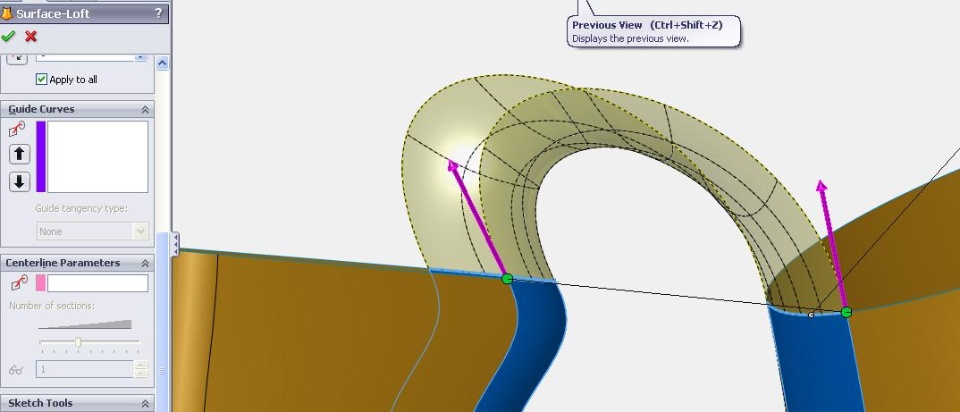
I'm sure it's obvious... Can someone enlighten me?
SolidworksSurfacing

Rob Stupplebeen
A fully relaxed spline does match up with a loft with tangency 1. Ihowever do not like the idea of an dimensioned spline handle for mywork though. I hope this helps.
Rob Stupplebeen
http://en.wikipedia.org/wiki/NURBS
http://en.wikipedia.org/wiki/B%C3%A9zier_curve
http://en.wikipedia.org/wiki/Spline_(mathematics)
Now if I could just understand how to control the number ofsections (it's greyed out) and the spacing of the sections, I mightfeel comfortable with the tool.
If you want to actually have more control to the surface as it goesfrom one to the other you need to create a spline for the surfaceto follow. You can use the same curvature constraints on a spline,and then add points in the middle (the fewer the better). Then youcan move the spline points, as well as control their handles, toget the desired shape you want.
The SW tutorials are great, except for surfacing. You might tryMark Biasotti's presentation at SWW2009.http://www.solidworks.com/page...ngs/presentations.html(it looks like the video isn't available yet, but you can downloadthe .ppt). You can see his presentation from 2008, which was verysimilar, here:http://solidmentor.com/modules...rticle.php?storyid=323
http://www.dezignstuff.com/blog/
See the bottom of the sidebar for the link.
Cheers,
Anna
Loft and Boundary.
Despite them sharing no resemblance in name, they actually fulfillvery similar roles.
Boundary is like a Loft on steroids, more options and justgenerally an improved loft.
There's a good video Mark Biasotti did about boundary and othersurfacing features:
http://www.viddler.com/explore/behnt/videos/24/
It's a little tricky to get the hang of it, but that video shouldclear up a lot. I first really found out about Boundary throughthat video a few months ago so I'm kind of a newbie as well youcould say - what really helps is that I had to use it extensivelyfor a part model of a mould. That project you have around thecorner will absolutely definitely undeniably (should I go on?)help, you'll pick it up much faster than just casually fiddlingwith options in the feature(s).
Boundary (and loft as well) just give tremendous previewing, othersoftware you just pick your curves and only at the very end itwould show a preview - they're not all like that but most are.SolidWorks gives you a great idea how your boundary is evolving asyou add additional curves and guides.
Hope this helps!
Thanks all, I think that really answers the question. I'm superimpressed with the knowledge on this board!
I am too shy to award points though...
and I see Ozzy Osborne in the same thread...cool stuffman...definitely gonna keep reading here
participation is really going to surge with talent like this
makes you want to do something impulsive like fill out several usersurveys or somethin'...