
Need help on this one. I've burned about 12 man hours thepast couple of days fighting this new SW 2009 (SP 0) install. Ihave a Dell Precision 490 machine (about 2 years old with 64bit XPPro) that has run SW 2007 and 8 with no problems.
SW 2009 installs with no errors (yes I have McAfee 8.5 off duringinstall - it comes up automatically during reboot though) but whenI try to open 2009 up it crashes, sometimes with no error messages.This my 4th clean wipe (uninstall, then delete files, then cleanout registry).
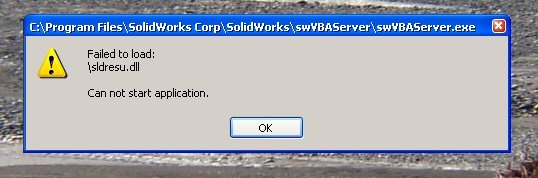
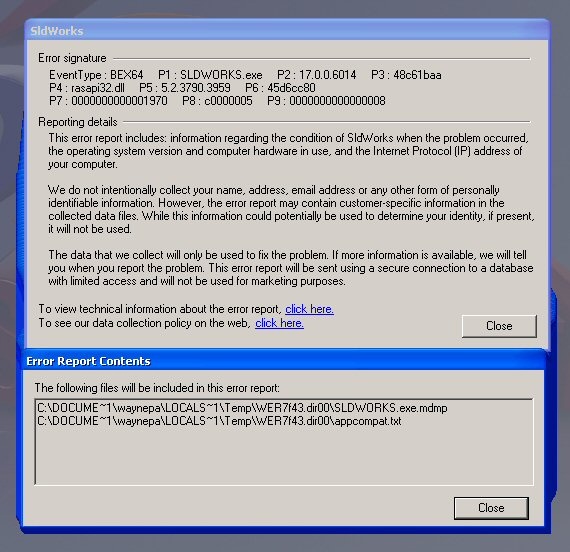
See attached error messages I've gotten.
Any suggestions? The VAR is suggesting a Windows wipe. I think thistactic is a little extreme and discounts the fact that SW 2007 and2008 ran fine as do numerable other app's on this computer.
Is there a program or process that can pinpoint what part of XPdoesn't play nice with what part of 2009?
ThanksSolidworksAdministration
SW 2009 installs with no errors (yes I have McAfee 8.5 off duringinstall - it comes up automatically during reboot though) but whenI try to open 2009 up it crashes, sometimes with no error messages.This my 4th clean wipe (uninstall, then delete files, then cleanout registry).
See attached error messages I've gotten.
Any suggestions? The VAR is suggesting a Windows wipe. I think thistactic is a little extreme and discounts the fact that SW 2007 and2008 ran fine as do numerable other app's on this computer.
Is there a program or process that can pinpoint what part of XPdoesn't play nice with what part of 2009?
ThanksSolidworksAdministration

The main problems I've had on installation is to ensure that youare logged on as a 'network' administrator and not just a 'local'administrator. Otherwise you get all sorts of problems!!.
Also, I had problems installing from an image. I fail to understandhow you can distribute updates from the network when Solidworksadvises you to install as a network administrator?.
I should have mentioned it but yes I'm on my second DVD. Sameresults. I have access to yet a third one (different division), Imay try that.
I've also trimmed all startup processes to barebones (Microsoftrequired, that sort of thing).
Anything is worth avoiding an HD format and re-install.
I had similar issues when installing SW2009 SP 0. It is extremelybuggy, and a horrible release of "cutting-edge" software. Ifpossible, I would try downloading SP2.0 from the customer portal -it is much more stable. Finally, have you checked for video cardcompatibility? There are not many SW approved video cards forSW2009 - another unfortunate bug.
HTH!
Bryan
Though I do have the older driver. I'll try updating it, see whathappens.