
I am looking into changing the way our company is running so we can be more cost effective. We have 60 Engineers/Designers/Draftsman that use SW and require workstations but instead of purchasing 60 workstations I thought about doing 10 rack workstations with a PC at each desk for running everyday tasks. Does anyone have experience with this technology? Currently two FEA guys here use this technology and have no problems. After researching the internet and Dell's website it seems like a better idea for us. What I was looking at is attached.SolidworksAdministration
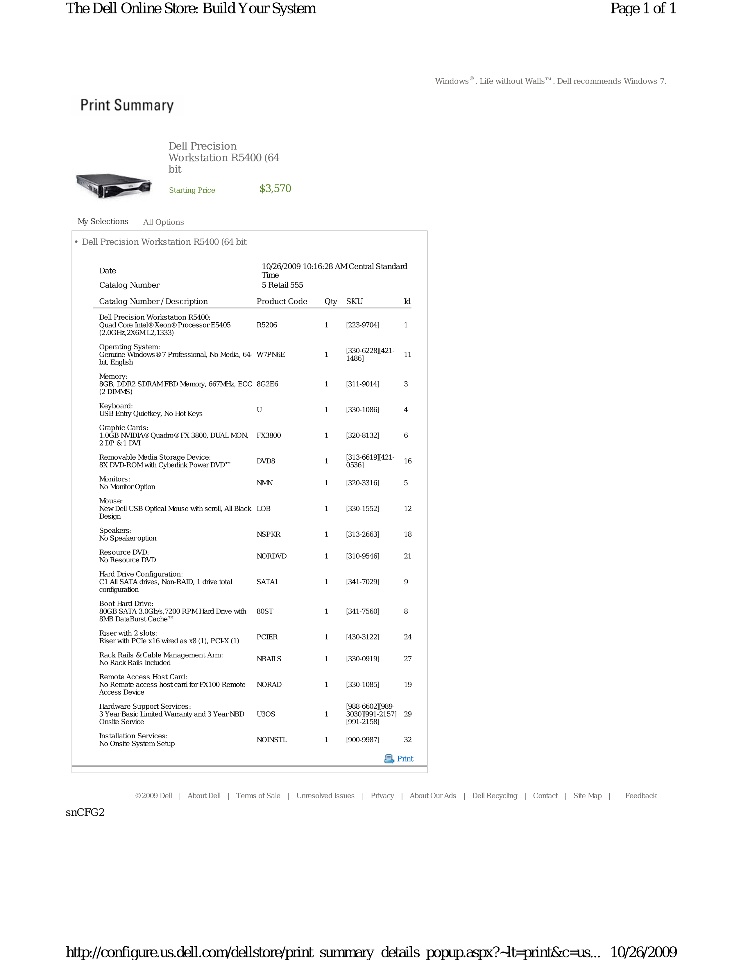

I could be wrong, but I think the R5400/FX100 solution is for a single user. Only one FX100 client can used with each workstation. It would cost about $4800 for each user with a 3 GHz Core2 Quad processor, 8GB RAM and FX 1800 graphics. That doesn't include the client monitor, keyboard or mouse. It would cost far more to have 60 rackmount R5400s than 60 T3500 workstations - and the T3500s would be faster (Nehalem vs Core2 architecture).
Otherwise, the R5400/FX100 should work just fine with SolidWorks. It's a great albeit expensive solution for engineers who work in hostile environments.
Enlighten me in what you are talking about.
Well there are a few ways to access the Knowledge Base, but one of the neatest is that from within this particular post; look to the top right hand colum of the page near the start of the discussion and under the text "Action" click the link "Check the Knowlege Base"
It uses your topic as the search criteria and displays related KB Solutions. You'll see a link the the solution I mentioned.
If you do go ahead with this; let us all know how it works out for you after it has been going for a while.
-Larry
Can multiple FX100 Remote Access Devices access the same Remote Access Host Card? (One at a time.) If this is possible, this might be a good solution for you.
I looked in the KB and it didn't quite answer my question but did help a little. I'll keep you posted...
Well? did you go to Rack Workstations? and how was it if you did?
I see that Dell has a model out that looks pretty darn cool
smilin
Steve
a lot has changed since 2009. a solution has appeared: http://www.hawkridgesys.com/products/nvidia/