
Hi,
I am trying to query our SQL Database in PDMWorks Enterprise to getinformation on files, specifically if they are checked in our out.I have no DB experience but have been looking at samples all aroundto see the basics. How would I get information on a file if it ischecked in or out? I want to use this in conjunction with thereport generator.
Thanks.SolidworksSolidworks Pdm enterprise Pdm
I am trying to query our SQL Database in PDMWorks Enterprise to getinformation on files, specifically if they are checked in our out.I have no DB experience but have been looking at samples all aroundto see the basics. How would I get information on a file if it ischecked in or out? I want to use this in conjunction with thereport generator.
Thanks.SolidworksSolidworks Pdm enterprise Pdm

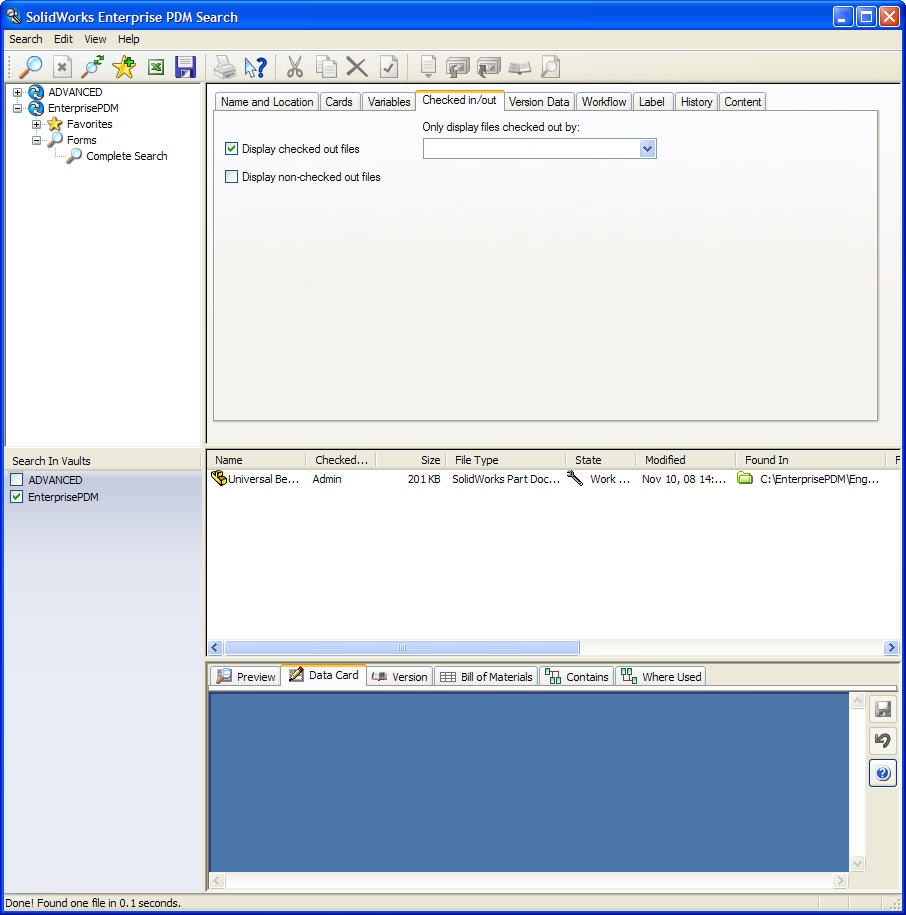
You don't need to use a query. You can do it with a simple search.(see image)
Search the knowledge base for solution S-013369. It will describehow to create reports. You will need knowledge of T-SQL.
Joy
What I wanted to do with the checking if it is checked in or out isputting that in a report, I do not know the variable to use that itis stored in, in the table. I was going to modify the examplereport that is in the PDMWorks install file and include the checkedin/out status.
Thanks for your help,
Michael
select filename
from documents
where userid <> 1 and deleted <> 1
Like I said I am fairly new to SQL coding I am posting the methodthat I am modifying that was made by SolidWorks to incorporate thechecked state. I am not sure where to put your code within thatmethod and what variables are used.
Your code is highlighted
@[DocumentsInWorkflowstate]
§Name [Documents in selected workflow state]
§Company [SolidWorks]
§Description
[This query lists all documents in a selected state and to whichthe user has access rights.]
§Version [1.1]
§Arguments
[
String FileName [N] [Enter file names. Use "%" for wildcard. E.g."in%.%"]
ProjectID StartProjectID [1] [Enter start folder. E.g "$\Topfolder", or browse for folder.]
StatusID CurrentStatusID [1] [Select status]
UserID TheUserID[S] [Select user]
]
§Sql
[
Declare @iStartFolder Int
Declare @StatusID Int
Declare @UserID Int
Set @iStartFolder = {StartProjectID}
Set @StatusID = {CurrentStatusID}
Set @UserID = {TheUserID}
select filename
from documents
where userid <> 1 and deleted <> 1
Select Doc.DocumentID, P.Path + Doc.Filename as 'Document Name',Doc.LatestRevisionNo as 'Latest Version'
From Projects P, DocumentsInProjects Dip, Documents Doc
Where P.Path like Replace(Replace(Replace( (Select Path FromProjects Where ProjectID = @iStartFolder )
,'[','[[]'),'_','[_]'),'%','[%]') + '%' And
P.ProjectID = Dip.ProjectID And
Doc.DocumentID = Dip.DocumentID And
Dip.Deleted = 0 And
Doc.CurrentStatusID = @StatusID And
{Doc.Filename, FileName, LIKE, OR} And
Exists ( SELECT ProjectID
FROM UserProjectRights
WHERE ProjectID = P.ProjectID AND
UserID = @UserID And
Type & 1 = 1
Union
( SELECT Gpr.ProjectID
FROM GroupProjectRights Gpr, GroupMembers Gm
WHERE Gpr.ProjectID = P.ProjectID AND
Gpr.GroupID = Gm.GroupID And
Gm.UserID = @UserID And
Gpr.Type & 1 = 1 ) )
]
For checked out (locked) files use this.
select filename from documents where len(lockpath) > 0 anddeleted = 0
For checked in files,
select filename from documents where len(lockpath) = 0 and deleted= 0
Be careful though, this can potentially return thousands ofrecords!
Mike
You can't just put SQL queries in the enterprise report tool.Please look at the solution I refered you to earlier.
The report should look more like this:
/******************* ********************/
@[CheckedOut]
§Name [List Checked out documents]
§Company [SolidWorks]
§Description
[This query lists all checked out documents document]
§Version [1.1]
§Arguments
[
]
§Sql
[
SELECT Documents.Filename AS [File Name], Users.Username AS[Checked Out By]
FROM Documents INNER JOIN
Users ON Documents.UserID = Users.UserID
Where Documents.Userid <> 1 AND Documents.Deleted <> 1
]
/******************* ********************/
Not really. You need to use the SQL Server Management Studio toexamine the database tables and columns.
If you have Visio (2003 SP3) you can create an entity relationshipdiagram (table map) by using the Reverse engineer feature undertools.
Regards,
Joy
Thank you again for all your help,
Michael
select documents.Filename, status.Name
from documents
join status
on status.StatusId = documents.currentstatusid
SELECT P.Path As 'Project Path', D.Filename AS 'File Name', S.NameAS 'Status Name'
FROM Projects AS P INNER JOIN
DocumentsInProjects AS DP ON P.ProjectID = DP.ProjectID INNER JOIN
Documents AS D ON DP.DocumentID = D.DocumentID INNER JOIN
Status AS S ON D.CurrentStatusID = S.StatusID
Where (S.Name LIKE '%') AND D.ObjectTypeID <> 0
Order By S.Name ASC
Thought I'd pass this on, as I haven't seen reference to it anywhere....
The easiest method I have found to create SQL Queries is to let EPDM build them for me.
1) Create the column set for the fields you want returned
2) Run the search
3) Change the registry setting:
Create a new DWORD value called DebugSQL under HKEY_LOCAL_MACHINE\SOFTWARE\SolidWorks\Applications\PDMWorks Enterprise Set it to 1 When running a search, the search query will be created in a file called c:\search.txt
4) Paste the contents of c:\search.txt into a new query.
This has made authoring reports in Crystal Reports a breeze.
Every time a search is run, c:\search.txt will be updated with the new query.
I'm totally freaked out by how you knew that! Awesome!
Get back to work Kent
How's EPDM treating you?
Actually, pretty decent. The database normalization is extreme and there is no such thing as a "Simple SQL Query". However, EPDM has done a nice job working out their database scheme. No SQL database customization is needed to add variables. Adding variables is an "Out of the Box" proceedure. API is all .NET! No .lst files, sys files, par files, txt files, dbw files and .vbs file to debug. Nice referencing structure (even if documents are suppressed or in another configuration). Item management is awesome! (We don't engineer files, we engineer items; conceptual part numbers, not the files that define them). Workflow is much more robust and flexible. It is way too easy to over secure the permissions (which, in my opinion, is the number one reason why inexperienced PDM administrators fail in their implimentation). I really wish EPDM would default to full permissions on everyone when defining workflows and the like. The idea that you "lock it down and give access as needed" is bunk! Start with everything wide open and only lock it down when absolutely necessary. Security is not free! Security is a necessary evil, but when it is not necessary, it is just plain evil. Probably the number one form of waste in engineering companies is the time it takes to work around uncessary security.
In EPDM, most of the complexity is hidden from the user, which makes my job harder, but the user's job easier. I actually like that. EPDM seems a lot more consistent and intuitive to the user.
My biggest concern is, due to the normalization level of the database, that "minor" problems can have catastrophic consequences in time and money before resolved. There are no simple "backend hack" solutions that can be trusted.
I guess I have a lot of homework to do
Kent
Hi David,
I have tried this tip to debug my sql queries. I am not sure what I'm doing wrong but there is not a search.txt file or any other text file that gets created.
I followed your instructions to the letter. Is there something I could have done wrong?
Thanks
Tim
EPDM 2011 SP2.0
SQL Server 2008
I know this is an old thread but I thought it might help since there's not much info on it anywhere. I was having the same trouble as Tim. I figured out that I had to right-click on the PDM Search and click Run As Administrator. The problem was security settings with Windows 7. It won't let you save a file to the root directory on your hard drive unless you do this. There is also an option in the shortcut properties that will allow you to always run it as admin.
Hi Brandon-
I am having the same issue as Tim whereas I have followed David's instructions fully and I am not getting a search.txt output anywhere. I have also tried right-clicking the PDM search icon at the upper-right corner inside my vault, as you've instructerd, but this does not bring up any menu. Are you able to do this in your vault, or does this need to be done somewhere else? Also not sure what you mean about the option in the shortcut properties...what shortcut properties? Also, I believe that I am setup as the admin of my machine, so I am not sure if that is the issue.
Do you have any other tips to creating the search.txt file?
Thank you,
Scott
EPDM 2014
SQL Server 2008
Windows 7
Scott, try right-clicking the "Enterprise PDM Search" icon on your desktop or through the Start menu. There should be an option that says "Run as administrator". Click that and run your search. If you created the DebugSQL registry key per David's instructions, it should create a "search.txt" file in the root of your "C:" drive. For security purposes, Windows 7 doesn't let programs save anything to the root folder on the hard drive without the user executing administrative privileges.
Hi Brandon-
Thank you, that worked to create the search.txt file. I had to first locate the search executible file, which I found here: C:\Program Files\SolidWorks Enterprise PDM. I created a desktop shortcut and was able to right-click and "Run as Administrator".
All good there, however I am still not able to replicate the query search when I copy-paste the search.txt contents into a New Query in SQL Management Studio. Here are the steps I have taken:
"Msg 208, Level 16, State 1, Line 29
Invalid object name 'dbo.Src_FindProjectsWithReadRights'."
Are you able to copy and paste the search.txt text directly into a new query within SQL Management Studio and output the same results as you did with the ePDM search? In the big picture I am hoping to accomplish two things by doing this: 1) I would like to use this code to set boilerplate Report Generator queries within ePDM. 2) I want to set up SQL queries within DriveWorks to create tables of information that our designers can use.
Thank you again!
Scott
Hi Scott,
I don't recommend cutting and pasting the contents of search.txt - it is an internal debugging tool that was shared by a user with other users so that they could learn more about T-SQL.
The bottom line is you still need to learn a little T-SQL to get what you want.
There are lot's on online resources to get you started:
http://technet.microsoft.com/en-us/library/bb264565(v=sql.90).aspx
http://www.w3schools.com/sql/sql_select.asp
http://sqlmag.com/t-sql/t-sql-starters-writing-simple-select-statements
Or, you can buy a getting started book on Amazon:
http://www.amazon.com/Beginning-T-SQL-2012-Scott-Shaw/dp/143023704X/ref=sr_1_1?s=books&ie=UTF8&qid=1399650658&sr=1-1&keywords=T-SQL+kathi+Kellenberger
Or, you can go for ninja level (Microsoft course):
http://www.amazon.com/Training-Kit-Exam-70-461-Microsoft/dp/0735666059/ref=pd_sim_sbs_b_4/184-7679983-2795751?ie=UTF8&refRID=15JP8G9Y6PYVVDPRK8XZ
Lastly, SQL Server Management Studio queries are typically written differently then the ones used in the Report Generator (specifically variable declarations and usage).
Refer the knowledge base solution: S-013369
Regards, Joy
Joy is right. I basically just used the search.txt results to give me a general outline of what I needed to do to write my own queries. I've never actually tried to copy and paste the contents into SSMS. FYI...I took a "Querying Microsoft SQL Server 2012" trainig course online through New Horizons Computer Learning Centers. It's a prep course for the MS Exam 70-461 that Joy mentioned. I'd highly recommend it. Don't know if I'd call it "Ninja Level" though LOL.
After five years, I found this post while I was researching data access. It's worth noting that x64 flavors of Windows require that regedit32.exe be used to edit the registry for this tweak to work.