Print Window

Is there a way to print just a windowed selection at thescale you want in either a PRT, ASM or DRW file inside ofSolidWorks without having to open it in eDrawings to do the print?We are trying to print out while inside SolidWorks a windowedselection of just an area no matter what file it is at a scale weselect (like in AutoCAD).SolidworksGeneral
Answers 12
SF
SF 2008-11-18 Best Answer
File, Print, Selection, OK, Custom scale.

Janusz
WC
WC 2008-11-18
I think you better take a closer look. There is no Selectionin the Print dialog in SolidWorks 2008 or 2009 to choosefrom.
SF
SF 2008-11-18
William,

I usally just zoom in, to what I want to print and just print. Makesure in your Print Range Option, Current screen image is selected.Hope that helps.
SF
SF 2008-11-18


Taking a closer look, I see it as an option.

At least in a Drawing it is.

In an Assembly or a Part, this option is greyed out.
WC
WC 2008-11-18
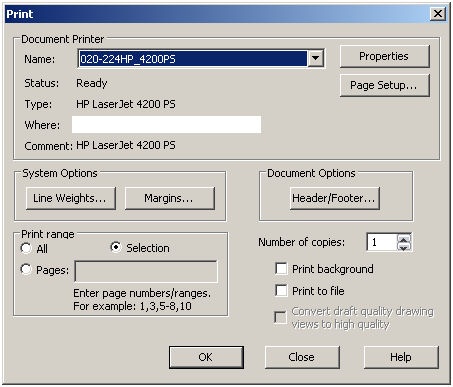
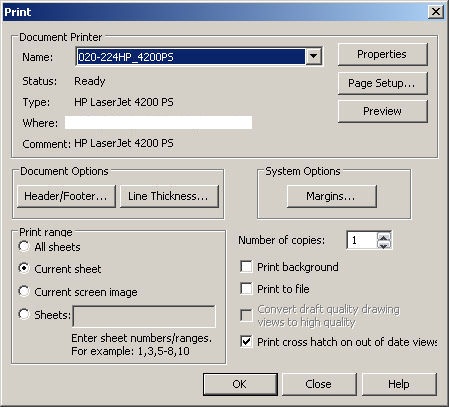
My apologizes to Janusz & Alan you are parially right. Itlooks as if in SW2009 they have changed the print interface. I'vetried looking at both a Off Domain and On Domain systems both inSW2008 and SW2009, a total of 4 workstations and found reqardlessof type of connection to printer and or and Workstation (LAN orLocal) that the results came out the same. See screen capturesbelow. First is from SW2008 and Second is from SW2009.

WC
WC 2008-11-19
Almost looks as SPR 23484 was never fixed?
CC
CC 2008-11-19
Yes, the print interface was changed from 2008>2009. No,there is no longer a "print selection" option, so you cannot printa small area to scale anymore.
WC
WC 2008-11-19
Charles ...... WHY? Did they run into a problem they couldn'tresolve in SPR 23484?

Well I guess we can use eDrawings to do a selected/scaled print.Would have been better to have left it in ... Hint Hint. We use itA LOT.
CC
CC 2008-11-19
I concur. I'm asking a few people about it right now to seeif I can drum up a good answer, I have used it a lot in the past aswell.

*Edit: Here's the best I've heard so far:

Adamiser: @charlesculp There's no more print to selection. DamnSWX. Trying to out think the fox. (11 minutes ago)

Adamiser: @charlesculp You can still do it manually. Set yourprint scale in the "Page Setup" tab and make sure your focus iscentered... (12 minutes ago)
RH
RH 2008-12-17
I can get an accurate scale using Print Scale in Page Setupbut, can' t see any way to "focus" on anything. It looks to scalefrom center of page of any .slddrw?
This will force me to have to move any specific view to "center ofpage" before printing to get a view that I used to just place theselection box around! Arrrhhh!
SF
SF 2008-12-17
They really need to bring this feature back. (print -selection) I recently upgraded to SW 2009 from 2007 and miss it alot. We need everyone to contact SW to try to get it added to thenext SP.
SF
SF 2008-12-17

Charles,

Can the "Current screen image" choice be used? Just zoom into whatyou need to print and then set a scale factor under Pageset-up?