
I have been having some fun with the new Photoview 2009. I amnow trying to render a hi resolution image ie 5500 pixels by 3300at max quality. So far the rendering time is 142 hours with aprrox56 hours left.
I have 2.85 GHz, 2 Quad processor, 8MB ram and using Vista 64Bitwith a FX 1700 Nvidia Graphics card.
Should these renderings really take this long? If so is thereanything I could do to bring the render time down. Differenthardware? Network Rendering? or even Maxwell Render. Any Advicewould be great.
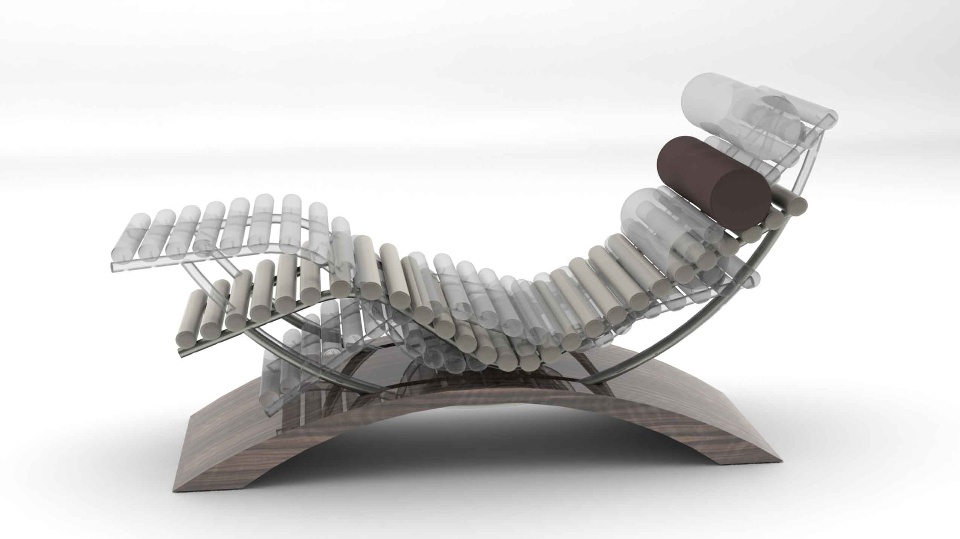
I have attached an image of the picture below.
Thanks
AndrewSolidworksPhotoview 360
I have 2.85 GHz, 2 Quad processor, 8MB ram and using Vista 64Bitwith a FX 1700 Nvidia Graphics card.
Should these renderings really take this long? If so is thereanything I could do to bring the render time down. Differenthardware? Network Rendering? or even Maxwell Render. Any Advicewould be great.
I have attached an image of the picture below.
Thanks
AndrewSolidworksPhotoview 360

Go to
http://www.solidmuse.com/solid...rk-photoview-360.html
I have a PhotoView 360 rendering benchmark that I am working to getdata points for. That will help us get an idea of where yourhardware stacks up with a standard benchmark.
How long does it take to render on the Best quality setting? Thereis a big difference between Best and Max for rendering time fromwhat I can see.
Unfortunately you can't use PV360 with a render farm.
Yes, a render could take that long. More cores at higher Ghz aregoing to get you the best results with any of the renderingapplications.
Can you send the file(s) to me to try on my Core i7 system. I wouldbe curious to see how long my system says it will take to renderyour image with my new Intel hardware. My e-mail address is foundat my blog.
Cheers,
The difference in render time between best and max can be quite abit longer. Using a transaprent material(s), max is a good choicefor a setting but if you can get by with best I'd change.
You have a pretty nice system. I'm actually VERY surprised it willtake 200 hours to render this. I'd find his unacceptable.
How long does it take to render without the transparentmaterials?
Can you suppress the c'bore and tap features in the rolls? Havingthe transparency account for rendering those features could beadding to your render time. Lots of internal features to have tobounce light off of.
Cheers,
The transparent material is really adding to the time. Just doingthe 4 pre-passes will take forever on my system. Even with therender set to Best settings.
I am not sure what you can do with PV360 to help.
A 16 core system of some sort might render in a reasonable amountof time. Need some kind of 4 socket motherboard with the fastest,most current cpu architecture, Xeon quad core processors you canbuy. Even that may take hours to render.
I would not spend the money on different hardware without doingseveral test renders set up with the materials you would reallylike to use.
I am sure there are others here who can give better advice onoptions. I just play with rendering and do not need to do anythingfor real work.
I wonder what Greg L or Mark B thinks about the rendering time forthis model.
Cheers,
Cheers,
You can do one render at full res then the other motion renders ata fraction of the full res, then scale up the motion renders andadd a bit of blur in Photoshop to the same size then just montagethem together. Result - faster render, better image.
The other thing to try is to reduce the resolution. This is for adouble page A4 spread in print right? If so with this type of imageI'd try dropping the resolution dow to say 240 dpi at page size. Ido this all the time and you rarely see any drop off in qualityunless you are printing onto super high quality gloss coated paper.If you are using standard gloss or satin stock 240 will be fine.Mat stock or textured you can go even lower as the inmk bleeds moreanyway.
Finally you can really cheat and drop the resolution right downthen use Photoshop to scale it up - use the right algorithm and youwill see some slight blurring but if you sharpen this channel bychannel you can hide the worse effects. Personally I use this lastmethod all the time - especially for large format graphics forbillboards and trade show displays. In fact just last week I didone in Hypershot HD which has output resolution limited to 4millionpixels. This was rendered out at 4m pixels, then scaled up inPhotoshop to a pop up size graphic - add a bit of noise, selectiveblurring and transparency and you'd never notice. Thats what youhave to do when your customer calls you at 9am panicking needs apop up graphic that has to go on the plane at 5pm
I totally agree with Kevin, this situation seems to call for athird party photo editing software. if you dont have photoshop orsomething similar try theGIMP it's a free portable app. and thereare tutorials all over You Tube. I recommend lowering down theresolution in PV360 than use the photo software to scale the image.Saving it as a TIFF or PNG is better for this purpose.
You could also create the three alternative position renderings (notransparencies) than create a layered image in the photo editingsoftware.
Nice Work by the way, I also design contemporary Furniture.
Maxwell will give you perhaps the ultimate in image quality -provided you can allocate the time to learning the materialsproperly - but it takes a long time to render, but even then withyour set up and resolution as a composite you'd be looking at astudio product shot like that rendering in maybe 5 or 6 hrs tops.
Would you be interested in a video demo of how to do this type ofimage compositing? I'm going to be running some render tests thisweek anyway so I'll post something up here later in theweek.
Render each position as fully solid (3X). Place your mid positionas the top layer in a Photoshop document, with the upper and lowerpositions as lower layers. Add transparency to the lower layers,and you have the fade-out effect without being able to seereflections on the opposite surfaces of your non-see-throughmaterials (why this is actually more realistic). This takes threefull renderings, but with the non-transparent rendering, thatshould go quite quickly.
Glass is particularily "expensive" because of the refraction;meaning the additional bounces that are needed for that type ofmaterial. Satin materials in PV (and PW) are expensive materialsbecause of the burriness shader that they use.
Andrew, I recently ran into your issue myself with a renderingwe're doing for the cover of the SWW agenda program. The shot usesa lot of blurry metal and also some transparent glass material - acombination for a real PV time killer.
I would suggest that when setting up a shot that has thesematerials, is to set up the composition, lighting and othernon-expensive materials first, then as the last step, assign theexpensive materials.
You're not going to gain anything in this image with the 'Max'setting other than a bunch of hours waiting around. The differencebetween 'Max' and 'Best' are more light bounces for 'Max' (won'thelp here...this would be helpful for something like anarchitectural interior with light coming through a small space).Max also has quite a few more refraction and reflection rays (thiswon't help here either - it's more for a case when you havemultiple nested glass objects...like making an entire car andeverything on the inside out of glass). Max also ups the blurryreflection rays to get nicer blurry reflections....(again, notreally useful in this case...only if you have a large amount ofgrain across a large surface made of something like satin metal).The additional irradiance rays won't make this image any bettereither...the Best setting is more than enough.
The extra bounce and additional IR rays along with the transparentsurfaces are a killer for Irradiance cached rendering - the list ofIR values becomes so long a lot of the render time is just lookingthem up and you would be better off with just monte carlo GI (whichis what I would switch it to if I were rendering in modo in thisparticular case).
Anyway, try best and I bet it renders in a few hours at most.
best,
Greg
Cheers,
Also in Photoshop you can not tell the difference in the quality ofthe render, though this may be more apparent if I was rendering theclear material.
Thanks again.