
I'm having some issues with my interface in PhotoView 360.Somehow I lost everything from the Materials advanced tab. It isblank until I click on a part, then I only get the properties (seeimage), with no color chooser area above. This happened in themiddle of making some adjustments. I think I hit some keysaccidentally, but I don't know which ones.
The screenshot also illustrates another annoyance. Notice that Ihave about 1-1/2" of blank grey between the image area and themenus. I cannot get rid of that. If I try to drag the top edge ofthe graphics area, only the sphere images at the top get smaller.
Any suggestions, or is anyone else experiencing this?SolidworksPhotoview 360
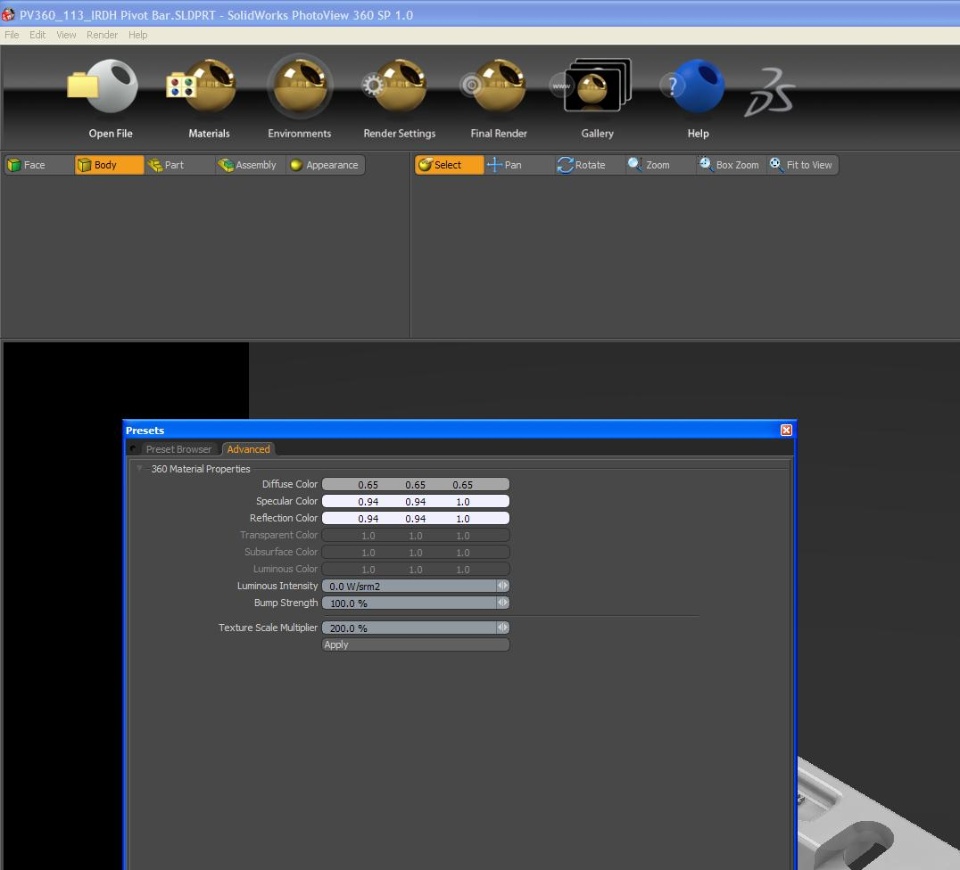
The screenshot also illustrates another annoyance. Notice that Ihave about 1-1/2" of blank grey between the image area and themenus. I cannot get rid of that. If I try to drag the top edge ofthe graphics area, only the sphere images at the top get smaller.
Any suggestions, or is anyone else experiencing this?SolidworksPhotoview 360

That's really odd....your config has changed.
SWPV360.cfg (should be in user/application data/luxology..)
Restart 360 and you should have your default layout back.
This should be in a FAQ I think.
-Greg
and yes i also thought that i had inadvertently hit some button. iguess not.