
Hi
I have the code as mentioned below and in the picture was workingfine in previous macro. but when i tried to copy the same and useit in differnent macro it throws the error.
compile error: invalid use of new keyword and points to the belowline.
objXL As New Excel.Application
Can any one guide me how to rectify it.
i had properly added the reference too.
SolidworksApi macros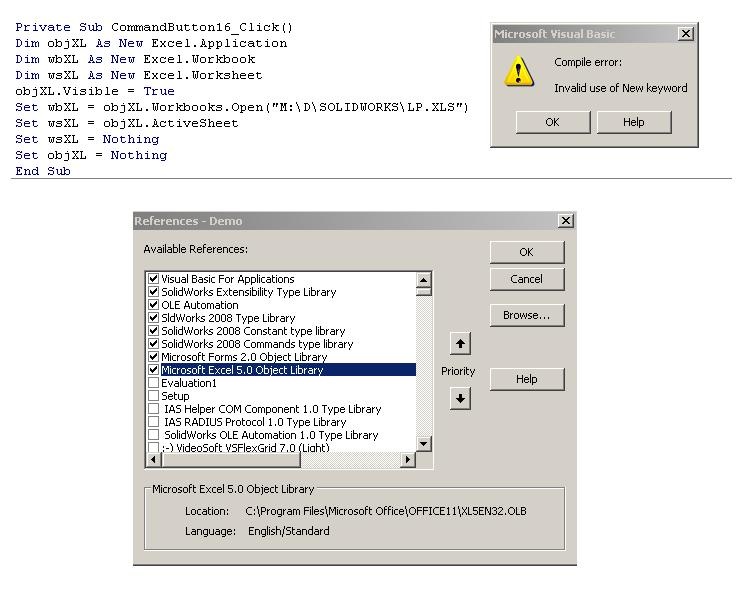
I have the code as mentioned below and in the picture was workingfine in previous macro. but when i tried to copy the same and useit in differnent macro it throws the error.
compile error: invalid use of new keyword and points to the belowline.
objXL As New Excel.Application
Can any one guide me how to rectify it.
i had properly added the reference too.
SolidworksApi macros

Dim xlApp As Excel.Application
Set xlApp = New [_ExcelApplication]
I am not good in vb, Can you update me where i need to add thoselines.
i just need to open a excell file from ("M:"\D\Solidworks\LP.xls")
must be:
Dim objXL As Excel.Application
Set objXL = New [_ExcelApplication]
Dim objXL As Excel.Application
Dim objXLRoot As [_ExcelApplication]
Dim objWKB As Excel.Workbook
Set objXLRoot = New [_ExcelApplication]
Set objXL = objXLRoot.Application
objXL.Visible = True
It works well, HOw to make excel to always open with maximizewindow.
Thank you.