
I have an assembly with two configurations, and I placedviews of both configs in to one drawing.
In the BOM, I want to be able to create two QTY columns, one foreach config.
Solidworks Help says that this can be done, by selecting all theconfigs in the BOM Property Manager.
However, I don't see the option in my BOM.
I can select one or the other, but not both.
Does anyone know if I'm missing something?
Pictures below to help explain.
BOMSample In SW Help
SW HelpInstructions
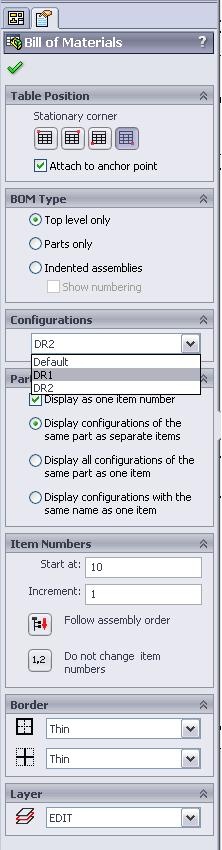
Whatmy BOM Property Manager showsSolidworksBill Of Materials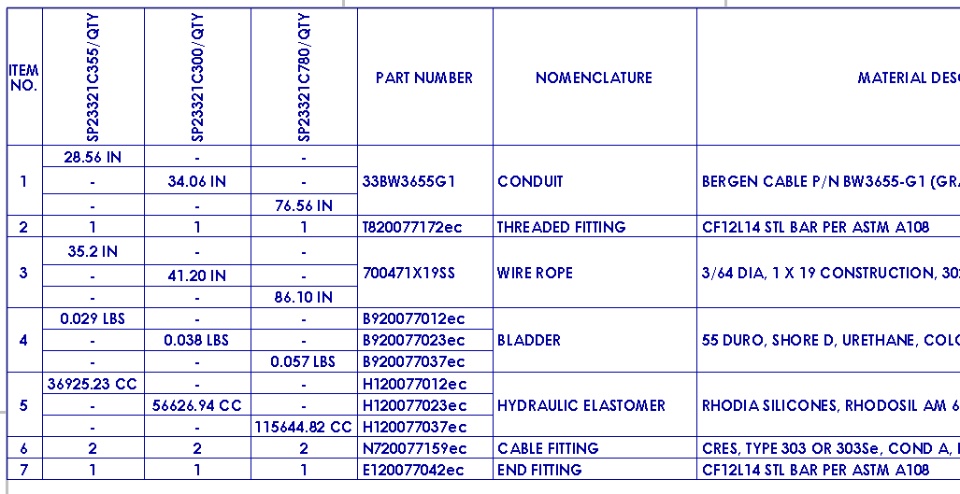
In the BOM, I want to be able to create two QTY columns, one foreach config.
Solidworks Help says that this can be done, by selecting all theconfigs in the BOM Property Manager.
However, I don't see the option in my BOM.
I can select one or the other, but not both.
Does anyone know if I'm missing something?
Pictures below to help explain.
BOMSample In SW Help
SW HelpInstructions
Whatmy BOM Property Manager showsSolidworksBill Of Materials

Thanks for the reply Josh.
I do have the BOM set to "Top Level Only".
Still no option of selecting more than one config.
I've tried every combination of the "BOM Type" and "Part ConfigGrouping".
Creating a new BOM from the start with each setting.
Still no option to select more than one config.
WT
Michael,
You have not specified what version of SW you are running. For therecord, I have no problems using SW06.
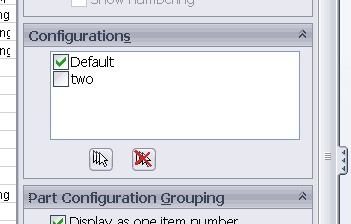
The location in the Bill of Materials Property Manager forselecting multiple configurations is "Table Properties" -"Configurations". Be sure to hit the "expand" icon to accessconfigurations.
See image.
Thank you for the responses Wayne, Eddie.
I've selected an assy, not a part. The BOM shows all parts in theassy.
I have SW Office Premium 2008 SP3.1
See image below for my BOM Property Manager, all sections expanded.
Under Configurations, it does not allow me to select more than oneconfig.
btw... GO SHARKS!
Well somethings up Michael,
Maybe something to do with that particular SP? Hopefully someonewith a matching set-up can confirm. However, I still suspect thereis something else wrong based on your drop down menu forconfigurations versus mine.
I'm running SW 2008 SW3.1 Office Premium, and I'm in a fresh assywith configs. My BOM properties windows looks like yours, except asshown here. Sorry I can't help.
Dwight
Hi Dwight,
How's it going? Sure glad it's Friday!!!
Anyway, as I suspected, your list is like mine, where you have thecapability to select (check mark) the desired configurations,including All or None.
Like I said, something else is going on.
Have a great weekend!
Hurrah!
Found out the answer.
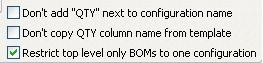
There is a checkbox under "Document Properties" -> "Tables"-> "Restrict top level only BOMs to one configuration"
Thanks everyone for the help!
Hurrah!
Glad you found that. Seems an odd option. And I wish the optionscame with an index.
Eddie
You have a good weekend, too. See you in Florida.
Now that it's 2020 is there any way to do what the original poster asked as far as a separate column for each configuration without having to set it to TOP LEVEL ONLY.
This kind of defeats the purpose of using sub assemblies in anything if it doesn't show the parts & count the quantities with multiple configurations in a parts list. Shocked that there's not more people asking or wanting this or there may be but SW isn't listening. We don't use it all of the time but those times we do would sure be nice rather than having to manually generate a parts list for each of the different configurations