
Is there any way to manually tell EPDM what you want to next revision of a file to be? Specifically when we redraw a part from our old system we would like to just bump the revision up a level instead of starting over at A.0. Is there any way to do this?SolidworksSolidworks Pdm enterprise Pdm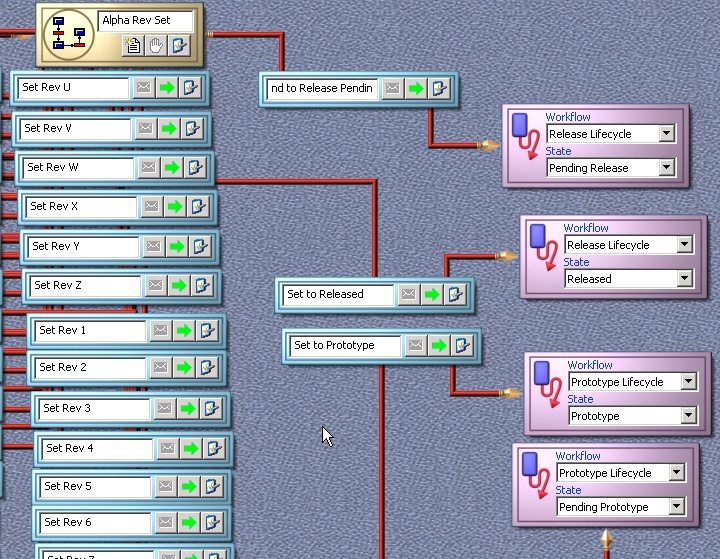

I'm sure there is an API way to do this, but I've never messed with that. I setup at "Set Rev" workflow. Make a link from your default workflow to this "set rev".
You would have a transition for each rev A thru Z or whatever. Inside that transition set the rev variable, and then it goes back to the original workflow, at the proper rev and state.
see attached screenshot
For our files that were released pre-PDM, we use the "Increment Revision" command. Only the administrator has been given Increment Revision rights in our system.
For a file that we want to add and leave at its existing revision level:
1. Add the drawing to the vault (or recreate in vault).
2. Before submitting for checking/approval, right click on drawing and select "Increment Revision." (Usually also select the referenced parts/assemblies in the dialog box that comes up.) This ups the revision to whatever would be first in the revision scheme, in our case, IR. Repeat until the revision listed on the "Version" tab is one before the one you ultimately want.
3. Use a special transition to skip approvals and jump straight to the "Released" state in the workflow, incrementing the revision as one of the transition commands. (In our case this special transition is admin-only.)
For a file that we want to add and immediately revise, we just increment the revision using the menu pick until it is at the existing level, and then make our modifications and submit to the normal review process, which will increment to the next revision at the release stage.
Hope that helps.
Megan
Mike,
I've written an API I call Bump/Jump that allows you to do just this. It works either manually or through a transition. Contact me if you want to know information.
fxp @ capinc.com
Thanks
Frank Pampreen
CAP INC.
Mike,
Just an FYI for you, we got an add-in from Razorleaf Corp. called "Automatic-Initial Revision" (AIR) for our initial load of archive data. It does not require a workflow transition and is based on variables in the files. It saved me a lot of grief of not having to put every file through a workflow. Once the initial load was complete I simply removed the add-in. We do utilized a revision control workflow similar to Cory's suggestion, however, that is for anything in the vault that needs a revision tweek.
Does this add-in use the API to change the revision or change it directly in the database? I have one our programmers looking at a way to set the revision counter to a user defined revision or move the revision label to a different version. So far he is only find a way to increment.
Sometimes we make corrections to a drawing but don't want to bump the revision.....be nice to check it out, make the change....then move the current revsion label up to the new version.
I don’t know about the AIR from Razorleaf Corp, but the add-in I’ve written does do exactly what you’re looking for. In fact one of our customers uses the Bump/Jump just for the same purpose. It does change the database internal revision value based on a database variable or a user input value. I have a video showing the add-in here.
Thanks
Frank Pampreen
CAP INC
Can't view the video.....blocked here.
So your add-in makes the change directly in the SQL database....not through the API?
Sorry if I was confusing. It does use the API to increment the internal revision value that is in the database. I don't directly manipulate the database.
Thanks
Frank
Do you have more information on it? Screenshots of what it the history looks like before and after a bump. Screenshots of the interface.
Jason,
After rereading your post let me try answering it more specifically. To repoint the internal revision value to a new version, to my knowledge this cannot be done with the API’s. You can do it in the database however with SQL updates. I’ve had to do that with customer databases in the early days of the Workgroup to EPDM migration tool. However, this is strongly discouraged by SW’s. My API is primarily focused on jumping revisions but allows for same revision bumping so that there is more than one revision of say rev “D”. Customers seem to be okay with this because it is still in chronological order and it’s a training issue to make sure they pick the latest revision. For users that are set up to always get the latest released revision it works out fine as well.
The other option you may want to try is to rollback the history of the file where the internal revision change was done, check out the file, make your changes, check in the file and then do an increment revision. The problem customers have with that is that rollback is permanent and mistakes can be costly. Doing a same revision bump seems be a preferred solution.
.
See attached images for history and manual user interface of Bump/Jump. The Bump/Jump tool also can be configured to run in a transaction. If the internal revision value is the same as the EPDM revision variable the user will be prompted to enter in a new revision value unless the option is set to allow same revision bumping.
I hope this helps. It's much easier to explain all this in the video. It is ashame you can't see it.
Thanks
Frank
Ok, I doing something similar in a workflow. users can send it to a "File correction" workflow, then change the file and Re-Release it which just bump the revision by "0". I just thought it was confusing have multiple versions with the same revision letter.
I saw something in the API that seem to indicate that the revision label for the current version could moved up one with a new version. Looks like its related to the file upgrade utility. I have tried teh file upgrade tool yet but doesn't create a new version of the file and move the revision label to that new version?