
Hopefully someone can answer this one quickly. I want to setup a design table for a mil spec part that I am modeling. It is aset screw, so it will have a few dozen configurations. I want towrite an equation in the design table to control one of thedimensions.
To do this requires a driven dimension. I want to rename it soanyone who looks at this later will know exactly where thisdimension came from. So this is all buildup to my question of...
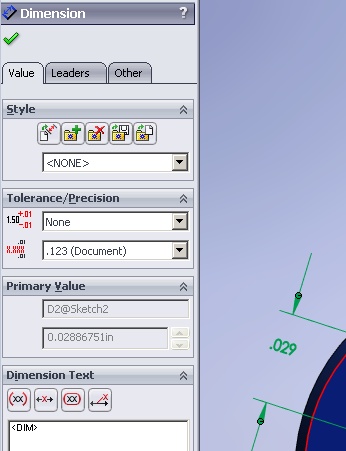
How do I rename a driven dimension in 2009? It is grayedout!
In the time it took me to post this, I found a work-around. I madeit driving (which overconstrained my sketch), renamed it, then madeit driven again. Is there a more appropriate way?SolidworksSketching
To do this requires a driven dimension. I want to rename it soanyone who looks at this later will know exactly where thisdimension came from. So this is all buildup to my question of...
How do I rename a driven dimension in 2009? It is grayedout!
In the time it took me to post this, I found a work-around. I madeit driving (which overconstrained my sketch), renamed it, then madeit driven again. Is there a more appropriate way?SolidworksSketching
