
I have a generic drawing set up for a multiple configuration assembly. The QTY column has the standard /QTY header but I want to lose the / text and just have QTY but when I edit the cell and rebuild the drawing the header reverts back to the default setting of /QTY.
ThanksSolidworksBill Of Materials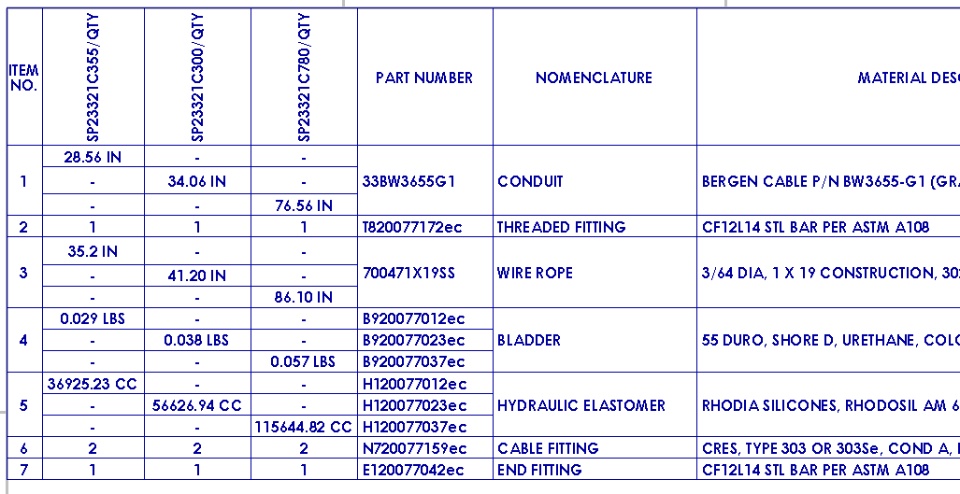
ThanksSolidworksBill Of Materials

this will trick SW so it doesn't go back to the default settingsbecause it doesn't exactly match the format it expects.
also, if it is a multiple-config assembly, turn on two columns,thus showing two of the configs. Then HIDE one of thecolumns.
Jody,
Are you able to get this to work for "Bulk Quantities"?
Example: If you have a file properties like; AR for As required orspecific quantities like; OZ or CC with different amounts?
This problem is killing me so any help/input would be greatlyappreciated.
From the Help file;
Override quantity column name in bill of materials. Whenselected, uses the name you enter in Name to use for the quantityin a BOM.
Thanks Kelvin,
But I have two problems.
1 - I'm on SW06 so your first suggestion can't help me.
2 - My request is to be able to showm multiple configurationassemblies, so that leaves out your second suggestion.
At this time I'm actually praying for help fromSolidWorks!!! However, even though I have never done this, I am not holdingmy breath as help from SolidWorks employees on this forum is nextto nil.
But to answer your question now, I believe I remember that beingdone using a combination of custom properties, an alternative QTYcolumn in the BOM, the original QTY. column being hidden and someIF statements. I will have to go a-searching.
That's okay Kelvin,
I am just frustrated that tabulated BOMs do not work the way theyneed to and as I said, it's killing me. The only way to get the jobdone requires manual intervention and this should not be the case.
I am aware of incorporating custom properties and the additionalmethod of equations with conditional statements using "IF", howeverneither provides for what I require, see image below.
NOTE: If anyone has any ideas, I'd be more than willing, happyactually, to test any suggestions, ...this includes you Solidworks!!!
Kelvin Lamport wrote:
You may also be able to use theTools > Options > System Options > Drawings ---Override quantity column name in bill of materials option.
From the Help file;
Override quantity column name in bill of materials. Whenselected, uses the name you enter in Name to use for the quantityin a BOM.