
Hi,
A lot of times, if I click the right button (to see a submenu) andafter make a zoom (with de scroll)... only zoom the part of thepart behind the menu. The rest of the part does not move. Thishappens with a simple part or with a big assembly, indistinctively.
I reinstalled a lot of times. I used a WinXP x32/x64 bits, a VistaUltimate x32/x64 bits witch SW08 and SW09 with different Servicepacks of SW. All of this combined with 5 types of motherboard andCPU (Asus, Gigabyte, Core2Duo, P4, AMD Athlon 64, Workstationmotherboard, Games motherboard) and with 3 graphic cards (QuadroFX4600, FireGL v7600 and FireGL v7700). I test all of this with thelatest drives of Nvidia and Ati, and with the certificate driversfor SW08 and SW09. I've done all of the possible combinations.
How you can see... I test ALL but... don't work.
Where de problem might be? It's impossible to work well.
PD: Image of the problemSolidworksAdministration
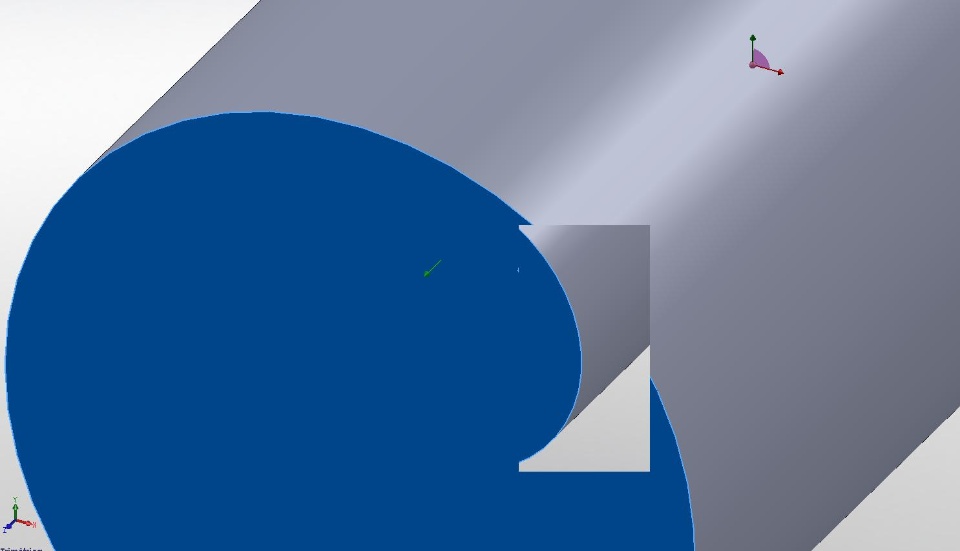
A lot of times, if I click the right button (to see a submenu) andafter make a zoom (with de scroll)... only zoom the part of thepart behind the menu. The rest of the part does not move. Thishappens with a simple part or with a big assembly, indistinctively.
I reinstalled a lot of times. I used a WinXP x32/x64 bits, a VistaUltimate x32/x64 bits witch SW08 and SW09 with different Servicepacks of SW. All of this combined with 5 types of motherboard andCPU (Asus, Gigabyte, Core2Duo, P4, AMD Athlon 64, Workstationmotherboard, Games motherboard) and with 3 graphic cards (QuadroFX4600, FireGL v7600 and FireGL v7700). I test all of this with thelatest drives of Nvidia and Ati, and with the certificate driversfor SW08 and SW09. I've done all of the possible combinations.
How you can see... I test ALL but... don't work.
Where de problem might be? It's impossible to work well.
PD: Image of the problemSolidworksAdministration

Although I don't have a solution for you, I also have this problem.
I'm using a vista business machine (dell m90) with a Quadro Fx3500M graphics card. I have realised that if this happens I have todouble middle mouse button (zoom all). Which is the only way to getit to show normally / rotate furiously and then just use the"previous view" button to get back to my original zoom.
I tried this (only with small parts or assemblys, because thehigher can´t move with OpenGL soft) anb the problemcontinuous.
I tried with a lot of Certifiqued drivers of nvidia and ATI(fx4600/FireGl v7600/ FireGl v7700) and a lot of OS
Thank you
Daniel Herr wrote:
I'm told and hoping SP2.0 will fix some of the display issuewith SW2009.
Cheers,
Sorry :-(
Hopefully SW will introduce some new code before SP2.0 goes outofficial. We can dream..... :-)
Cheers,
Cheers,
Other data, on my old workstation, a P4 with a Gforce 6800 Ultra-> softmod to Quadro Fx4000, I never have this graphic refreshproblem. Always work perfectly, from SW04 to SW08 version.
In my test with the new workstation, I tried to simulate the sameconfigurations (OS, Solidworks version,...) but I can't put mySoftmod Fx4000 on my new workstations because it has an AGP graphiccard connector.
This thread is 3 years old but I have the same issue. Anyone find a "fix" for this?
I am running
SolidWorks 2012 SP2
NVIDIA Quadro 4000 with SWX approved driver.
Do you have a Windows Aero desktop theme enabled? If the answer is no, you need to enable one.
Cheers,
Anna
I am using the "Windows 7 Basic" theme. I usually dont use the default "eye candy" themes in Windows, since Id rather my graphics card focus on SolidWorks. Are you saying that having the less graphic intensive theme actually causes issues?
Chris,
Yes indeed it does, check out this explanation: https://forum.solidworks.com/message/329574#329574
Thanks for the link, interesting. Ill give Aero a shot to see if it fixes my problem.