
so far all has been going well, but i have noticeddegradation in the system performance as i install software. i havekept it to minimum but there are some programs i've just gotta haveonthis machine.
one thing i have noticed lately is after i start solidworks, selectfile/open SW will hang, and must be killed w/task manager. if itdoes not hang, then after exiting the open command, i will be leftwith a ghost image of the "open" menu pick.
i am using the SW Vista64 approved driver for SW08 and SW09.
as for the driver settings, i am using the default base profilewhich worked fine up until recently.
does anyone have settings for the FX3700 thet are willing to share?
i must admit that the Nvidia control panel is a clouge as it isdoes not identifiy SW as a program installed on this computer andit is not obvious how to setup the app properly.
thanks,
dave
SolidworksAdministration
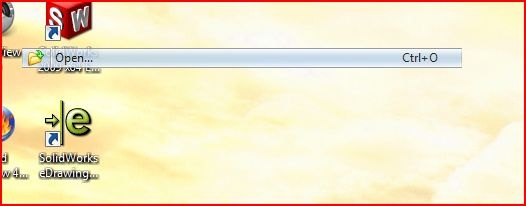
one thing i have noticed lately is after i start solidworks, selectfile/open SW will hang, and must be killed w/task manager. if itdoes not hang, then after exiting the open command, i will be leftwith a ghost image of the "open" menu pick.
i am using the SW Vista64 approved driver for SW08 and SW09.
as for the driver settings, i am using the default base profilewhich worked fine up until recently.
does anyone have settings for the FX3700 thet are willing to share?
i must admit that the Nvidia control panel is a clouge as it isdoes not identifiy SW as a program installed on this computer andit is not obvious how to setup the app properly.
thanks,
dave
SolidworksAdministration

Check out the following thread for the SW hang issue. There is infothere that helped my same problem with SW and Vista x64.
http://forum.solidworks.com/fo...tid=14&threadid=17099
Cheers,
Cheers,
thanks, i was wondering how to do this in Vista. It worked!
one thing about the unchecking the "show only programs found onthis computer" is when i select Dassault SW, the apply byutton doesnot appear, meaning i cannot apply the changes. BUT when i use theadd button and add the solidworks.exe, new settings appear and theapply button reappears. wierd...
dave