
Setup: SWX 2010 SP02, WIN XP64
Problem: Column header in Windows Explorer should show the custom properties of the file but it doesn't.
The information is in the file but not being read by Windows Explorer.SolidworksSolidworks Explorer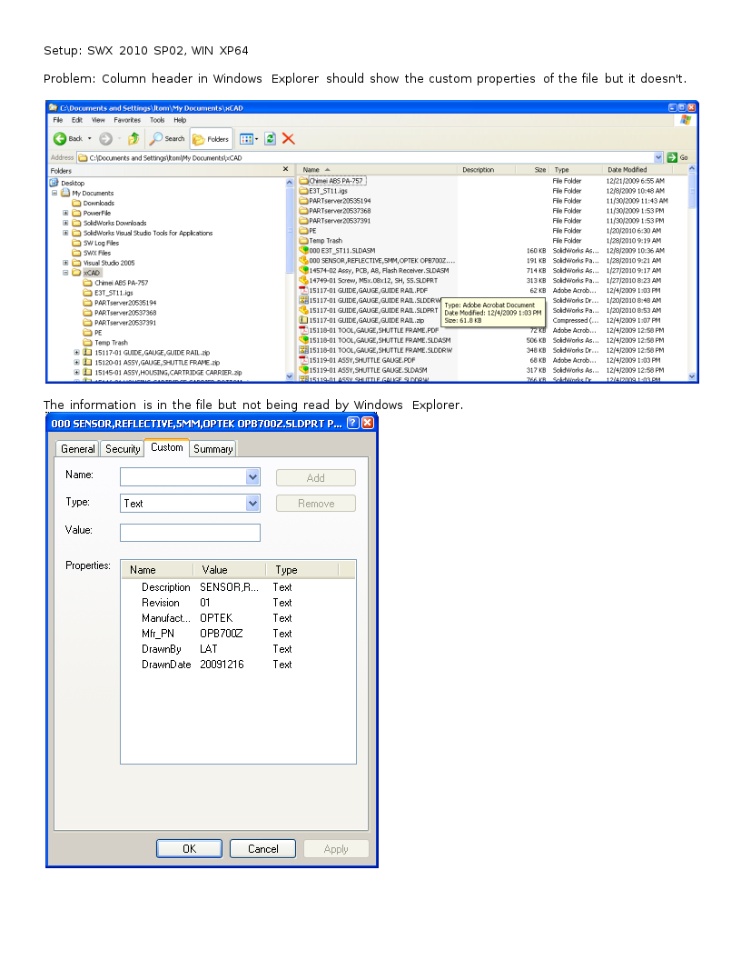
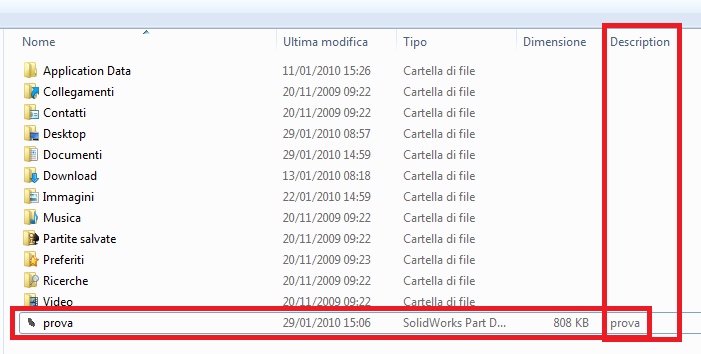
Problem: Column header in Windows Explorer should show the custom properties of the file but it doesn't.
The information is in the file but not being read by Windows Explorer.SolidworksSolidworks Explorer

For me works fine.
Try to add a column, because this description is the 'summary description' and not the SW file description property.
Lawrence did Alessandro's comments help you at all?
I am having the same problem and find it frustrating as we use part #'s as the file name and rely on the description for identification.
I have two description column options both turned on and they do not reference the SW description. Would like to know if you found a solution for this.
Thanks,
Jason.
It's been like this for the 12 years I've been using SolidWorks. If there was an answer to this problem, it would have been figured out by now
Use SolidWorks Explorer.
Cheers,
Devon Sowell
http://www.pdmsolution.com
yes, if you like to "search" for your stuff, SW Explorer is fine, but not if you want to browse. You have to first find the file (sometimes the problem), then select it, and then change to properties tab at top to view the properties of the file. All this while waiting for previews to load etc...thus slow!
It is a pain. I wish SW explorer would allow you to view any properties of your files in column/detail view as in windows explorer.
usage scenarios:
I have a bunch of files that I want to check into the vault and ensure release revision. show revision column and sort, can easily see the rev levels of the documents.
User does not have solidworks or PDM access, but needs to handle the files, browse, search for etc. ooh, this gets tough.
file names are serial numbers (no logic), need to see or sort by part number, description, make/buy, revision, or other custom property
SW has all the parts, just need to put them together into SW explorer.
How can we push for this in 2011!
Hello Jason-
"usage scenarios:
I have a bunch of files that I want to check into the vault and ensure release revision. show revision column and sort, can easily see the rev levels of the documents.
User does not have solidworks or PDM access, but needs to handle the files, browse, search for etc. ooh, this gets tough.
file names are serial numbers (no logic), need to see or sort by part number, description, make/buy, revision, or other custom property
SW has all the parts, just need to put them together into SW explorer.
How can we push for this in 2011!"
You want to check files into the vault, but the users has no access to SolidWorks or PDM? That won't work. Why? Because SolidWorks files must be saved before check in.
2011? Too late beta testing now, perhaps 2012 but doubtful.
Look for some wholesale changes to SolidWorks PDM coming soon.
Cheers,
Devon Sowell
http://www.pdmsolution.com
Hey Devon, thanks for the reply, those were supposed to be separate usage scenarios, just didn't use the fancy numbered list .
I only have this problem using Windows7, with XP the SW description shows up fine. Also, in Windows7, it shows in the Save menu, but not in the Open menu.
Property Handler for SolidWorks files (part & assembly) has been updated apparently in SW 2010 SP4. now you can see and edit some of the properties directly in windows explorer. My question is how I can install this property handler on other computers that do not have SolidWorks 2010 SP4 installed?
Hi, it works fine for me in both XP and W7.
Try going to SW options/general and set which ever custom property you want to be considered "description" by windows explorer.
In my case I'm frustrated because SW doesn't offer the possibility of using "title" as file description (only custom props), so I have a macro running all the time to set a property called "description" = "summary title", so I can identify my parts when inside the assemblies (otherwise I'd only see numbers, my file names are serial number as it should).
This is a bit rubish from solidworks but at least i found a workround via macro.
Regards
One of the main causes of the Description field issue is that the sldpropertyhandler.dll was not properly registered on the PC. We have had some trouble getting this to register properly due to insufficient permissions. We found that by running the command prompt as the administrator was the most effective way to resolve the issue.
1. First, locate where you have the sldpropertyhandler.dll is stored on your computer. To do this, open Windows Explorer and navigate to your SOLIDWORKS installation directory. The default location is C:\Program Files\SOLIDWORKS Corp\SOLIDWORKS). Once you find sldpropertyhandler.dll, take note of the path to this file.
2. Open a command prompt by going to Start > Run > type cmd. Right click on cmd.exe and pick Run as Administrator.
3. In the command prompt, type in the following based on your SOLIDWORKS installation folder location as noted above:
regsvr32 “C:\Program Files\SOLIDWORKS Corp\SolidWorks\sldpropertyhandler.dll”
Hit the Enter key on your keyboard.
4. Make sure that you get the registration was successful message.
Run SOLIDWORKS and verify that the issue is resolved.
Hello,
Same question as the OP, I have tried and can show in explorer the two descriptions but they are not showing the description from SW..
I will try the last suggestion to see if the .dll file has anything to do with it..
Hello again,
ok just tried this and nothing doing. Strangley if i go via SW to insert a screw for ex. and use our part library, i can navigate to a screw, right click and write in a description. This is not linked to the SW one..
However when i reopen the screw individually, in properties description it is now written the new description that i added! But in the right of the window i can see the old part description as well..
what is going on?!