Display Issue

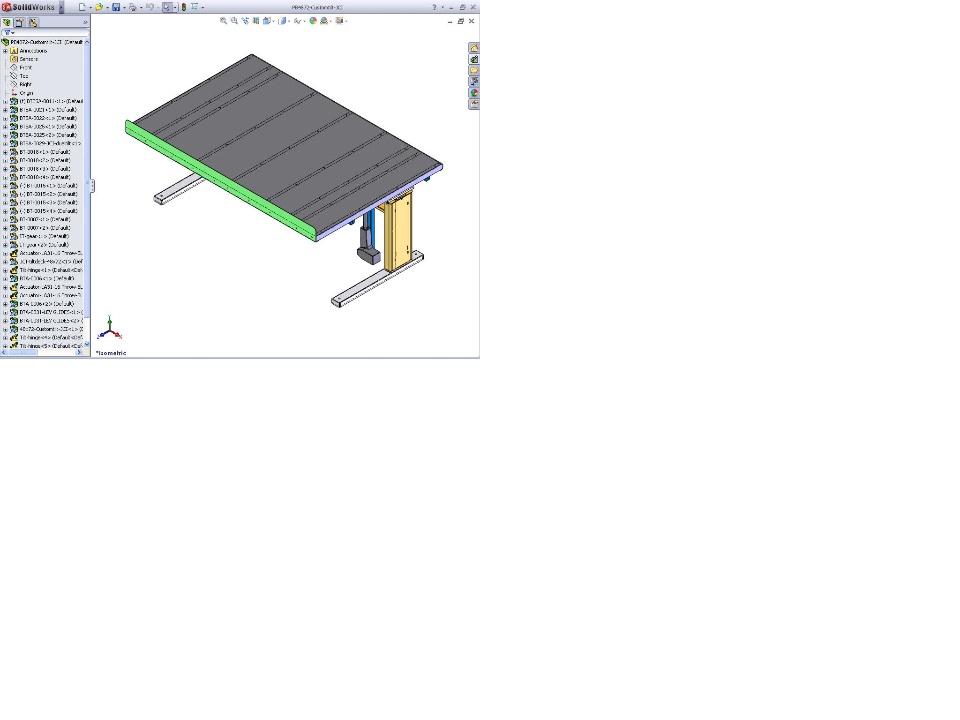
I was wondering if this is normal or there is a graphics cardissue. We are running cards that are approved by SW with the latestdrivers. We are getting these unsitely lines. You can see theoutline of parts underneath parts. They go away when we zoom in butthey are always there when we zoom back out. They are also in ouriso views in drawings. See attached file.SolidworksAdministration
Answers 11
MK
MK 2009-05-26 Best Answer
The first option to try would be to make sure your assemblyand assembly drawing views are fully resolved, I see you havelightweight components in your assembly.

If lightweight is your problem, you might want to read thislengthly thread...

http://forum.solidworks.com/fo...AR_FORUMVIEWTMP=Linear
JB
JB 2009-05-26
I see this often as well. It happens when the part on top isvery thin compared to your overall zoom level. It seems that SW hasa "depth perception" issue trying to determine if the parts behindthe thin piece are actually hidden. I haven't yet seen it affectdrawings, just models.
CB
CB 2009-05-26
It doesn't matter if we load lightweight or not. We still getthe lines.
JM
JM 2009-05-26
With no files open, go to Tools->Options->SystemOptions->Performance and turn on 'Use OpenGL'. Open up your fileand see if the problem goes away. If it does, it's graphicsrelated.
You say you're using the latest drivers. Are they the latestapproved drivers? Also, if you're using a branded system(Dell, HP) you need to choose the brand as the manufacturer versusthe card's manufacturer.
JB
JB 2009-05-26
Jeff,

This occurs with OpenGL on or off. It's easy enough to simulate foryourself. Create a flat part, 2000mm or so square and 1mm thick.Create a new assembly using that part, and put 3 or 4 instances in.Mate them into a sloppily aligned "stack" so that some edges shouldbe hidden. Zoom out and the edges appear. Zoom in and theydisappear. This has been an "issue" for quite a long time. Doesn'treally bother me, so I say "issue" in quotes.

Edit:
It also only occurs in non-orthogonal views (isometric or anyrotation other than straight on).
CB
CB 2009-05-26
Dido what Josh said.
SF
SF 2009-05-26
Yep, I've seen it. As Josh says it happens on thin (relativeto the overall size) parts. The issue has been around for years andI haven't found a workaround.
KL
KL 2009-05-26
A simple but irritating workaround is to adjust the mates ofthe underlying parts so that a tiny gap exists between the matingsurfaces.

This "issue" has been around a long time, most noticeably withsheet metal parts.
JB
JB 2009-05-26
A "tiny" gap won't do it. Stack up 3 or 4 parts like Imentioned. Zoom out far enough and you can see the edges of thefourth, fifth, sixth one down.
KL
KL 2009-05-26
I'm sure that used to work!!!

I've just tested and have to agree ... it definitely does not withSW09-SP3.
SF
SF 2009-05-26
This is not something you can do anything about. As far as Iknow it has always been a problem. As noted by others, if thesurface is thin with respect to the overall scale of the model,some lines show through the surface.

As for graphics cards, I am using a certified driver, tried thenewer certified driver which was not usable and switched back tothe older one. The newest is not always the best choice, itseems.