
Hi,
it's possible to dimension a spline like the image attached ?
I think no, but I'm not a guru on spline.
Thanks,
SolidworksSketching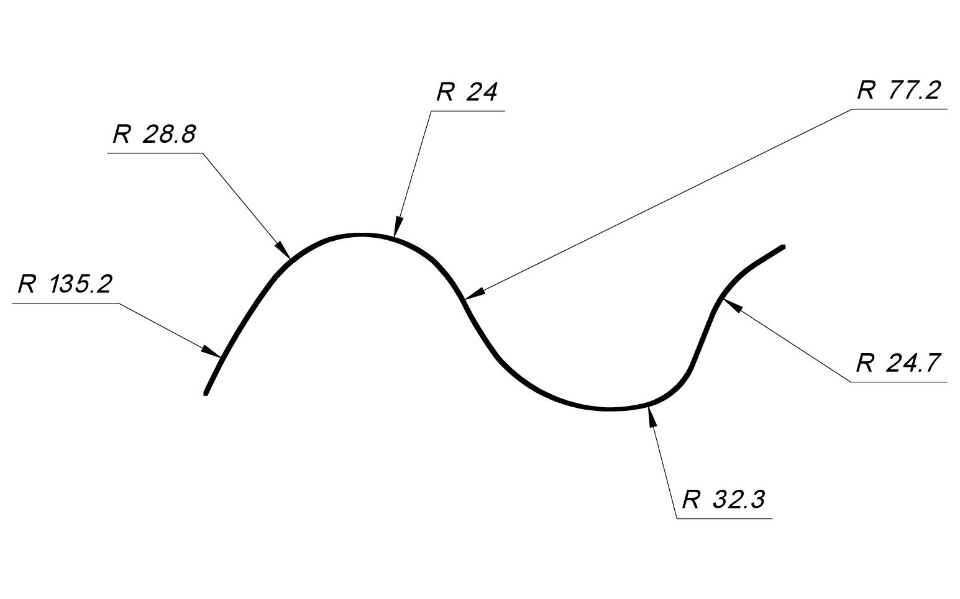

it's possible to dimension a spline like the image attached ?
I think no, but I'm not a guru on spline.
Thanks,
SolidworksSketching

You can't use a dimension for the radius, you have to use thePropertyManager.
The arcs and Fit Spline method allows you to control that, but itis tough to get the fit spline to work with gaps between the arcs.If the arcs touch and you put a fit spline over them, you're gonnaget possibly a kink in the spline, or at maybe a wild jump in thecurvature comb.
The lower image shows a fit spline where the purple are arcs andthe pink is the gap between the arcs where the spline bridges thegap. You gotta be careful, because SW doesn't allow you to controlwhich end of the arc is connected, so you could easily get thespline following arc endpoints in the wrong order. It took me 4-5tries to get this one right.
Matt Lombard wrote:
Actually, it almost is possible. You can right click on a splineand select Add Curvature Control, which allows you to specify thecurvature in the PropertyManager at that point.
You can't use a dimension for the radius, you have to use thePropertyManager.
this solution is good.
I can't dimension the radius of curvature, but it's good.
Thank you again.