
Hi there,
Our design department is working on process improvements. One areawe are tackling is streamlining our component library withconfigurable parts. Our products are hand-built with pulled parts -each of which has a part number, right down to the last nut, boltand washer. All of the part numbers of these parts are attached tothe part's properties in SWX so that when we produce drawings, theBOM is correctly populated with a part number and description.
Currently, we have a part file for each diameter bolt used on thefloor (3/4", 5/8", 1/2", 1/4", etc.) and then 30 or moreconfigurations of each of those parts with the length of each bolt.Every diameter/length combination has a part number, but those partnumbers are arbitrary - they were assigned in the context of thesystem we use, not the physical realities of the bolt. They neverchange, but there's no way to derive the part number from thephysical characteristics of the bolt.
I'd like to find a way to condense our bolt library into a singlefile, making one smart component that will size itself correctly,and come up with the correct part number as well. I was thinkingthat Derived configurations might do the trick, but I would stillhave a tremendous amount of redundant data to deal with...
Any suggestions?SolidworksConfigurations design Tables
Our design department is working on process improvements. One areawe are tackling is streamlining our component library withconfigurable parts. Our products are hand-built with pulled parts -each of which has a part number, right down to the last nut, boltand washer. All of the part numbers of these parts are attached tothe part's properties in SWX so that when we produce drawings, theBOM is correctly populated with a part number and description.
Currently, we have a part file for each diameter bolt used on thefloor (3/4", 5/8", 1/2", 1/4", etc.) and then 30 or moreconfigurations of each of those parts with the length of each bolt.Every diameter/length combination has a part number, but those partnumbers are arbitrary - they were assigned in the context of thesystem we use, not the physical realities of the bolt. They neverchange, but there's no way to derive the part number from thephysical characteristics of the bolt.
I'd like to find a way to condense our bolt library into a singlefile, making one smart component that will size itself correctly,and come up with the correct part number as well. I was thinkingthat Derived configurations might do the trick, but I would stillhave a tremendous amount of redundant data to deal with...
Any suggestions?SolidworksConfigurations design Tables

I think you have the best mix the way you have it now.
WT
I don't think derived configurations would be helpful.
We have a part file for each of our screw types. The first columnof our design table has the configuration name, which we use forpart number.
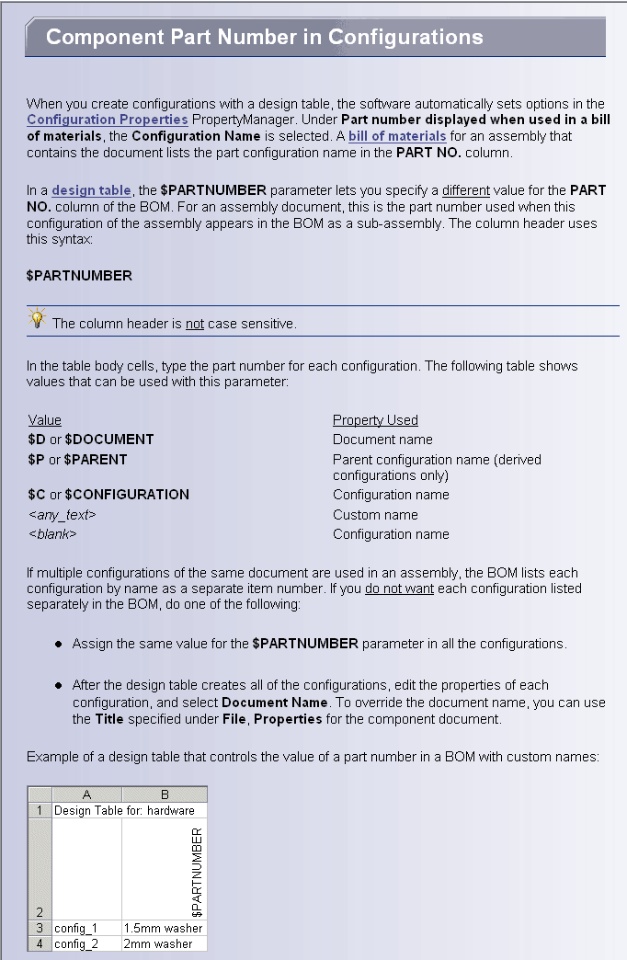
You might instead include another column with $partnumber as theheader, which will keep your part number values separate from yourconfig names. The config names may then be logical descriptions ofthe screw size, which should make it easier for your users to pickthe right one.
The design table includes a column for diameter and a column forlength.
If it was completely automated, that may be a different story, butfor us the users need the ability to specify hardware sizethemselves. it's more files, but it way more manageable!
We have a single part file for all our capscrews. It has 215configurations, and it's about 300kb. It's that small because onlyone of the configurations has ever been activated. The rest are allthere but they are generated by a design table. The file size onlygrows for each config. that has been activated. Our jobs are prettycompartmentalized, so each job pulls in a fresh copy of the (small)master file. Of course the file size grows as the job progressesand more configurations of the file are activated, but I figure onelarger file open in memory is better than 6 or 7 smaller ones.
By the way, the column header to populate a custom property called"partnumber" would be $PRP@partnumber.
Josh Brady wrote:
By the way, the column header to populate a custom propertycalled "partnumber" would be $PRP@partnumber.
Partnumber is an internal property, not accessable under customproperties that I've discovered. I think it'd be sort of nice if itwere, so let me know how you are doing it.
Thanks
Dwight
Jason McCrory wrote:
You guy are probably right - but what about a smart component?Is there a way to attach a part number to a specific set ofgeometry created by a smart component? the SW toolbox seems to wokpretty good in assemblies where part number isn't important...
WT