
We upgraded from 2007 to 2009 last week.
One odditie some users found was that our datums and gdt now have athick, phantom line.
Going thru the document properties, I realize the way thesedifferent linetypes are handled are different. It must have broughtour thick detail circle thru from 07
Has anyone else experienced this or now of anyway to fix?
I am nowhere near up to date on the standards but would always makethe detail circles thicker - now I have to sacrifice one of them.
I tried loading all the predefined standards ANSI, ISO,etc. but sawno difference.
I already see I have to make my own drafting standards file so wecan tweak various decimal place displays, etc.SolidworksDrawings And Detailing
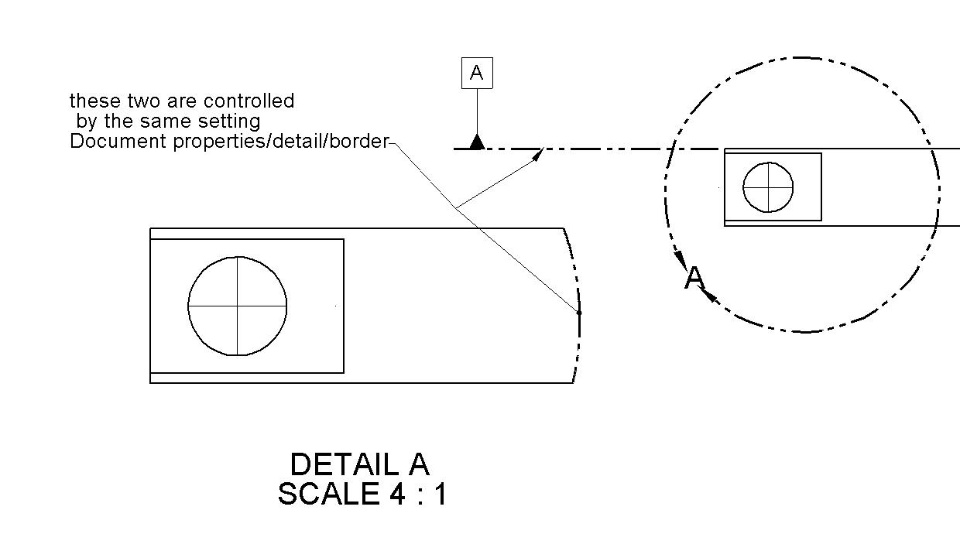
One odditie some users found was that our datums and gdt now have athick, phantom line.
Going thru the document properties, I realize the way thesedifferent linetypes are handled are different. It must have broughtour thick detail circle thru from 07
Has anyone else experienced this or now of anyway to fix?
I am nowhere near up to date on the standards but would always makethe detail circles thicker - now I have to sacrifice one of them.
I tried loading all the predefined standards ANSI, ISO,etc. but sawno difference.
I already see I have to make my own drafting standards file so wecan tweak various decimal place displays, etc.SolidworksDrawings And Detailing

I can set Detail Circle & Border to Thick and GD&Tdimensions and datums are appearing thin and solid. Could be a 2009issue but 2008 sp5 is working as intended.
I love the negative dimensions and the speed but this needsfixed.
Since they both change when going to doc properties/detail/border -figure it is locked in for now. I hope they do fix in the next sp.I am chasing down some other problems higher on my list than thisunfortunately. (ie pdm lockups on check in...)
I would love to know how to make the spacing around the letterbigger on the detail circle - anyone know how to do this? (see myscreen cap from the first post). We set the detail text to 1.5times the main text.
I also want to say I understand this is a GD&T line font issueand I know I am sure when I say that only an elite few in the worlduse GD&T but is it really that small of a community that usesdatums? This is really a poor reflection of the community ofdesigners that use SW when nobody even stirs the pot and it is, atleast this time, a clear problem that is reproducible on everymachine and an easy coding error.
Paul,
I agree, something like this regression would kill us if we were onSW09. I'm thankful were're not but would love to be using some ofthe newer functionality.
One last thing, you stated;
"I also want to say I understand this is a GD&T line fontissue and I know I am sure when I say that only an elite few in theworld use GD&T but is it really that small of a community thatuses datums?"
How would one use Datums w/o GD&T?
What percentage of Solidworks users use GD&T?
I even think that it is more likely that the population of peoplewho use Pro-E or use high end CAD are more likely to GD&T.Don't you?
Just finding people who can interpret GD&T as a cost savingmeasure is rare. I think this is why SW can get away with notfixing little errors in them or fixing bugs. People don't reallyuse it. I think I'll put up a poll.
Anyway, ...What portion of SolidWorks users use GD&T? (I'llguess 25% but probably on the high side.)
It's a great question. "Start a poll!" I'll chime in right away.
I'm not sure I believe that using a high-end CAD system constitutesthe use of GD&T. I think it is more product related.
I've used Pro/E at Aerospace companies & at more industrialtype facilities and found that GD&T was used more fortechnical/complex products than anything else.
I've used SolidWorks at one Aerospace company & at moreindustrial type facilities (blacksmith shop) and once again foundthat GD&T was used more for challenging products.
The biggest issues I have always come up against aren't so muchDesign Engineering, we could teach them but rather the rest of ourcustomers. When I say customers, I'm referring to our machine shop,our inspection department, our quality department and of course,outside vendors & services.