
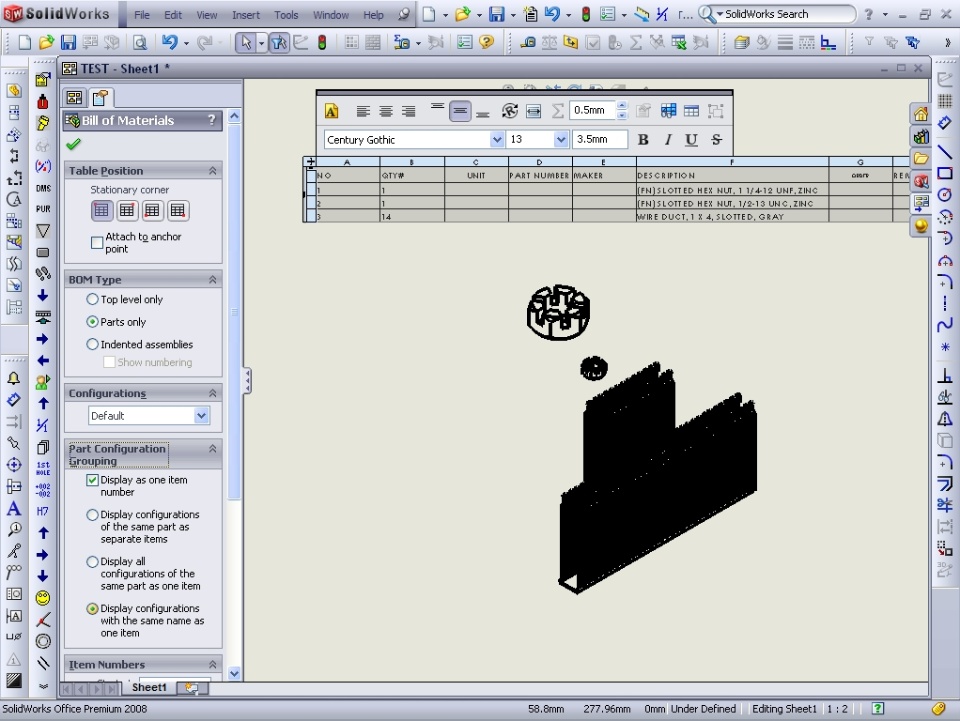
I have a part with multiple configurations because ofdifferent lengths. See attached. I have gotten it as far as gettingthe length of the part to show up in the qty by using a designtable, but I would like a way to combine the qty's. I can't usepart configurations grouping because of the way we do ourfasteners. (one file multiple configs for the sizes, so I can'tcombine these.) Since I use the document name to show as a partnumber...the bom shows each part as a different line but it has thesame part number. Our fasteners show the config names so the partnumbers are different. Is there a way to combine these or a wholedifferent way to go about this?
Getting the length value to show as qty is a little funny,combining these would be the second level of funny. In my past thesecond level of funniness for SW never works.
Thanks,
CodySolidworksBill Of Materials

Getting the length value to show as qty is a little funny,combining these would be the second level of funny. In my past thesecond level of funniness for SW never works.
Thanks,
CodySolidworksBill Of Materials

Not knowing exactly what flavor of funny you used to make lengthshow up as qty, I can't guess as to whether the qty for yourcombined line item will equal the sum of the lengths of all theinstances.
Oh, and there's nothing attached, by the way.... :-)
I went in and switched the properties to a user specified valueinstead of document name. That didn't change anything. Maybe thereis a different way to show the length in the qty. I tried to linkthe "Length" value directly to the d1@sketch1 value, but SW can'tlink that with different configs. The way I have done it is in thedesign table there is a dimension value for each config, I createda "Length" property that is what shows in the bom. Then in thedesign table I just made the cells equal.
I have attached an example of what I am doing. The nuts need to beseprate. The wire duct needs to be combined.
Any help is greatly appreciated.
Cody
Cody