
See attached.
A user can't open Solidworks. 4 licenses free. He could earlier andnow can't. He has no other Solidworks instances running. He hasrebooted. Can anyone help us out. Much appreciated.
DerekSolidworksAdministration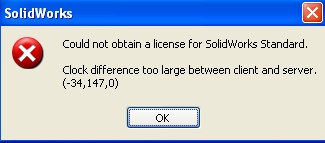
A user can't open Solidworks. 4 licenses free. He could earlier andnow can't. He has no other Solidworks instances running. He hasrebooted. Can anyone help us out. Much appreciated.
DerekSolidworksAdministration

Under the Solidworks program group -> Solidworks Tools ->Lincense Manager
This will tell you who has licenses checked out.
Also, try rebooting the license server.
Cheers,
I checked this...we had 4 licenses available.
Anna,
Huh?...LOL
"Sync up the servers and clients with a time server and you shouldbe fine."
How do I do this? I don't have access to the server for reboots oranything so I'd have to explain to our IT dept how to do this.
Derek
Not saying thy can't...i was just curious to know how...just incase...lol
For those who want to free themselves from their IT department, thecommand you have to enter in the DOS command prompt is:
Net Time \\computer name /SET
You enter this on the computer you want to change to match the timeof "computer name" in the command. (Typically you type this in onthe client, and use your server as the computer name.)
The spaces between net time, and the name, and /SET are important.
If you get a System Error 5 while doing the command, check yourtime zones, months, years. The times must already be somewhat close(within a handful of minutes) for this command to match themexactly.
Shuvom Ghose
CAPINC
Thanks to all who replied. We haven't seen the problem again. Freak thing? Everything has been running smooth.