
I have an annoying problem: I can't get the center mark to bein the center of a slot! I had a perfect drawing, now, after aminor dimension change, all my sections views don't display thecenter mark in the center. Please see image below.
No matter what I select, the center mark snaps off-center. I trieda few things like changing the display to shaded with edges, movingmy section line to force a view update, and even tried differentslot center marks to no avail.
Thanks for your help,
RenSolidworksDrawings And Detailing
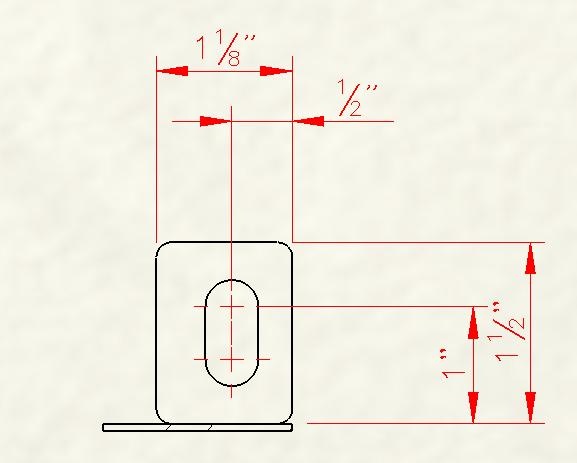
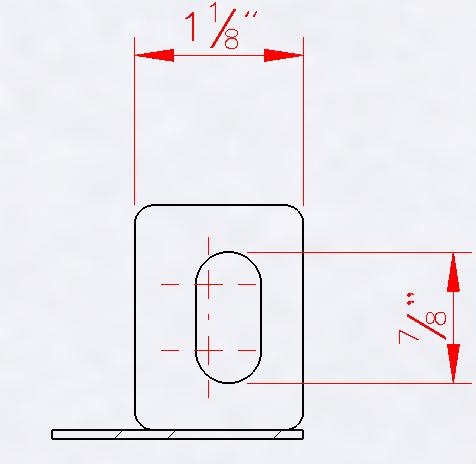
No matter what I select, the center mark snaps off-center. I trieda few things like changing the display to shaded with edges, movingmy section line to force a view update, and even tried differentslot center marks to no avail.
Thanks for your help,
RenSolidworksDrawings And Detailing

WT
I tried to force rebuild with a lot of hope but it still didn'twork.
I guess I'll have to do it manually for now.
I am currently dealing with this issue as well. This has happened to me when adding a center mark to a section view that was created from a non vertical or horizontal section cut.
All,
This would appear to be unintended behavior. I would encourage anyone experiencing this issue to report it to your VAR as a to check to see if this might be a bug.
I encounter this occasionally, it seems too much trouble to report it. The RX procedure can be time consumimng and the files are usually too big to email.
I have just had this on a curved sheet metal panel shown in the flattened state. I had previously produced an oppoisite hand panel and that was fine in the drawing. For some reason this one produces the offset centre marks. Maybe it will sort itself out after I close and re-open.
Take the time to do the Rx. Good software requires good feedback-and most of the vendor's I've worked with use an FTP or file service so that you don't have to send messages by email.
Seven years later, and still not working consistently. Please fix this SW.
are you sure the hole is square to the view? Please double check???
The inconsistency I'm seeing is in regards to placing centermarks at the center of a slot. It is not a slot feature, but sketched geometry (a manually drawn slot, so to speak). It was manually drawn because it was a modification to an existing part, with an extensive design table. All of the slots on the part are sketched. The software will recognise 90% as slots, locating the centermark in the center. There are a few that will only put a centermark at the slot ends.
Exactly what I was thinking.
Can you post the file here so we can take a look - there might be something else which we can find out
2020 and this is still an issue sometimes, but i have a fix that sometimes works:
add the centre marks in, then delete the whole view and ctrl-z to bring it back, works 70-80% of the time.
It happens to me sometimes when I am trying to mark center of a hole drawn by "hole wizard". I just remove the tick in the box "Slot Center Mark" under "Manual insert options" and it will be fine. So I suggest first mark the slot centers and then remove this tick and continue with the holes.