
Now that I've upgraded from 2007 to 2009 sp1 I open anassembly drawing and some of my balloons that point tosub-assemblies are * instead 1, or 2, etc.
I tried making a new drawing of the same assembly with new BOM andnew balloons and still get these *'s
Anyone else encounter this ?
SolidworksBill Of Materials
I tried making a new drawing of the same assembly with new BOM andnew balloons and still get these *'s
Anyone else encounter this ?
SolidworksBill Of Materials

For example plate 001.sldprt gets dowels pressed into it, so theplate is put into it's own little assembly with the 001 part, and 2dowels, saved as 001.sldasm. The BOM would list 001 as item 1, butthe balloon for that item is "*"
I first noticed this when opening a 2007 assembly drawing. If I putthose subs together in a new assembly they get a balloon numberlike they're supposed to, but in the original design somethingscrewy
I have had this happen to. For me makeing sure the model is loadedand resolved and then hitting rebuild solves this problem. Maybythis will help for you.
Still no luck. I just don't get it. The one thing that is obviousabout this whole thing is that when I open the drawing of theassembly, it tells me..
"Solidworks has detected that the units of the drawing differ fromsome of the components in the assembly. This can affect the displayof notes or table cells linked to custom properties assigned tothose components in LightWeight. Resolving these components can betime consuming but will update the text correctly. Would you liketo resolve these components ?"
Yes or no
Well I've noticed that several of my components (whether they areassemblies or parts) are in lightweight, maybe because they weredone in 2007.
Nonetheless it seems that when I get that message and thoselightweights is when I experience the *. However the * is not onall those components that are set to lightweight & vv not alllightweight components have *.
This could also happen if your the sketches on your part are show,when picking an edge if the sketch is show the balloon will callout the sketch showing a *.
So it's like it has a problem with the dot or arrow of the balloontouching the "part" of the sub that is excluded from bom. However,this is not consistent. I'm pointing to a cylinder assembly thathas all of it's components excluded from bom (the body, rod, clipring, nut) and the balloon Item number is just fine. Hmmm.
Remember, this is from a design done in 2007, and now opening thedrawings in 2009.
Then in the lower left is a checkbox for "link balloon text tospecified BOM", with a drop-box to specify which BOM to link it to.Make sure that is set properly (verbage was changed from '08 to'09).
It has to be something to do with making the design and drawing in2007 then opening in 2009. And maybe have something to do with thenew ability to do detailed number or flat numbering. (hence thepointing to the "part" of the sub that is exluded.
Update...
Check this out, Remember my 1202.sldasm with 1202.sldprt (excludedfrom bom) and the bushing pressed in. Well in the 1200 assembly Ideleted the 1202.sldasm and inserted it, mated it back up where itgoes, and vualla, the balloon has no problem calling that item 2.Hmmm.
My drawing of the assembly had no problem pointing to the body ofthe cylinder with item 9. (The cylinder is a sub-assemblyconsisting of the it's parts excluded from bom, , switches andcordset, flow control and elbow are not excl.)
So this morning I open up the drawing 1200. The pointing to thebody "part" of the cylinder (assembly) is a *. Of course if I dragthe arrowhead to the elbow (not excluded) it lists the sub-assemblyas item 9, just fine.
So...
I performed an experiment to see if it had a direct relation to thecreating in 2007...
That cylinder assembly, well I put into a new 2009 version assembly(just as it is in 1200).
In a new 2009 version drawing it is item 1, just fine, no matterwhat "part" of the cylinder I point to.
So I concluded that it does have a direct relation.
But what aspect of the new stuff is actually causing it.
Well if I go into the cylinder assembly and change the body (the"part" that the arrow points to) to NOT be excluded from BOM, thenin the 1200 drawing, it has no problem ballooning item 9, thenswitching back to excluded, back comes the *.
So I concluded that it MAY have a direct relation to the new optionof detailed numbering (9.1) or flat numbering.
I have an 123.sldprt in 123.sldasm, the 123.sldprt is excluded fromthe BOM. Can't get the * to turn into a number.
If you exclude it from BOM, it doesn't need a balloon.
Having a part and an assembly with the same number isn't a goodidea; it can cause file reference errror.
Joel Bickel wrote:
Again, the * is there because you set it to "excluded from BOM".
If you exclude it from BOM, it doesn't need a balloon.
Having a part and an assembly with the same number isn't a goodidea; it can cause file reference errror.
ThePart is excluded from the BOM, not the assembly.
What I have is Assembly A with Part A included in it that isexcluded from the BOM.
Then I have assembly B with assembly A in it. When putting thenumbers on part A within assembly B it shows a "*".
Tim
Set it to exclude from BOM in asssembly A and do not set it toexclude from BOM in assembly B. It is not a property that willstick with the part.
Now for Joel, "AGAIN", the assembly that the * is pointing to isNOT excluded from BOM, just the part inside that assembly. Andagain, this is only on assemblies created in 2007, and now openedin 2009. If I do all the exact same stuff from scratch in 2009,then balloon it, it's all fine, just like the old days.
As I posted on 11/26/08
"So I concluded that it MAY have a direct relation to the newoption of detailed numbering (9.1) or flat numbering."
Joel Bickel wrote:
Tim,
Set it to exclude from BOM in asssembly A and do not set it toexclude from BOM in assembly B. It is not a property that willstick with the part.
Brad-
These are 2009 parts.
Tim
Before you create all of your drawing again, try switching the BOMtype from "indented" to "parts only" and then back to indented.
I don't have any files that are from 2007 to try this on, so thesuggestion is not proven.
All files I'm working with are 2009.
Doug-
I have crashed about 10 times in drawing mode in the last 2 dayswith stuff you are talking about.
Tim
I tried an experiment. I put that 0001 assembly with the 0001 part(excl from bom) into a new blank assembly called "BOM ISSUES". It'sthe only thing in there.
Made a drawing, bom, with Item 1 / 0001, and cascaded under was mybushings and dowels. I ballooned it, and GO FIGURE, it ballooned it"1". Hmmm.
But in my real design where the problem is, it gets a *. WTF.
I know one thing, excel based bom doesn't have a problem doing itright.
I turned view Origins on, and then pointed my Ballon to theAssembly Origin, and then turned the Origins back off.
https://forum.solidworks.com/f...ey=y&keyword1=speedPAK
I'm not using Speedpak. The way I've worked around this bug is tocreate another configuration in the subassembly to be used in themain assembly. This new configuration has the "excluded from BOM"unchecked for the part that is confusing SolidWorks2009.
This works but it creates an extra configuration that shouldn'thave to be there.
Douglas Leach wrote:
I'm having a similar issue. The "Link Balloons to BOM" box wasgreyed out for a while, so my balloon numbers were way offsometimes. After uninstalling and reinstalling Solidworks and someof it's components I was able to check the box, but then some ofthe balloons were showing * instead. Or it would show two differentparts as the same balloon number. Usually deleting the BOM andcreating a new one would fix the problem. Unfortunatly while tryingto fix an "Software OpenGL" problem, the "Link Balloons" problemcame back.
I found that if I turn on "Solidworks 2D Emulator" in the Add-ins,the BOM linking works properly.
ALSO SEE >FORUMS BOM BOM link to drawing Grayed OUT!!
For coupling, air cylinder, gas spring or other off the shelfassemblies, I commonly set the sub-assembly components to beexcluded so that they are not displayed and only the top levelsub-assembly information is displayed in the BOM if it is set toindented. This used to work fine but the functionality seems to belost in 2009.
Instead of setting sub assembly components to be excluded from theBOM through selecting the properties for each component followthese steps:
1) go to your configuration manager
2) RMB the configration to be used and LMB properties
3) Under BOM Options check the "Don't show child components in BOMwhen used as sub-assembly" box
4) LMB OK and save your sub assembly
The balloons in your drawings should now display the proper numberbecause your parts are no longer set to be excluded from BOM's andare set to be hidden when used as a sub assembly.
"Solidworks 2D Emulator" in my Add-ins.. is it something I have todownload ?
Cheers,
AL
Hi John, I had got rid of the * by unchecking the exclude from BoM check box. Your method is better though. That Part Configuration Grouping tab was right under my nose but I'd skipped past it as it was closed... Yet again a problem solved in 10 mins by looking on the forum :-)
Thanks
DaveP
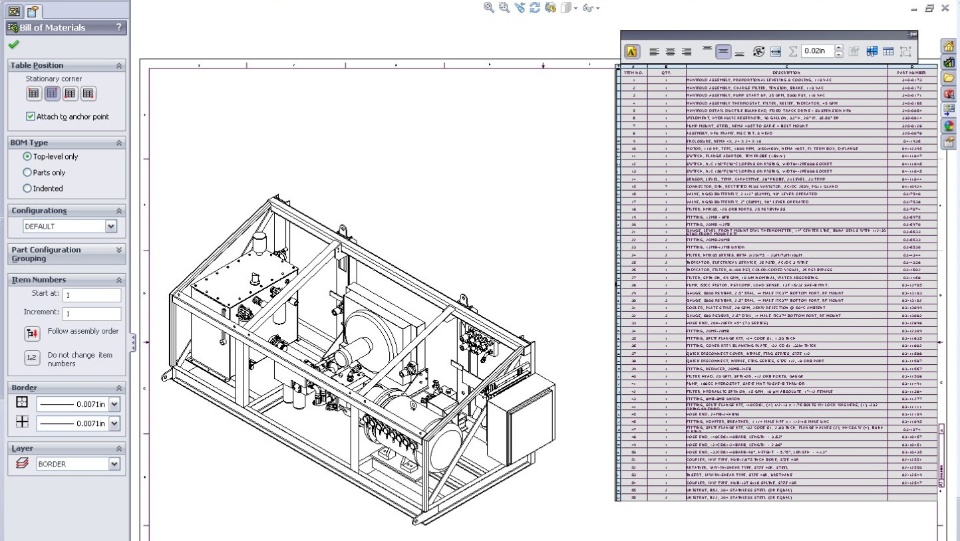
At the drawing level highlight the Bill of Materials property manager window and it is the 4th tab down.
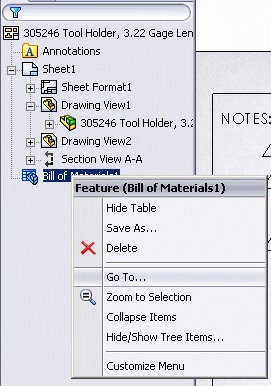
To get to this property manager you have to click on the upper left corner of the BOM on the actual sheet not the featuremanager design tree. Hope this helps.
FOUND IT!
Thank you, John! The chain around my ankle just released, so I can go to lunch!
Best regards,
Adam
Oh so much special thanks to Peter Debono for solving my problem with the following:
Instead of setting sub assembly components to be excluded from the BOM through selecting the properties for each component follow these steps:
1) go to your configuration manager
2) RMB the configration to be used and LMB properties
3) Under BOM Options check the "Don't show child components in BOM when used as sub-assembly" box
4) LMB OK and save your sub assembly
The balloons in your drawings should now display the proper number because your parts are no longer set to be excluded from BOM's and are set to be hidden when used as a sub assembly.
It works like a charm.
Thanks again
Well an update on the solution.
Yes that worked however...
The reason why we want to exlude from BOM is because we put dowel pins and bushings in a plate in an assembly, Exlude the plate from BOM so it doesn't show up twice. Ex: The plate is 09-080-0001, put it in an assembly saved as 09-080-0001 with dowels inserted in it. The BOM will list the 09-080-0001 and cascaded under will be the dowels. (Of course we detail the part not the assembly). If we use the "Don't show child components in BOM when used as sub-assembly" it will not list the dowels either.
So back to square one.
I think I just now today figured out how to actually accomplish what we want.
I was having a similar issue.
My solution, and I'll tell you the what first and the why after.
The what:
Set the BOM type to "Parts only". In each subassembly which I want shown as one balloon in the main assembly drawing, I am creating a new cfg for the subassembly called NAHP (Next Assembly Hide Parts), and in configuration properties for that configuration select hide. In the sub assemblies which you do want to balloon the parts in the main assembly, select show in the config properties.
The why:
This way when you create the assembly drawing for the SUBASSEMBLY, then you can show the parts by using any non-NAHP config, but the parts hide in the next assembly because you use the NAHP config. Pretty cumbersome to have to do it that way, but it's the only way I could get it to give me balloon numbers and part quantities properly.
It seems to me that this should be more clearer in the help, as it seems that a ton of people must run into the same problem, which also seems to be corroborated by the multitudinous posts in this thread.
and then after much success, a few minutes later I got a star in a balloon hahahahahaha
Oh man, I have two nearly identical sub-sub-assemblies within sub-assemblies, one balloons correctly, the other not, even whether I put the subassembly as show or promote, one works both ways, one works neither way, and all using no checkboxes for exclude or include in bom.
Interestingly, If in the main assembly, I copy the subassembly arbitrarily in space, the asterisks change to the corrrect number. If I suppress the copy, the balloons go back to asterisks. I believe this proves that it is a bug, not a faulty setting.
I created a video capturing a similar issue. Is this the same issue you are having?
How ironic.... I just opened up to revise an older drawing and now I'm see the '*' as well on a couple of components. I'm using the "Top-level-parts" option because of configurations and these components are shown as an item number correctly on the bill.
This has got to be a bug.
SW 2011 SP2 x64
Yes, it sure is. And it is not being fixed. I'm ready to start whining; I reported this in October. Just to make myself clear, we cannot create ANY MULTI-CONFIG drawings correctly. Ever. Period. This is pretty basic functionality that is not working correctly.
Here is the SPR#: 540610
Please, make a stink about this. Please, tie yourself into that SPR. I do not know how many people this affects, or why, but it is a gigantic pain in the rear for us. Really, think about, it, for the past 6 months we have had to hand balloon; when our standard procedure is to use SW automatic balloons. Now, when we go back to review drawings, we have to figure out how it was ballooned, revise accordinly, etc. Serious PITA.
So, again, if you are having this problem, add yourself to the list of people with that SPR number.
Yes, major PITA! I gave up and ended up making a 'dumb' bom table and 'dumb' balloons which is surely opening a fairly large door for error in the future. Maybe in my revision block I'll put "MANUAL BOM AND BALLOONS DUE TO SW SPR 540610".
Charles,
Please pardon my ignorance, but how can we add ourselves to the list of people with that SPR number? I can't find any place to do that.
Thanks,
Walter
sorry, no time to watch that long of a video. But...
I do have a workaround. It seems the culprit isn't the subassemble file or lower, because what I've done is make a copy of the subassembly, then suppress the original. So far, the copy has ballooned correctly for me.
A different annoying bug though, I have a couple items in the bill that are not in the assembly. I think they might have been at one time, but no longer. I even went as far as to shut everything down then delete the part file, and it still shows up on the BOM. So I was forced to deselect follow assembly order then move it to last item then delete it. Annoying bug also, I spend so much time trying to work around bugs in this software. A couple weeks ago I told the president that in a perfect world where software changes were easy, I'd take about 1.6ns to phase out/in SW/Inventor...yeah I said it, to give SW a chance to clean up their bugs before its too late. Way to many usability hurdles especially in drawings.
Mine still has the '*' error with no sub-assemblies at all. All single level components. And none are set to be excluded in the bill.
Contact your VAR, preferrably by emailing them with a drawing that shows the error. Then just reference the SPR number when you talk to them. That is the best way.
Don,
We do add a note in the drawing that states that any electronic copy of the drawing may be inaccurate. This doesn't get printed for the print copy (which we check after it is printed, so we know it is accurate). How rediculous is that.
Well here I am again, almost 4 years after original post.
We contacted our VAR about this and got a reply in Dec 2008. The reply was..."I was able to find an SPR that is out on the very issue that you are describing", "It is marked as high at SW, so they are working on it.", "SPR 461990 - Balloon attached to a subassembly in which components are excluded from the BOM shows an asterisk, customer would like subassembly number".
So then we upgraded to 2010 and that * problem seemed to be gone. We worked like a whole year without that problem. Then when we upgraded to 2011 SP3, bam...it's back just the same as it used to be. As a matter of fact, an assembly that was detailed with balloons in 2010 that was just fine, now open it up in 2011 those damn * show up on those certain balloons.
I went to research SPR's and I get blank page (not loadable web-pages). Are they really keeping SPR's confidential to save face, like some blog posting says ?
I think this topic is far from being concluded. Please keep your replies coming. Maybe we'll uncover something.
Same old, Same old.
SW seems to manage to screw up more than they fix with each new release. I have spent many hours trying to get bugs addressed, rarely successfully, and even when fixed, you can pretty much guarantee they will reappear in a later release.
I am furious at the way we are used as 'beta-testers' on supposedly finished products.
Dear Solidworks,
Stop trying to add new features to your product to justify yearly license fees and make a decent, stable product. Fix the things you have left screwed up for several years instead of adding useless and annoying fly-out boxes.
2009 was fine, 2010,2011 are garbage and never should have been released. I am now looking at ANY other program to use as SW has lost the plot.
I've the same issue, with SW2012 x64 SP5. I have a single-level assembly (no subassy's), but do have two configurations. I made the second config early on, and haven't used/worked on it in a while. Anyway, I created a dwg of the default config, and the BOM/balloons worked just fine. I had a hiccup where they arbitrarily changed from Item No. to Part No., but got that lined out. Now, my issue is I've added a part to the assembly, in the default config, but it balloons as '*'. The part properties and exclusion level are no different than any other part, and I've tried unchecking the 'suppress new features / components' to see if the assembly style had anything to do with it, but no luck.
I can change the BOM to 'Parts Only' from 'Top-level' and they show up, but why would any new parts not be considered top-level?
I tried to then create a new assy, new dwg with BOM, then add a part to the assy and see if the dwg BOM updated. It did just fine, like it should. I tried in both SW2012 & SW2013. I went back to my assembly/dwg with the issue, and inserted a new BOM and it looked correct. Deleted the original BOM, the model automatically referenced the new BOM and no more *'s.
Hopefully this will help anyone with a similar issue, as it's stumped me for days and I was just short of scrapping the dwg and starting over - lots of lost work!!
Justin S.
I solved this asterisk issue by:
RMB on the drawing view > Properties > View Properties tab > Under balloons make sure "link balloon text to specified table" is checked > Then in the drop down menu, choose the correct Bill of Materials.