
When I create a 3d pdf of an assembly and view the pdf someparts do not show.
I have the lastest Adobe 9 extender and Im using 2009 sp2 64 bit.
My system is as follows:
Vista Ultimate 64 bit
i7 920
6mb ram
2mp video ram
1.5 terabyte disk space.
Thanks for any help
ChrisSolidworksImport export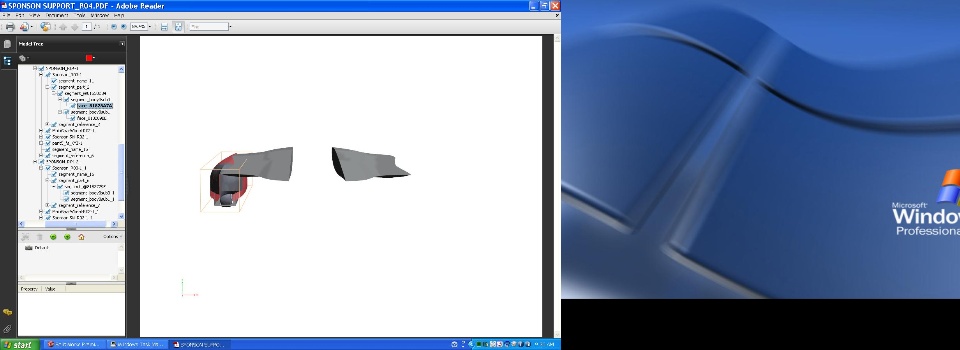
I have the lastest Adobe 9 extender and Im using 2009 sp2 64 bit.
My system is as follows:
Vista Ultimate 64 bit
i7 920
6mb ram
2mp video ram
1.5 terabyte disk space.
Thanks for any help
ChrisSolidworksImport export

We you create a 3D PDF it will only show the componets you haveshow on your model (won't export hidden components). i.e. if youare displaying a sectioned model on your graphics area it willexport half of your model.
hope that helps!
There is no hidden files on my model and model is not sectioned.
It's a complete model of a enclousure with connectors, screws,etc...
When I view the 3D PDF some components are gone.
I contacted my Solidworks supplier and they are working on it andmay be a bug....don't know
Chris
We have been creating 3D pdf files successfully in the past with SW2008. Only after upgrading to SW 2009 do we now have an issue.We've tried many different things, such as CTRL Q, resolvinglightweight components, removing Flow Simulation Add-In, removing3Dcontrol Add-In, viewing in Adobe Readers 9 and 8...
On the 32-bit PC, the Presentation Studio was installed as anadd-in and Adobe Reader 8 was upgraded to 9. Now pdf files arecreating normally on this PC with all faces and smooth surfaces.The downside is that the main assembly gives this PC a hard timeand crashes. For some reason the 32-bit PC spends an enormousamount of time trying to generate a pdf file of the main assembly,only to either crash or create a blank pdf file (of a small size.)We eventually succeeded in creating required pdf files of theentire aircraft assembly on the 32-bit PC after several attempts.
The 64-bit PC already had Adobe Reader 9 installed, andPresentation Studio does not come in a 64-bit version. ReinstallingAbode Reader 9 made no difference.
We had cleaned the registries on both machines before upgrading toSW 2009 SP1. The third machine is a brand new 64-bit PC and had aclean install of SW 2009 SP2. I just created a 3D pdf file on thebrand new 64-bit PC with SW 2009 SP2 and it too failed to createthe proper file. Adobe Reader has not yet been installed on thismachine.
Our SolidWorks supplier has been working on this issue for a whilewith no resolution yet. I am wondering what files are utilized whenpdf files are created. Something triggered the 32-bit PC to workproperly.
Regards,
Peter Ferreira
Just to follow up on this problem. S-018480 referred to the missing faces and SPR#472575 referred to the solution which resolved the missing faces issue, but has not addressed the issue of wrinkled faces.
I was never able to create proper 3D pdf images on my PC running SW2009x64 SP4.1 with Quadro FX570 driver 6.14.11.8250, even after installing Presentation Studio Add-In.
I tested our simulation PC running SW2010x64 SP2.1 with Quadro FX570 driver 6.14.11.8246 before and after installing Presentation Studio Add-In, and it too failed to create smooth faced 3D pdf images.
I upgraded my PC with SW2010x64 SP2.1 and the ATI FirePro V7800 video card running certified driver 8.723 and then latest driver 8.773.1.1, and it too failed to create smooth faced 3D pdf images.
We just installed SW2010x64 SP2.1 on our new PC running Windows 7 Professional, and once again it failed to create smooth faced 3D pdf images.
Regards,
Peter Ferreira