
I have a part I need to change, but I need to know all theassemblies where it is used to make sure that the change doesn'thave unanticipated problems. I do not have PDMWorks installed atthis company (no IT guy to manage it and I don't have admin accessto the server).
Is there a Design Assistant, similar to Inventor, that will allowme to create a 'where used' report for a part?
I tried using SolidWorks Explorer, but it crashes when I try to runa Where Used in it...I am thinking this is because PDMWorks is notinstalled/set up.
I am using SW2008.
Thanks,
Elise Moss
www.mossdesigns.comSolidworksAssemblies






Is there a Design Assistant, similar to Inventor, that will allowme to create a 'where used' report for a part?
I tried using SolidWorks Explorer, but it crashes when I try to runa Where Used in it...I am thinking this is because PDMWorks is notinstalled/set up.
I am using SW2008.
Thanks,
Elise Moss
www.mossdesigns.comSolidworksAssemblies

You have to have Solidworks Search enabled (I believe),andindexed. If you have never used it, it is prettystraightforward...
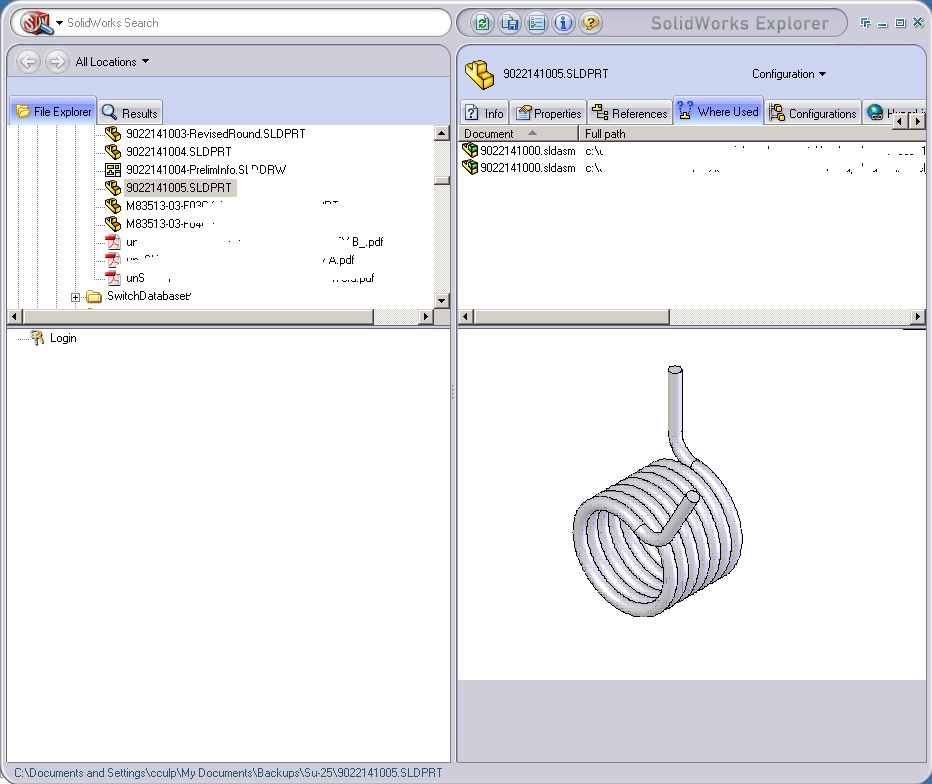
See attached screenshot (with some information whited out...)
You can try this: In Windows Explorer, right click the part file,go to SolidWorks on the menu, then either Rename or Replace. Thewindow that comes up should give you a where used. Then you canjust hit Cancel once you get the info you need.
Short of that, SW Explorer does a search based on examining eachassembly in a particular path, and querying the file to see if itreferences a particular part name. There is nothing that guaranteesthat the two parts with the same name are in fact the samepart.
I'm going to add the fourth contradictory posting to this thread.
First, you don't have to have PDMWorks installed in order forSolidworks Explorer to run. If Solidworks explorer is crashing whenyou attempt to a where used, then the problem lies elsewhere. Startby making sure Solidworks explorer is patched to SP1.0. You can dothat from the customer portal.
Second, the where-used functionality in Solidworks Explorer doesn'tuse the indexing service. It uses a straight-forward windows searchmechanism. You specify locations to search for files in theSolidworks Explorer Options dialog box. You can also specify thatSWEX search subfolders of those locations automatically. This makesexplorer take a long time.
That brings me to item three, using the rename/replace menufunction to run a where-used. If you haven't specified a searchlocation-as indicated in my second point-Soldiworks explorer willsearch for affected files in the active folder only (the folderwhere you ran the rename or replace)
Finally, I have to disent in part from Matt's statement that thiscan't effectively be done without a PDM system. In my experience itall depends on the quality of your referential structure.Solidworks explorer can pick up references (both assembly andin-context) in Solidworks documents and xrefs in AutoCAD documents.So, if your model is a 100% reflection of your BOM, then awhere-used search will yeild pretty good results. PDM/PLM/EDMsystems allow you to create manual relationships between documents.For example, in Cyco Meridian, you can associate an inspectionprocedure with an assembly so that when you change a component aspart of an ECO, you'll know that you also have to update thetechical illustrations.
My company uses an ERP system to run 'Where used' reports. It alsodoes the item master and the individual boms for our parts, so allof our CAD and documentation is kind of window-dressing for thatdatabase.
Anyway, try patching your Solidworks Explorer installation, I thinkthat will give you results similar to what you get in Inventor(without the VAult ofcourse)
John
We have a pretty large volume of models and assemblies on ournetwork, I'd say about 500Gig+ of stuff. No PDM is being used.
So, if I want to cover all the bases, I must select the very toplevel of my network and hit "Search".
Needless to say, this takes a LOT of time. Because of this, manyusers don't even try, which perpetuates the problem of referencesgetting screwed up.
When the SW Search was introduced, I got excited, thinking thatthis was the magic bullet to make where used searches better. Thiswas until I found out (here on the forum) that it's not true. Why?I'm not sure. They probably rightly assumed that not all userswould index their entire network all the time, which would have tobe the case to be on top of all the changes.
I use Windows Desktop Search (aka, Solidworks search, although Idon't use the SW module, I do it straight in WDS). This helps meQUICKLY find, and then just double click on, assemblies, etc whereparts are used. Do a search for the part file, and all theassemblies it is used in show up (takes about 3 seconds to searchour 57,000 files). I do have all of our network files in the searchpath, and no we don't use a PDM system.
If I want the "official" where used, I use the KBM/AS-400/whateveryou want to call it, which manages our parts and assemblies forproduction. This doesn't manage Solidworks documents, so it's amatter of keeping accurate model/drawing files on the users end forthat one. And it doesn't matter what the software does, thatrequires good pratices by the engineer with or withoutPDM/etc.
Correct me if I'm wrong, but what you are really getting is a listof assemblies where a file of a given name is referenced, correct?You have no way of guaranteeing that if you have multiple partsnamed Cover.SLDPRT, your search cannot distinguish one Cover fromanother. Is that right? That's why I wanted to distinguish betweena SW Explorer search and a PDM search. PDM is going to be the onlyway to guarantee you get a real Where Used list. Backing the WhereUsed data out of a search of a bunch of assembly or drawing filesis not the same as building a database with that info in it, andthen just pulling the info when needed. Granted, most people havefile mgt practices that require unique file names, but I don'tthink that you can assume that all users always have unique filenames.
-deleted-
*Edit:
Ok, so my Solidworks Expolerer is flaky since I just upgraded, Ican't verify how it is working now until I get it re-indexed andfully up to speed on 2008.
On the crashing you are having doing a Where Used in SW Explorer:
Make sure that the is no reference to PDMWorks in the SW Exploreroptions. CLick on the Add-Ins tab and clear the PDMWorks box. Also,there is a tab for References/Where Used, make sure you have one ormore paths listed there and that there is no refernce to a vault inthat path.
Hope this helps!