
I am recording an animation (with use of Photoworks) inwhichI use Tranparency in much of it.
When I look at the screen (unrendered), the items I have trasparentare not shown (yippee), but when I render it, the items that aresuppose to be unseen are now seen. This is what happens when Irecord too. What am I doing wrong, Isnt transparency supposed towork in Animation (with Photoworks) ??SolidworksMotion Studies






When I look at the screen (unrendered), the items I have trasparentare not shown (yippee), but when I render it, the items that aresuppose to be unseen are now seen. This is what happens when Irecord too. What am I doing wrong, Isnt transparency supposed towork in Animation (with Photoworks) ??SolidworksMotion Studies

I figure since S/W has both features, Photoworks and Animation (andthey usually are used hand in hand), and allows the transpaerencyto work withing Animation, that when you throw in photoworks, thesekey properties are ignored. This doesnt make sense.
I agree it doesn't make any sense and I agree it should be existingfunctionality. Unfortunately it's not the case and the only realway to have the functionality implimented is to submit anenhancement request.
I can tell you you're not alone in wanting this functionality.
Duplicated 15 parts which you are going to fade in, assigndifferent transparent and reflection properties for each parts,change to figure bit by bit, then mate all the parts together, inthe animator timeline, do a hide/show to show the duplicated partsone by one, if you got enough patience, I guess it still can bedone.
Please refer to the example below, it's not a goodexample////
You might need Xvid Mpeg4 codec to watch the 2 second movie.
http://www.bxhdesigns.com/anim...l_straight_320x240.mpg
Partly...
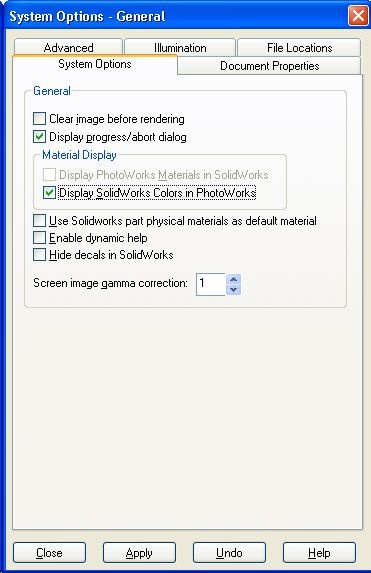
It should work if you set your system option like this (seeattached)
I tried the method you provided, but still can not get the fadein/out effect, is it possible to show some sample for us? Thanks inadvance.
Go here...
http://www.mikejwilson.com/sol...lidworks_files-04.htm
Download and open the 'Animated Treasures' assembly.
It should render and animate similar to the downloadable 'AVI'file.