SW 08 - Admin Images and the SWIM

I've used Administrative Images for years.
However, for 2008 I was going to try the SWIM (SW InstallationManager). And I'm having a really hard time with it.

I guess what it boils down to is:
1. Do you use the SWIM for Administrative images?
2. What is the benefit?
SolidworksAdministration

Comments 10
JC
JC 2007-12-04
I'm trying to reinstall the admin image using it as we speak.I had done it manually like in previous version but now when Iinstall 2008 from the image the help files are missing. The helpfiles are there in the image, they just don't get installed from acommand line install. A manual install from the image works fine.

So I'm going to try this install manager once again and see if itworks.

SF
SF 2007-12-05
The main reason I use it is because you have the option toinstall as a different user. This really helps when most of theusers don't have admin privileges on their PC's.

Dan
RJ
RJ 2007-12-05
This was the first year i tried it too. After installing theimage 4 times it finally works...sorta.

There isn't much documentation on the new admin image and my VARdidn't know a lot either since it was their first time useing it.I'd much rather do it the "old" way because i know that works.

KS
KS 2007-12-05
Thats a shameI was hoping that this version would allow fully automated imageinstall and updates. Guess not; particularly when one considersincluding all the SolidWorks accessories like eDrawings, DWGeditor,COSMOS, etc. I've also been doing this with batch files, and Iguess I'll keep doing it that way...
SF
SF 2007-12-05
I had the same issues with the new admin installer.
RJ
RJ 2007-12-06
one of the reasons i had to delete the image was becuase ofthe bat files you can run. when it asks what you want installed, ithought it was talking about the image and not the client so ipicked everything. and then i also picked to run a bat file. when itested it, it installed everything and then ran the bat file.

like i said, there isn't much documentation on it. i tried runningthe IM again to repair the image but that didn't work either. so,delete and start over.

mine still installs cosmos even thou i selected not to installit....
SF
SF 2007-12-06
Are you running Premium or Office Pro? If you are runningOffice Pro, it detecs it as Office Premium when it installs forsome reason. When you apply a SP don't download the Premium stuffand the image should update fine. I got ours setup and it worksreally good. I still think ithe install manager needs more workthough.

There is something to be aware of though. When you build theinitial image, select the option to create a new installation. Thiswill allow you to keep any existing version on your PC. Now herecomes the problem. When you apply a SP to the image, you should setto upgrade the latest installation of SW. Anyone who put 08 ontheir PC will upgrade fine and keep 07 as well. Anyone who didn'tdo the initial install will get their 07 upgraded to 08 and nothave 07 on their PC anymore.

RJ
RJ 2007-12-06
I'm running Office Pro. So that answers the problem of theCOSMOS stuff.

I haven't tried loading both 07 and 08 yet and I need to on a fewPC's. Thanks for the heads up...!!
JC
JC 2007-12-06
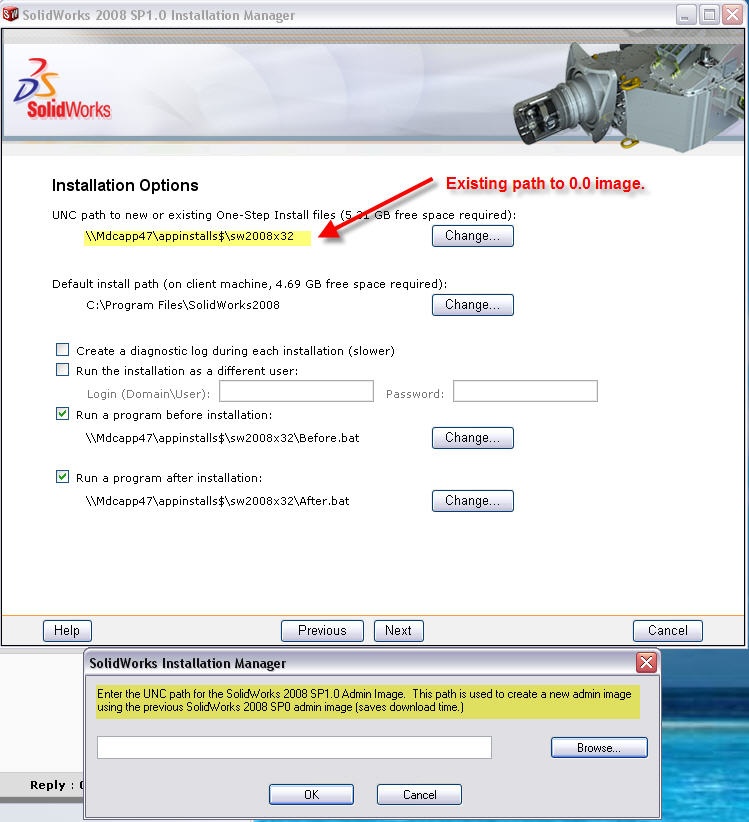
I have an image setup for 2008 sp0.0 but when I try to applysp1.0 to it through the Install Manager it seems to want to createa copy of the image rather than upgrade the sp0.0 image. It tellsyou to specify the previous image to save download time and specifya new location for the sp1.0 image. What gives?

SF
SF 2008-01-08
You cannot update an admin image the way you used to be ableto do.
Instead you create a new image using the files from the old imageand then delete the old image(if you choose to)