
SolidWorks 2008 SP3.0 is now available for download. Thefollowing is a change to the Installation Manager to help improvethe experience:
The Installation Manager provides an estimate of disk space thatwill be used for new installs, major version upgrades and ServicePacks.
Prior to 2008 SP3, the disk size estimate when applying a Servicepack incorrectly showed the much larger size of a full install.This disk space estimation error did not affect what was actuallydownloaded, ie requesting a Service Pack would always download theSolidWorks patch file versus a full product download.
In SP3, applying a Service Pack now shows the appropriate estimateddisk space.
SolidworksAdministration
The Installation Manager provides an estimate of disk space thatwill be used for new installs, major version upgrades and ServicePacks.
Prior to 2008 SP3, the disk size estimate when applying a Servicepack incorrectly showed the much larger size of a full install.This disk space estimation error did not affect what was actuallydownloaded, ie requesting a Service Pack would always download theSolidWorks patch file versus a full product download.
In SP3, applying a Service Pack now shows the appropriate estimateddisk space.
SolidworksAdministration

Just wanted to let you know that I had great success with the "onestep" admin image for 2008sp0 and 2008sp2.1 installation,configuration and deployment. I have only three seats so I had notused admin image for a while due to setup time not justified. Well,for all who have not tried the new "one step", I highly recommendit. one benefit is deployment speed. Awesome, kudos to theprogramming team. Thanks for making it easier!
Just downloading SW2008SP3.0 so will post when installed (or not).
The following is from the SP3.0 releas notes.
Service Pack 3.0
SolidWorks x64 for Windows Vista 64-bit
64-bit SolidWorks is now available as an early visibility releaseon the Windows Vista 64-bit operating system.
Known Issues
Windows User Account Control (UAC). You may experience theseproblems:
Equations do not evaluate properly.
Macro record and run do not work.
The DrawCompare tool does not work and issues an "Unexpected error- quitting" message when starting SolidWorks. You can then click OKto continue normally.
To avoid these problems, turn off Vista's User Account Control (inVista, click Control Panel, User Accounts, Turn User AccountControl on or off).
Cosmos Products. The frequency solver, nonlinear solver, and lineardynamic solver are available but will fail on execution.
News Feed. The on-screen news feed in the task pane area isdisabled.
It took me almost 90 mins...Then another 10 or so to load...
And thats with Cable...
Regards,
"The file 'SolidWorks CD #1' is not a valid installation packagefor the product SolidWorks 2008 SP02.1. Try to find theinstallation package 'English_i386_SolidWorks.Msi' in a folderwhich you can install SolidWorks 2008 Sp02.1"
So, after that, I pointed the directory to my 'My Documents' folderand located the SolidWorks Download folder that had all thedownloaded SP in it. Located SP02.1, opened the swwi folder, datafolder, then selected the English_i386_SolidWorks.msi. I got thismessage after I hit ok:
"The file 'C:\Documents and Settings\bcovert\MyDocuments\SolidWorks Downloads\SolidWorks 2008SP02.1\swwi\data\English_i386_SolidWorks.msi' is not a validinstallation package for the product SolidWorks 2008 SP02.1. Try tofind the installation package 'English_i386_SolidWorks.msi' in afolder from which you can install SolidWorks 2008 Sp02.1"
So now I'm stuck.
Regards,
English_i386_SolidWorks.Msi
That's the file its looking for on the SP02.1 "disk" - I did myupgrade online, no disk...
Anyone know where we can find this file? Like right now? I'm behindschedule...again...or still...whatever...
Todd B (not Rezwan)
EDIT: Ok, in my case the SP0 original DVD worked forme....
Brad by the way nice Bleach pic.
Ryan, thanks for the avatar compliment. I was kinda leary aboutputting a Bleach avatar up, seeing as this is a forum forSolidWorks.
I often get this warning. I use the old school way of updating(manually downloading each update and installing)...
I want to share my experience with this issue in the hopes thatsomeone else may benefit from it.
When using the automatic download and install features of theinstallation manager, the installer downloads updates/patches/filesto a directory on your hard drive. Usually this is in the MyDocuments area in Windows XP and the Users folder in Vista. Thesefiles download simmilarly to a torrent file, a small peice at atime, and then reassemble on your hard drive. The last folder to beextracted is swwi. Once the installation manager is used to installan upgrade, this procedure leaves behind a new file, calledEnglish_i386_Solidworks.msi. This file is a record of theprocedures followed during the update procedure, and is specific tothe upgrade itself. The creation of an administrative image alsocreates this file.
If you upgrade Solidworks from 0.0 to 1.1, theEngilsh_i386_Solidworks.msi left behind will be required toprogress from 1.1 to any further service pack. You cannot use theEnglish_i368_Solidworks.msi file from any other operation toprocede forward to another service pack. If you somehow deleted thefiles used to upgrade solidworks, the only way to upgrade is todownload the entire installation package for your version ofSolidworks. I have made this mistake several times. You can howeveruse the manual download and update procedure by selecting yourcurrent service pack and downloading the appropriate patches.
One final note; those of you that wish to use Solidworks on theVista 64 platform will need to download the entire install package.All 3.75 GB of it.
Have a great day.
Greg Mitchell
If I want to upgrade to the next version, I have to keep the lastversion on my machine!
Only after I upgrade can I delete the previous upgrade directory.This is unacceptable! Why can't it just ask for the original CD?
I just tried to upgrade from 2.0 to 3, but I had deleted the ver 2upgrade to conserve disk space. When it asked me for the originalmsi to begin the upgrade, it wouldn't accept the CD, it would onlyaccept the file from the ver 2.0 upgrade, which I had alreadydeleted. This means every time I want to upgrade, I will have todelete the last upgrade to revert to ver 0.0 so it recognizes theCD.
On one machine - it is XP Pro Sp 2.0 on which there are 5 accointsset up, with one admin. The admin cannot do the install without theinstall blowing up at "e-drawings" with a "do not have permissionto write registry key", which is weird because the account doingthe install is the "admin" on the machine. A review of regeditshows that the files are coming in with the "originator/owner"permission off, which means that Solidworks cannot load Solidworkson my machine (I think).
We got through this for 2008 SP 1.0 by manually tweaking up theregistry to allow the update to eventually work its way through.When the install stops at "e-drawings" and quits, it leaves COSMOSun-upgraded.
Why not just have "e-drawings" quit, and move on to COSMOS, ratherthan just dumping the whole install?
Any help would be appreciated.
I am not sure what you mean by mis-reporting the estimated downloadfile size. Since using the installation manager on a couple of thelast service packs it wanted me to download over 3 gigabytes forthe 2.0 service pack, which I did - and it downloaded over 3gbswhich took over 8 hours on our connection. I don't think it wasmisreporting the file size. To update to service pack 2.1, Ifollowed someone's suggestion and used the "if you're havingproblems downloading" button and downloaded a 140 megabyte file.That service pack install was almost easy. In my opinion theservice pack updates for SW need major work not just a "change". Idownloaded 3.0 SP and now when i go to install it, it seems to hangat about 3/4s of the way through "configuring SP3.0". I've killedthe process at least 3 times so far, because I got tired of waitingfor it to complete. I think DS needs to rethink their SP processand revamp it to actually help the customer install them. Rightnow, I just install the service packs for the core program anddelay as long as possible any of the others. It needs a MAJORimprovement, asking for the msi file of previous installs shouldnot be required either, since that adds more complexity to analready WAY too complex process. I realize my comments probablywon't be read or cared about by anyone working for Solidworks, butI just had to vent after going through the pain of trying to keepSW2k8 SP current.
-Tim
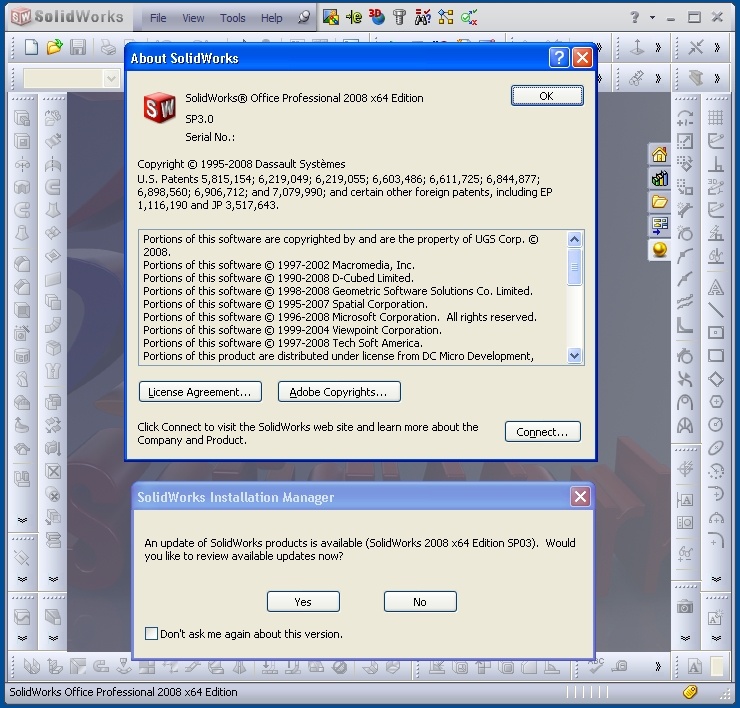
I also get that "an update is available" whenever I openSolidworks, and it tells me 2.1 SP is there, when I am already onSP2.1. I am wondering if it is because I used the "if you're havingproblems" button to update, and download a much smaller file,instead of going thru the official "installation manager" method? Idownloaded almost 4 gigs of files to update to SP2.0 and it nevergave me that message. After I used the shortcut it has beennotifying me. I just told it never to notify me again for thatupdate. Which made it stop, in my opinion, something else in thepantheon of needed improvements to the SP process.
-Tim
Brad Covert wrote:
So here's what it says when I insert an older SolidWorks 2008installation disk:
"The file 'SolidWorks CD #1' is not a valid installation packagefor the product SolidWorks 2008 SP02.1. Try to find theinstallation package 'English_i386_SolidWorks.Msi' in a folderwhich you can install SolidWorks 2008 Sp02.1"
So, after that, I pointed the directory to my 'My Documents' folderand located the SolidWorks Download folder that had all thedownloaded SP in it. Located SP02.1, opened the swwi folder, datafolder, then selected the English_i386_SolidWorks.msi. I got thismessage after I hit ok:
"The file 'C:\Documents and Settings\bcovert\MyDocuments\SolidWorks Downloads\SolidWorks 2008SP02.1\swwi\data\English_i386_SolidWorks.msi' is not a validinstallation package for the product SolidWorks 2008 SP02.1. Try tofind the installation package 'English_i386_SolidWorks.msi' in afolder from which you can install SolidWorks 2008 Sp02.1"
So now I'm stuck.
Erase whatever you have downloaded so far of SP3. Run theinstallation manager. Sometime before it starts downloading, thereis an option to uncheck a box that says it is OK to downloadpatches. Once you do this, it will download the entire SP3. Itshould be about 2.5 GB. Once it finishes, you should be able toinstall it with no problem.
So the solution to Brad's problem is to download 2.5 gigs of files- of which only a small percentage are really needed? Basicallydownload the whole program so all the files are there when theService Pack is performed? That's probably a good solution, butshouldn't DS make the process easy enough that it wouldn't benecessary to download something, the majority of which, you alreadyhave?
-Tim