
Alright.
FINALLY got 2008 loaded, and ran into a problem I've had withpractically every new version of SW I've had.
I don't use a Windows default color scheme, and subsequently, myscreen colors are typically all screwed up.
Background is always easy to change, SW makes that variable easilymodifiable. It's everything else around it that's usually not sostraightforward.
The picture should show what I'm looking at. White on the verylight gray doesn't make for very easy reading. Needless to say, myoptions colors aren't set to this scheme.
The problem is that there's never a direct method to readily modifytoolbar/pulldown colors.
Any suggestions?SolidworksGeneral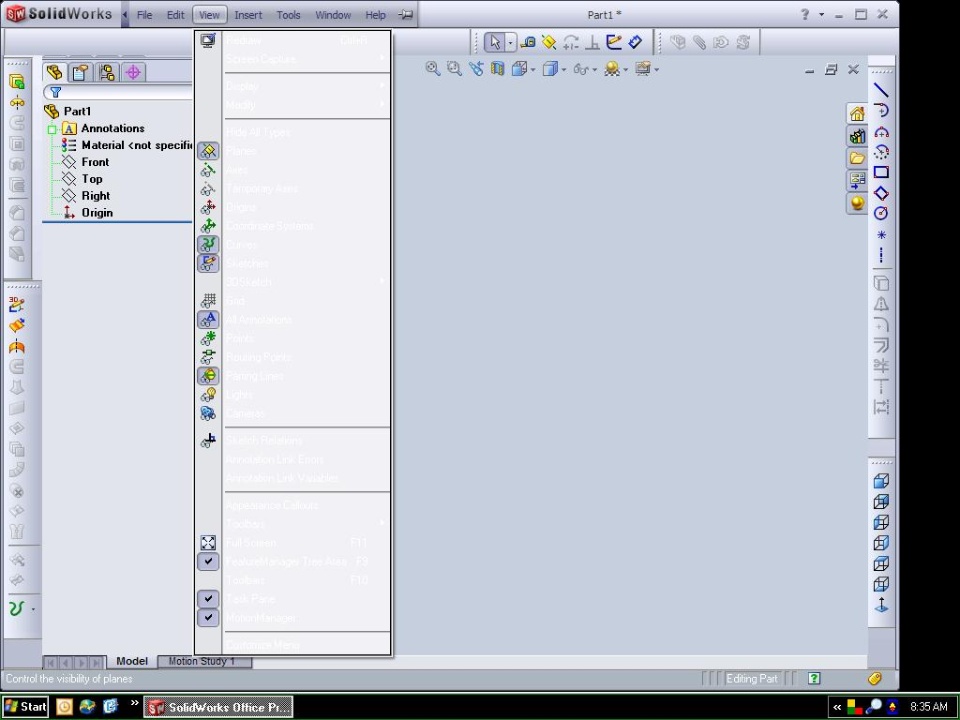
FINALLY got 2008 loaded, and ran into a problem I've had withpractically every new version of SW I've had.
I don't use a Windows default color scheme, and subsequently, myscreen colors are typically all screwed up.
Background is always easy to change, SW makes that variable easilymodifiable. It's everything else around it that's usually not sostraightforward.
The picture should show what I'm looking at. White on the verylight gray doesn't make for very easy reading. Needless to say, myoptions colors aren't set to this scheme.
The problem is that there's never a direct method to readily modifytoolbar/pulldown colors.
Any suggestions?SolidworksGeneral

I believe that SW uses standard Windows colors for some parts ofthe UI, and it may be picking up on what you have setup on yourdesktop.
Maybe try setting the Windows theme to something default, and itwill probably look much better.
The menu text is driven from the windows colour scheme that youhave set. Try changing you meny text (in the windows scheme) to redor something if you want black backround