
Hi everyone,
I'm new to this forum, and my company recently purchased SWProfessional 2007. We are based in the UK and make die castcandleholders. I'm using Photoworks to render my models and what Iusually do is place them against an image background, say a pictureof a living room with a coffee table. Then I position my 3D modelso it looks like it's on the table, but I'd like to be able to putin some reflections and shadows as well.
You might have talked about this already somewhere on the forum,and if so, would someone be able to point me in the right directionon how to do this? Thanks very much.
Cheers
Sumi AppaRao
Product Design
Howell Tomkins Ltd
Walsall, West Midlands, UK
SolidworksPhotoworks



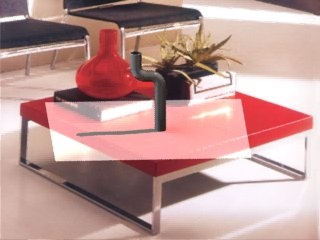


I'm new to this forum, and my company recently purchased SWProfessional 2007. We are based in the UK and make die castcandleholders. I'm using Photoworks to render my models and what Iusually do is place them against an image background, say a pictureof a living room with a coffee table. Then I position my 3D modelso it looks like it's on the table, but I'd like to be able to putin some reflections and shadows as well.
You might have talked about this already somewhere on the forum,and if so, would someone be able to point me in the right directionon how to do this? Thanks very much.
Cheers
Sumi AppaRao
Product Design
Howell Tomkins Ltd
Walsall, West Midlands, UK
SolidworksPhotoworks

Download and view the powerpoint. About mid way through I have acouple of slides explaining what you are tring to achieve.
Rob
Thanks for replying so quickly. I downloaded your presentation anddid what it said, but this is the result. I must be doing somethingwrong. Maybe I should make the floor infinite?
Thanks again for the help.
Cheers
Sumi
There is a bug (I wish SW Corp would fix this issue, it's beenaround a couple of releases) which casues what you're seeing if youuse the studio plastic material and indirect illumination settingtogether.
The work around is to create a decal using the background image andapply the decal to geometry you create and add to the model. Theadditional geometry represents the floor and (or) wall the objectwill be sitting on. I'm not explaining this very well so if youneed more help let me know.
If you're not using indirect illumination be sure your studioplastic material is set to full transparency and I typically setthe color(s) to white. I believe I included the sample SolidWorksfiles with the power point so you can open those and see what allmy settings were.
Let us know how it goes.
Sumi
PS: I understand what you said about the workaround solution. MyVAR tech support guy recommended that as well.
You're right, I WAS using Indirect Illumination! Indirectly, ofcourse. I had a positive value for Diffuse Material Brightness inScene Editor. Once I made that value zero, then I couldn't see thefloor surface anymore. Thanks again for your help; it's saved me alot of time.
Cheers
Sumi