
I added some ribs for the first time and it just seemedpretty labor intensive so I wanted to toss this out to see if I amover complicating the process. The attached photo shows the ribs.Essentially I made a plane that intersected each boss, created arib profile (45 degree angle) then used the rib feature. I did thisone at a time (it didn't allow multiple ribs/sketch entities). Itook advantage of symetry where I could.
Is that the way to go about it? Suggestions?
SolidworksParts And Features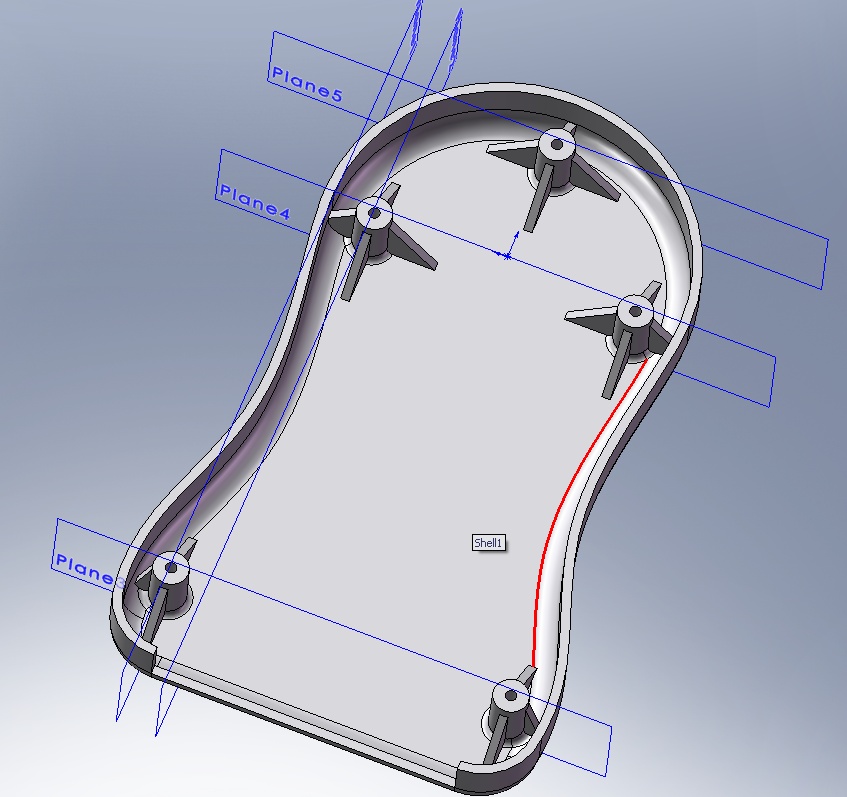

Is that the way to go about it? Suggestions?
SolidworksParts And Features

In addition to what Dan said, I would be inclined to put a planeparallel to the tops of the bosses and extrude the ribs normal toit. Then add draft to the ends to get your taper. This willprobably require fewer features. I typically just use a standardextrude, not a rib feature, but that is partially because the ribfeature came along after I learned to use the software and seemedto be a bit flaky when I tried it out.
Create an offset surface of about 0.1mm of the part inner facesinto the part BEFORE adding the bosses.
Create the bosses with no hole - one feature
Create the rib in section through the boss - extrude - mid plane -turn merge off.
Pattern BODIES 90 degrees x 1 or x 2 (for bottom one)
Cut the ribs with the offset surface.
Combine
Add holes
Mirror (might need to move the combine after the mirror and mirrorbodies).
BTW I use the rib tool all the time and it is very robust now -especially for networks.
Craig
When Rib properties opens the thickness always defaults to 10mm. Isthere a way to set the default to say 1mm?
Pete
I don't know the answer to the default thickness. I would thinkthat it would default to the last value entered, but it doesn't.Enhancement Request time?
To post a new topic, pick a forum and then pick New Topic underQuick Links/SolidWorks Forums at the top of the left side. Youcan't miss it, it's bright red!
Rib is one of those features that I really like. There are a fewthings that it doesn't do very well, but I think it's prettypowerful.
One of the things I don't like so much about it is the default ribthickness. You can change the default to something other than 10mm, but the only other value you can use is .394 inches.