
So I have a part with a series of holes. To make the partdrawing much cleaner looking I've been using the hole table.However, I noticed that holes generated from the same sketch andfeature are coming up in the hole table as different size, thuswith different tag letters.
Does anyone know way this is happening? It's irritating that Icannot merger the size cells together (even though they are theexact same size) because solidworks sees them as beingdifferent.SolidworksDrawings And Detailing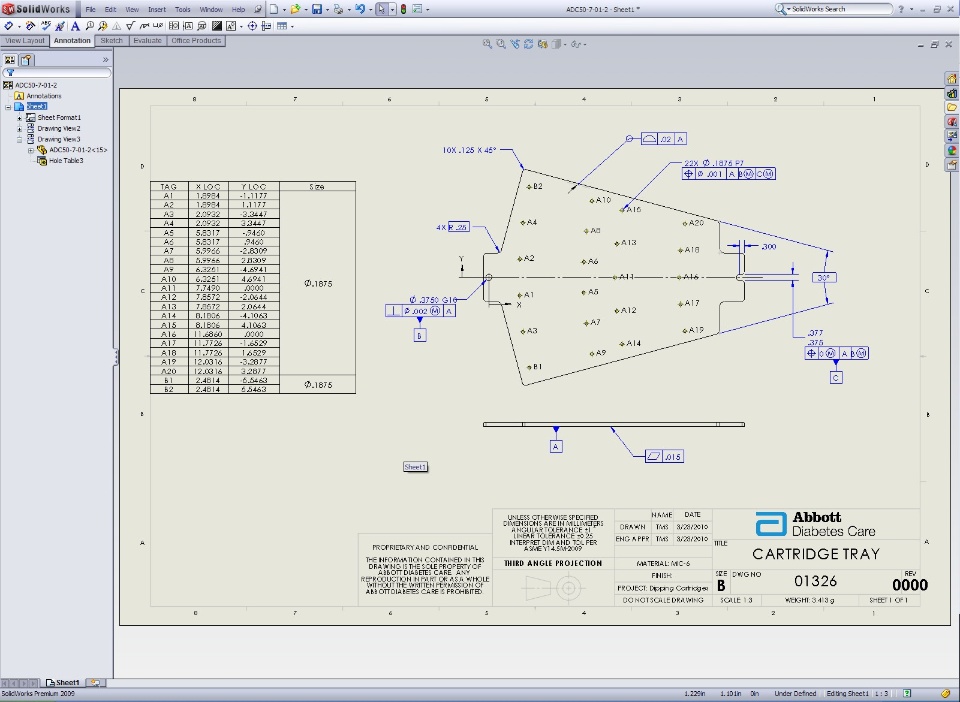

Does anyone know way this is happening? It's irritating that Icannot merger the size cells together (even though they are theexact same size) because solidworks sees them as beingdifferent.SolidworksDrawings And Detailing

Also what version and SP of SW are you using?
I have had this happen on rare occasion in older versions of SW. Ithas been awhile since I have seen this happen. I use hole chartsextensively for our tooling details.
Nothing you can do to fix it that I was ever able to figure out.When that would happen I would just live with it.
Be sure to report this to your VAR with the files so they can passit along to SW.
Cheers,
I'm having the same problem. SW2009 SP4.0
All of the holes are in one sketch, two patterns, the seeds being B1, A9 and A14, A19. In the sketch B1 has the dimension, all others made equal. I have no idea why B2 would be grouped with B1, either way I can't combine them.
Thomas,
SolidWorks does this at times. Hole Wizard gets stupid and you can't fix that behavior. Not sure if starting a new detail helps.
I just live with it on the rare ocassion when it happens.
Be sure to submit it to your VAR so SolidWorks can look at the files.
Cheers,
Anna
Still an issue, 13 years later. SW2020SP5 #SolidWorksIsBest
I ran into this issue. It seemed to only happen on my countersunk holes. On some of the holes in the series I selected the outer circle of the countersink and on other holes I selected the thru hole. When I went back and selected all of the holes in the series by the outer circle of the countersink it seemed to fix the problem. I would think that selecting the inner circle of the thru hole consistently would fix this too. Hope this helps you too.
Still an issue, 2020SP5. My VAR is unable to solve this issue.
i think the way around this is to just delete the hole table and make a new one