Fillet makes my part look like I added a draft!

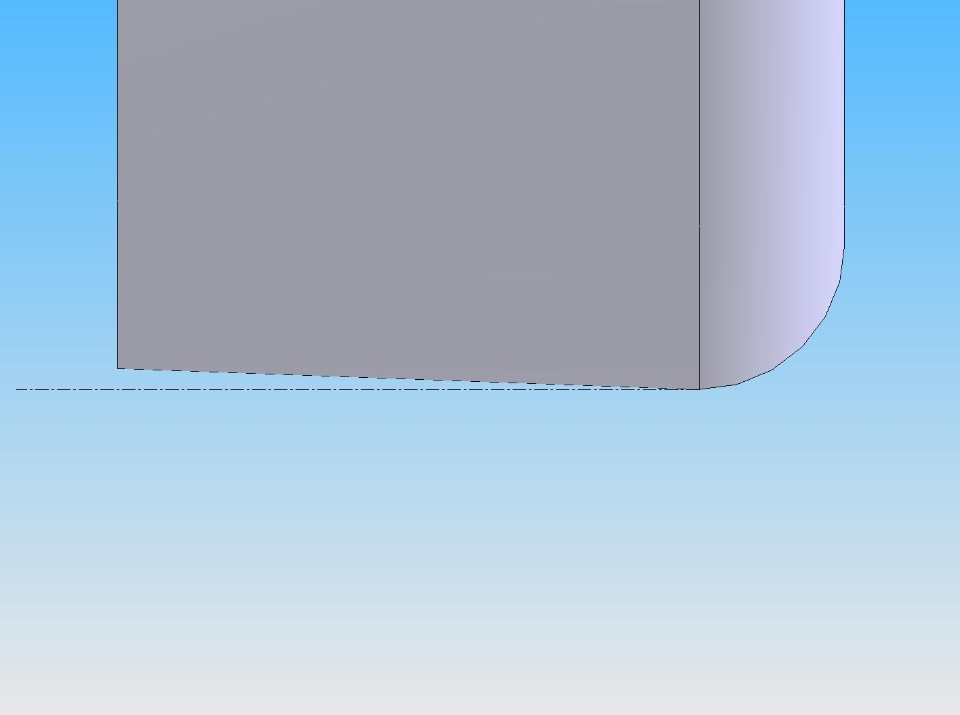
When I add a fillet to a round part, and then square up thepart with a side view the part looks like I added draft to it! If Itake this part into a drawing it looks fine and it even measuresfine (90`) in both the drawing and solid model, but looking at ityou would think there was an irregular angle. Has anyone else seenthis? I am sure it's something graphical but it's something thatshould be looked into.


James Fisher
SW 2006 SP4.1SolidworksParts And Features

Comments 7
PY
PY 2006-12-05
Is your perspective view mode on? Perspective view might tendto make it look like a surface with draft applied.

Pete
SF
SF 2006-12-05
Perspective view is off. I turned on perspective view and sawthe effects, but turned it back off. We have tried it on 3different machines with the same result.
SF
SF 2006-12-05
While this may be a long shot, what graphics card(s) are youusing?
SF
SF 2006-12-05
NVIDIA Quadro FX 1300 we also have seen this on a Quadro FX1400. We just got a support request back from our VAR that said itis a known problem that corporate is aware of and it is onlygraphics problem.
ML
ML 2006-12-06
How does it look like draft? I can see that the edge displayis intermittent, but it doesn't look like draft.

Anyway, have you tried changing your antialiasing settings? (Tools,Options, Display/Selection)

How about image quality? (Tools, Options, Doc Properties, ImageQuality)
SF
SF 2006-12-06
I hope this pic will show it a bit better. I added acenterline that shows where the line of the part should be. Thispart is nothing but a simple revolve with one fillet. The crazything is it doesn't do this on the opposite end of the part.

Matt,
I tried all of the quality and anti-alias settings with nosuccess.
SF
SF 2006-12-07
I have the same on a Quadro FX 3500, running SW2007 SP2.0x64. The actual drawn solids and sketches (on screen) containingfillets seem to 'bend' the connecting line or surface