
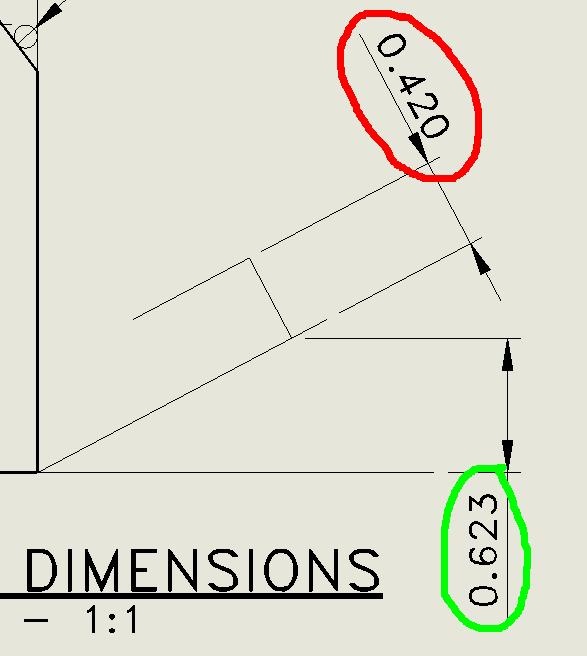
Is there a way to flip the dimension to the other side of theline?Example: In the image attached I need the dimensioncircledin red to move to the other side of the dimension line androtateto look the same as the one circled in green.SolidworksDrawings And Detailing







I have the same problem encountered also and I want to know is thera short cut method or icon as a "match properties command" so thatit automatically align my text horizonatally if i need it. Usuallyit take at least 6 click to change vertical dim to horizontal fontsdisplay.
Thanks,
Boboy SW2006
SP0.0
Jeff
I don't believe there is any standard which allows dimensions to beoriented upside down or past 90°.
Sometimes, due to space limitation, I need to change my verticaldimension to horizontal fonts and it takes me 6click to made itthru changing its properties. I tried to use favorite but onlytolerance can do.
Hi Jeff, Can you enlighten me on how to do this in 1 click atfavorites setting?
Thanks,
Boboy