
When creating Detailed Views: Is there a way to changetheLineStyle of the Exterior Line representing the boundarytosomething more than just a Solid-Circle (Phantom, Spline)? Itlooksconfusing with the Solid Line...Thanks!SW2006SolidworksDrawings And Detailing







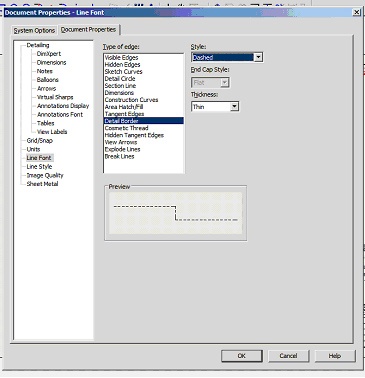
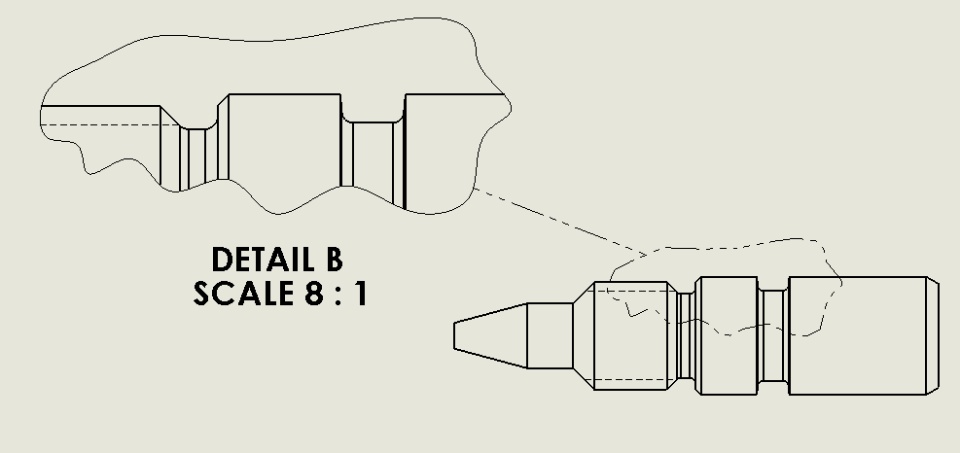

I will try to attach a screenshot of it. You just go to Line Fontand scroll through the drop down menu to Detail Border to selectthe desired option.
Hopefully, this wasn't too recent an addition for you to do justthat... I would hate to have to use a 2D sketch in a drawing likethat, but the detail border that you have in mind will certainly behelpful in your example view...
Ryan
You can use a spline or other shapes to display as the Detail"profile" and view border but to do so, you must change the DetailCircle Style to; With Leader, No Leader or Connected.
See attachment.
The default for Detail View creation style is "Per Standard". Theonly setting that has options for document templates are for "ViewLabels". Of course, this would be the perfect location to add theoptions if SolidWorks were to be so kind.