
Hi,
Can you suggest what would be the most proper (and practical) wayto create a copy of the model and associated drawing withoutmessing with existing ones?
The same question I would like to ask regarding assembly model andassociated drawing. How to keep BOM without changes if I removesome parts from assembly, and if I added new parts, how to add themat the end of BOM to avoid changing all existing balloons? Is itpossible or can be done only manualy?
Thanks a lot,
MarkSolidworksAssemblies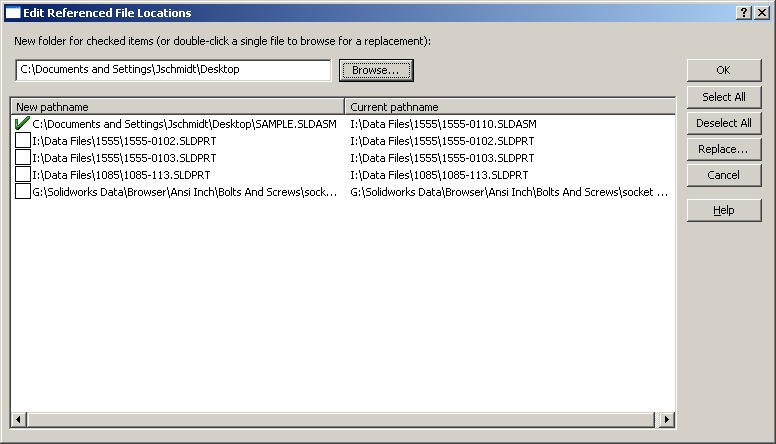
Can you suggest what would be the most proper (and practical) wayto create a copy of the model and associated drawing withoutmessing with existing ones?
The same question I would like to ask regarding assembly model andassociated drawing. How to keep BOM without changes if I removesome parts from assembly, and if I added new parts, how to add themat the end of BOM to avoid changing all existing balloons? Is itpossible or can be done only manualy?
Thanks a lot,
MarkSolidworksAssemblies

I'm not entirely sure about what would happen in your BOM question.Perhaps export/save your BOM in Excel format to keep it static, butI'm not sure why you'd do that with updates happening in yourassembly.
To not change a BOM but change the assembly, add anotherconfiguration to the assembly.
File > Save As
Browse to desired location
Change the file name (required if saving to the same directory assource file)
Check "save as copy"
Click on "references"
Check the box next to the assembly and/or parts you want to copy.(see pic)
Click "okay"
Click "save"
You can copy a part and its drawing the same way.
There are other ways as well so I hope someone else chims in. Orsearch the forum for "copy assembly," this has been discussedbefore.
Regarding BOM baloons; in the BOM table properties check the "itemnumber" tab. Checking "follow assembly order" should add new partsto the bottom of the BOM. Checking "do not change item numbers" mayor may not keep them the same when a part is deleted from theassembly. I'd have to try it to be sure.