
I seem to have found a pretty big limitation in SWX tool Box.
as mentioed in a previous post, I have created a custom toolbox forone of my clients. I went in and configured all the data for thierpart number/materal codes. this included descriptions ect.. Iassumed that this data would be passed along to the configurationspecific properties of the newly configured part in toolbox. Thiswas not the case. All the data entered in the tool box configuratoris only used for the toolbox configurator interface. the result ofthis is that now my client still has to go in and manually enterthe configuration specific data after toolbox configures and entersthe part into the assembly.
is it me or does it seem like most of the tools are in place hereto automate this so users can have the configuration specificproperties populated from the tool box?
SolidworksToolbox
as mentioed in a previous post, I have created a custom toolbox forone of my clients. I went in and configured all the data for thierpart number/materal codes. this included descriptions ect.. Iassumed that this data would be passed along to the configurationspecific properties of the newly configured part in toolbox. Thiswas not the case. All the data entered in the tool box configuratoris only used for the toolbox configurator interface. the result ofthis is that now my client still has to go in and manually enterthe configuration specific data after toolbox configures and entersthe part into the assembly.
is it me or does it seem like most of the tools are in place hereto automate this so users can have the configuration specificproperties populated from the tool box?
SolidworksToolbox

Did you get an answer to your question? Because i would also liketo create custom part numbers prior to adding it as they say"Manually" and then have it display in the BOM.
I just want to clarify something... Did you use the Toolbox"Configure Data" interface to enter all your data?
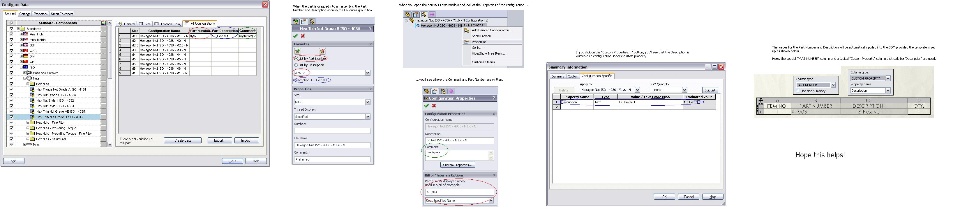
If you use that interface, and drill down to each fastener's "AllConfigurations" table, you can enter a Part Number, Description andComment for each configuration. The Description is the only itemthat gets written as a configuration specific custom property. ThePart Number and Comment are written to the Properties of theConfiguration (RMB on the configuration in the ConfigurationManagerand select Properties...).
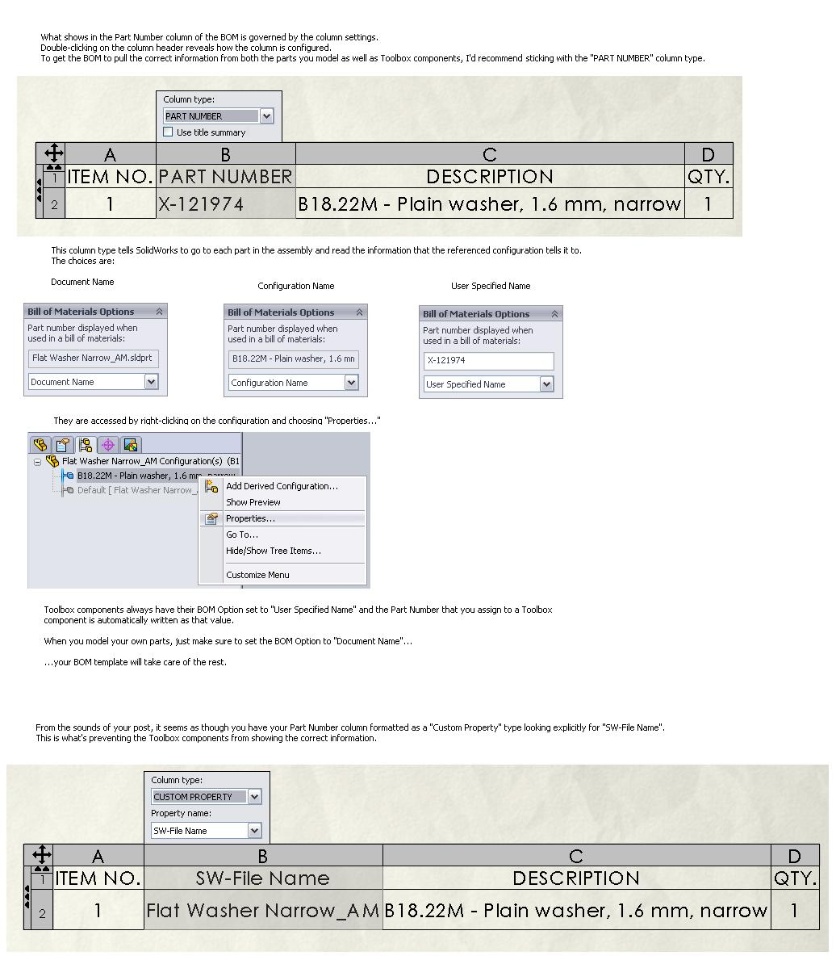
The Part Number is written as a "User Specified Name" in the "Partnumber displayed when used in a bill of materials:" field.
The Comment is written to the "Comment:" field
I've attached an image that I hope helps.
This should work perfectly, provided your Bill of Materialstemplate columns are set up to extract this data. If the BOMtemplate was customized to extract differently named customproperties e.g. PartNo and Desc, then those fields in the BOM willbe empty.
Cheers,
-Sal
Thanks for the easy to understand post. The Toolbox parts in theBOM has always been troublesome for us.
Regards,
The problem with this is you lose your (SW-File name) My intentionis have the user save the model as the file name and then it wouldbe displayed in the part number field. If i change for toolbox thena value has to be filled out manually in the custom properties. Ilike things being automatic. The reason why the toolbox doesn'twork with the SW-File name is because the file isn't being saved asthe part number it's being saved as the catagory name.
The Configure data Properties tab creating drop down lists helpswith the additional information if needed. I guess my point is iwant to change the file name. and add additional columns.
Solidworks didn't develop the toolbox, it was design by anothercompany. And for the most part Solidwork doesn't support anyvariation of the mdb files. Does anyone have any experience?
Dave
When you say that SolidWorks doesn't support any variation of themdb files, what do you mean? As I understand it, you are looking toget the Toolbox items to show up correctly in your BOM - morespecifically the part number.
It sounds like you've formated the part number column in your BOMto pull SW-File Name - instead of using the generic "Part Number"column. If that is the case, can you explain why you decide toformat the BOM this way? Are you aware that the generic "PartNumber" column in the BOM will pull the file's name provided thepart's configuration has the "Part number displayed when used in abill of materials:" option set to "File Name"?
By the way, you are correct that SolidWorks did not originallydevelop Toolbox. It was developed by a Gold Partner named CIMLOGIC.CIMLOGIC was, however acquired by SolidWorks in 2000 and itsemployees joined the company. Those individuals as well as otherSolidWorks developers have continued to work on Toolbox ever since.
Cheers,
I figured it would be much easier to use the SW file for my partnumber field in the BOM because my file name and part numbers willbe the same and I also type in the description when saving the fileand this to is displayed on the title block. I think it is a verysimplified. It works beautifully but not with the features oftoolbox.
To help me better understand your proposal could you send me a snapshot?
Thanks
I've attached an image that contains some details about how Toolboxfunctions with Bill of Materials. I hope you find it useful.
Cheers,
Thanks for the images. Since my last post i have found a way tohave both the sw-file naming feature and the tool box part numberfield. Both can be used at the same time if you add an equation, ifthen statement. It works well.
Dave