
Anyone run into a situation where you balloon items on adifferent sheet than the sheet with the BOM and the item numbersdon't match the BOM? This problem definately occurs when you havemultiple configs in your assembly and you set a given part to bedifferent in each config. (i.e. socket head cap screw A is a M6x12in config 1 and is a M8x25 in config 2). I am currently havingtrouble with an assembly. I have fixed any of the descrepenciessimilar to the one I just stated, but the problem still exists. Ihave noted that if I insert another BOM on the page with theoffending ballons, the balloons instantly switch to the correctitem numbers, however when I delete the second BOM they switchright back. I've seen other strange BOM/item numbers with SW 2007,anyone else running into this?SolidworksBill Of Materials




Thanks for the help.
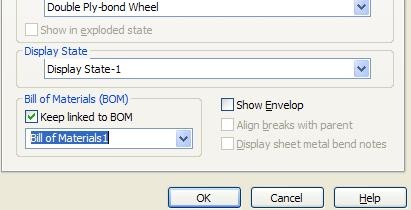
As an addition to Pauls advice above.....I have just discoveredthat that the 'Keep linked to BOM' option only works on theSolidWorks proprietary BOM and not the Excel based BOMS - these donot show up in the drop-drown.
Thanks
Vareck,
The BOM choice is a view property and not a sheet property. RMB onone of the assembly views and there should be a tab in the lowerleft corner for BOM link.