
can not modify profile in SW2009.
Relocated profile will not go with weldment body. Sketch profile stays at the original position separated from relocated weldment.
See attachment. I rotated profile 90deg. Body have relocated. Profile stays at original location.
Any idea how to fix it?SolidworksWeldments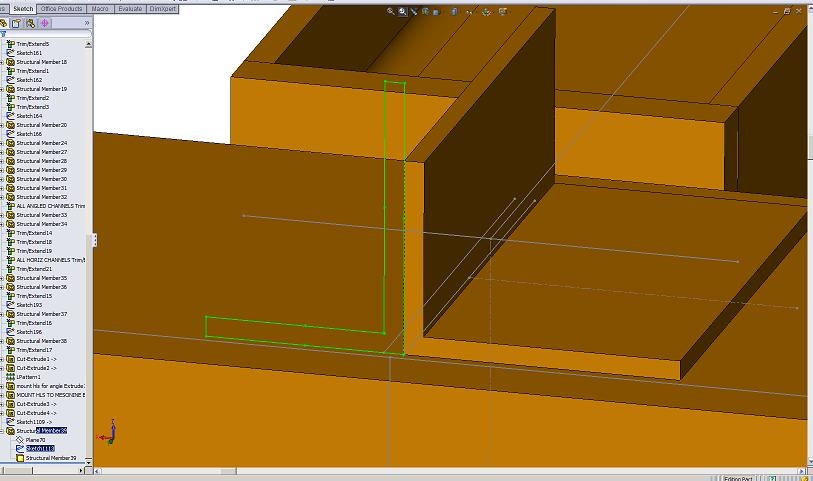
Relocated profile will not go with weldment body. Sketch profile stays at the original position separated from relocated weldment.
See attachment. I rotated profile 90deg. Body have relocated. Profile stays at original location.
Any idea how to fix it?SolidworksWeldments

I have it rotated as you can see in the attached file. The problem is that after rebuilt sketch did not rotate. It jumps back and stays separated from body it's belongs to.
What I need is to have sketch profile in line with the body. We use custom profiles and modify profile sketch dimentions in the model. Till now it worked smooth.
It's a bug.
The more people that log a problem the more chance of getting it put right.
I have asked my reseller to raise an SPR for next service Pack nothing can be DONE AT THIS TIME the more users that raise it the more chance it has of getting fixed
What do you mean by relocated?
Did you use the property manager to rotate your profile?or did you actually went into the profile sketch and modified the skectch?
adrian velazquez wrote:
Lana,
What do you mean by relocated?
Did you use the property manager to rotate your profile?or did you actually went into the profile sketch and modified the skectch?
try. Insert weldment. It's uneaqual angle in attached screen shot. I need to rotate it 90 deg. Locate profile :90 deg. Rebuilt. Angle body will be rotated. Weldment Profile Sketch will not. It stays at original location.
I was not able to reproduce the issue.
Hahaha
Use SolidWorks Rx to record a video of what you are doing and send that to your VAR. A picture is worth a thousand word, a movie is priceless.
I gave them description & jpeg.
Don't you think movie and zip of the model is too much for this issue?
The engineer at Solidworks suggests that this issue relates to the method that you are using to construct the weldment, and is not a fault.
He has created a sample file (which I have attached to this email) to demonstrate the required method. You could also take a look at the tutorial covering this subject, as this may help to clarify.
The reponse I gave them to their response
I appreciate what the solidworks expert is trying to suggest however for the past 4 or 5 years the way that the weldments operated was a very good tool in that you could adjust position of a sketch and suddenly they remove that function and then to say that it's not a problem with solidworks, well for me solidworks has lost some of it's functionality that it had previously, on the last 3 versions (2008 2007 2006 ) bit of copout answer if you ask me.
These guys are supposed to be the experts? No one in Steel fabrication industry measures from the centre of a box section so why are we now forced to work from the centres when creating designs and drawings very confusing and a bit Crazy ! If you go on any solidworks related forum and look up this issue the customers out there are not best pleased.
Also an awful lot of Hassle to get an SPR raised for very little professional feed back from solidworks I know if I blamed our clients for our tools not working the way they did when they brought them, we wouldn't be in business for much longer
Oh well if this is the way it's going to be there's not much I suppose we can do about it, except live with the loss of some more functionality of Solidworks for now.
Just to let you know what my solution is, I have reinstalled 2008 and, I'm now using this for weldment design only and getting on just fine and dimensioning from the edge.
its aload garbage hence my last post on this above
as to the attchment i'm unable to upload the document Sorry!
This issue only occurs when using the downloaded profile from the solidworks content ansi iso bsi.......
it seams to be alright if using the weldment profiles which come with solidworks install ansi iso but theres not much to chosse from
If any of you are going to SolidWorks World, I suggest that you find the person in charge of weldments and talk to them.
Do you want to reuse the sketch or something?
I can relocate the profile pierce point as I please and rotate, mirror and change the dimensions in the sketch and the weldment builds as desired.
This is using the downloaded zip profiles...
The BOM lengths and angles are correct
To me, it's a bug and it should get fixed!
It should be reported as a bug.
thanks for pointing out the issue
Wayne Matus wrote:
OK so now Lana is now going to have to have 8 different profiles for each unequal angle iron size since you cannot rotate the profile or mirror the profile any more.