
I was fiddling around trying to get the mass field toautomatically populate in BOMs and after some experimenting foundsome interesting things:
If you select a column in a BOM so you get the "Column Properties"dialog box, then choose Equation, and enter \\\$PRP:"SW-Mass", thecolumn will show the mass of the part's current configuration foreach part in the table.
This also works with other variables. It works with\\\$PRP:"SW-Volume" for example.
I have also tried \\\$PRP:"SW-Material" and successfully automaticallyinserted the material chosen in the Materials Editor (by Edit,Appearance, Material)
These are all without having entered any custom properties inthe part file. This is desirable because if the part doesn'thave the particular custom property defined, the BOM field normallywon't populate. This happens when you are working with a largeassembly with parts models made by vendors and others besideyourself that didn't setup their custom properties like you did.
There are several problems I am looking for solutions for at themoment:
1) the values inserted in this way have a \\\$PRP: in front of thevalue. For example, the mass reads \\\$PRP:3.32 I need a workaround toget rid of this.
2) the values are for the current configuration. if your BOM liststwo or more configurations of the same part, the bom gets populatedwith the material, volume, and mass of the current configuration,so they will be all the same. I need a workaround to get the valuesfor the specific configuration for that row in the BOM.
3) is there a list of all the undocumented built-in propertiessomewhere, such as "SW-Mass", "SW-Volume", "SW-Material" etc thatdon't show up in the dropdown lists for custom properties?
Check out the image below to see what I am talkingaboutSolidworksDrawings And Detailing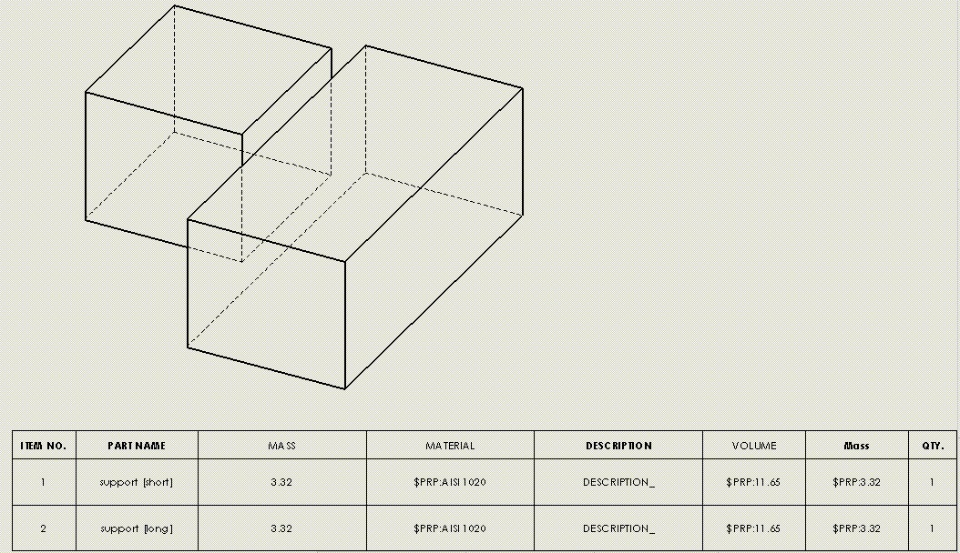
If you select a column in a BOM so you get the "Column Properties"dialog box, then choose Equation, and enter \\\$PRP:"SW-Mass", thecolumn will show the mass of the part's current configuration foreach part in the table.
This also works with other variables. It works with\\\$PRP:"SW-Volume" for example.
I have also tried \\\$PRP:"SW-Material" and successfully automaticallyinserted the material chosen in the Materials Editor (by Edit,Appearance, Material)
These are all without having entered any custom properties inthe part file. This is desirable because if the part doesn'thave the particular custom property defined, the BOM field normallywon't populate. This happens when you are working with a largeassembly with parts models made by vendors and others besideyourself that didn't setup their custom properties like you did.
There are several problems I am looking for solutions for at themoment:
1) the values inserted in this way have a \\\$PRP: in front of thevalue. For example, the mass reads \\\$PRP:3.32 I need a workaround toget rid of this.
2) the values are for the current configuration. if your BOM liststwo or more configurations of the same part, the bom gets populatedwith the material, volume, and mass of the current configuration,so they will be all the same. I need a workaround to get the valuesfor the specific configuration for that row in the BOM.
3) is there a list of all the undocumented built-in propertiessomewhere, such as "SW-Mass", "SW-Volume", "SW-Material" etc thatdon't show up in the dropdown lists for custom properties?
Check out the image below to see what I am talkingaboutSolidworksDrawings And Detailing
