
Hi,
I want to create a cubic box (for example 20 * 20 * 20 Angstrom^3) with a CNT with specified length and diameter in its middle in materials studio.
Is that possible in materials studio? I try this, but I don't know how to transfer CNT in the center:
1- build - build nanostructure- single-walled CNT - periodic
2- build - symmetry- supercell - increase C (z direction)
3- build - symmetry- lattice parameter - change a,b to desire value- change gamma to 90
(attach file)
Now, how can I transfer the CNT to the Center of the box?
Thanks,
Karan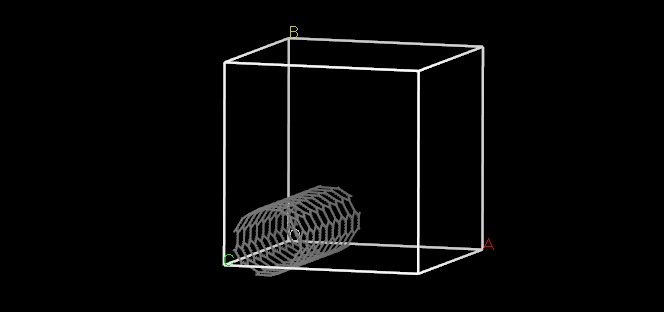
I want to create a cubic box (for example 20 * 20 * 20 Angstrom^3) with a CNT with specified length and diameter in its middle in materials studio.
Is that possible in materials studio? I try this, but I don't know how to transfer CNT in the center:
1- build - build nanostructure- single-walled CNT - periodic
2- build - symmetry- supercell - increase C (z direction)
3- build - symmetry- lattice parameter - change a,b to desire value- change gamma to 90
(attach file)
Now, how can I transfer the CNT to the Center of the box?
Thanks,
Karan

You can use a Centroid for this. After step 3:
4. Select any atom, right click, Select Fragment
5. On the Sketch toolbar, click Centroid.
6. Select the Centroid
7. In the Properties Explorer, set FractionalXYZ to (0.5, 0.5, 0.5)
8. Press Delete to delete the Centroid
Good luck!
Reinier
Bests,
Karan