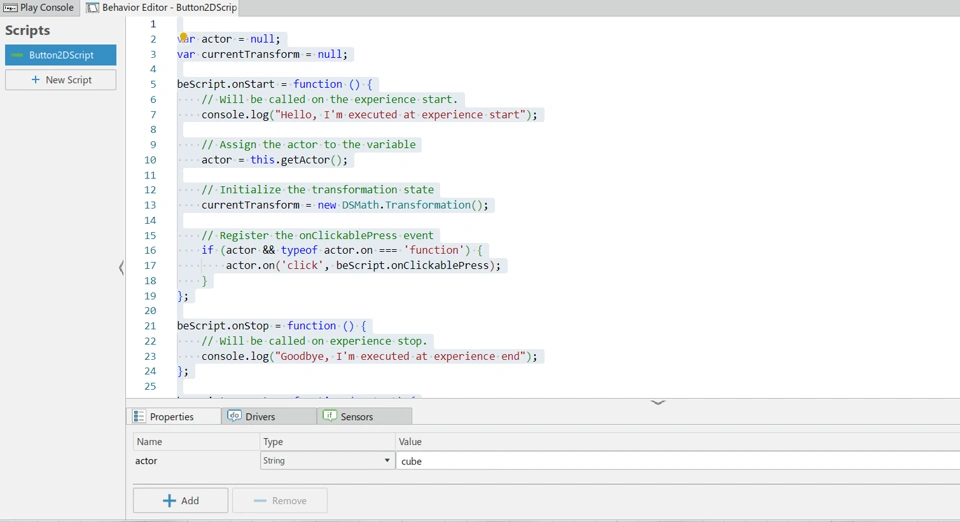
var actor = null;
var currentTransform = null;

beScript.onStart = function () {
    // Will be called on the experience start.
    console.log("Hello, I'm executed at experience start");

    // Assign the actor to the variable
    actor = this.getActor();

    // Initialize the transformation state
    currentTransform = new DSMath.Transformation();

    // Register the onClickablePress event
    if (actor && typeof actor.on === 'function') {
        actor.on('click', beScript.onClickablePress);
    }
};

beScript.onStop = function () {
    // Will be called on experience stop.
    console.log("Goodbye, I'm executed at experience end");
};

beScript.execute = function (context) {
    // Will be called on each frame.
    if (actor) {
        console.log("Hello again, I'm executed at each frame and rotate the actor (" + actor.getName() + ") at a speed of 0.1 rad per frame around the Y world axis");

        // Create a rotation matrix for 0.1 radian around the Y axis
        var rotationMatrix = new DSMath.Matrix3x3();
        rotationMatrix.makeRotationFromEuler([0, 0.1, 0]);

        // Apply the rotation to the current transformation
        currentTransform.matrix = currentTransform.matrix.multiply(rotationMatrix);

        // Check for alternative transformation application methods
        if (typeof actor.setMatrix === 'function') {
            actor.setMatrix(currentTransform.matrix);
        } else if (typeof actor.applyTransformation === 'function') {
            actor.applyTransformation(currentTransform);
        } else {
            console.error("No valid method found to apply transformation to the actor.");
        }
    }
};

// Add a clickable press event
beScript.onClickablePress = function (context) {
    // Will be called when the actor is clicked.
    if (actor) {
        console.log("Actor " + actor.getName() + " was clicked!");

        // Example action: log the current transformation state
        console.log("Current transform: ", currentTransform);
    }
};